Modes
A mode defines the intended operation of an asset. The mode is typically set by the schedule or manually set by the operator, but can also be set via a mode tag when the asset is configured as 'OEE_Enabled'. Modes are used for scheduling assets using the Operations Scheduler in Kanoa Ops. This tool allows for the planned assignment of modes to various assets, ensuring that each piece of equipment is in the correct mode for its intended operation at any given time. In addition to being scheduled, Modes can also be manually controlled via the Line Operation screen. This feature enables operators or supervisors to dynamically adjust the mode of an asset based on real-time operational needs or changes in the production environment.
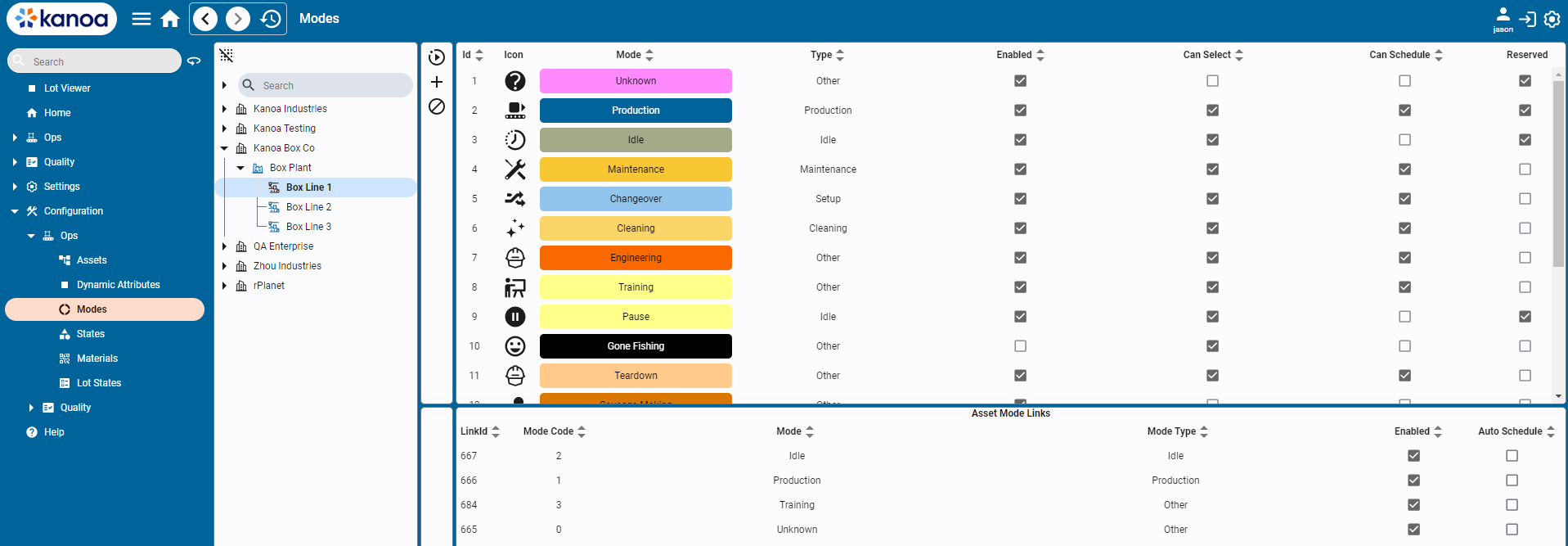
Modes
There are reserved modes predefined by the system such as 'Unknown', 'Idle', 'Production', 'Changeover', 'Maintenance'.
- Unknown: Serves as a catch-all state for uncertain scenarios or unclassified states of the asset.
- Production: The primary mode where assets are actively producing products. This mode indicates readiness for production and active engagement in the manufacturing process.
- Idle: The default state for an asset when it is not actively working but is available to produce. It represents a standby or waiting condition.
- Changeover: Used during the transition between different production runs. It covers setup activities, cleaning, and other preparatory tasks needed to switch products or start production.
- Production Delay: Used purely by analysis to determine how much time an asset has been delayed when scheduled to be in production. It is determined by the asset being set to a production mode, but no workorder or product has been selected.
New modes can also be created and associated with an asset. This is where you can customize the application to suit your manufacturing process. The mode indicates the production context of an asset and is an important aspect of how utilization and production performance analytics are determined.
Mode Types
Mode types are used to categorize modes. Mode types cannot be modified and are pre-defined by the system. The important mode type is 'Production' as only asset count and state events that occur during modes of type 'production' are included in production anaylsis. Mode types however are used along with modes to provide insight into asset utilization, in terms of 'how much time do my assets spend idle available for additional capacity compared to changeover, or setup, or CIP or maintenance.
Mode Types consist of....
- Cleaning
- Idle
- Maintenance
- Other
- Production
- Setup
Configuring Modes
Adding & Editing Modes
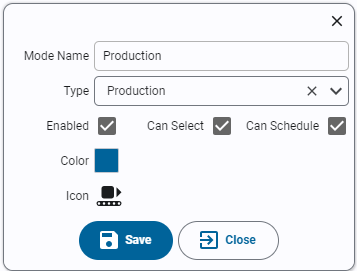
- Name: Name of the mode. Mode names must be unique.
- Type: Select the mode type for this new mode.
- Enabled: Indicates if the mode is active and usable within the system.
- Can Select: Determines if an operator can set an asset to this mode from the asset operation screen.
- Can Schedule: Determines if an asset can be scheduled to be in this mode.
Linking Modes to Assets
Once created, modes are linked to assets. Each mode is assigned a unique mode code. While the value used for a mode code is not important, it must be unique for the asset modes. If the mode for an asset is to be set via a plc tag, then the mode code defined should match between the PLC and MES.
- Select asset or assets from the asset tree.
- A list of modes assigned to the selected assets will appear in the bottom pane showing the mode link id and mode code.
- To link a mode to an asset, select one or more modes and click the 'Link' button. The mode will appear in the bottom pane.
- Assign a numeric mode code for the asset mode.
Auto-Schedule
💡 **Note: **New feature in kanoaOPS 1.3.5
By default, a mode will have the 'auto-schedule' bit set, which allows the scheduler to set the asset to this mode when scheduled and the asset is currently in
an 'idle mode. To clear the auto-schedule bit, simply double-click in the 'Auto Schedule' column and set to false.
Unlinking Modes from Assets
Modes can be unlinked from assets using the unlink option available on the screen. If event history exists for a mode, the system will not allow you to remove the link. It will instead be disabled.