Serialization
A serialization is a template for generating unique, sequential names such as WCP0000000001. Kanoa uses serializations to name lots in Kanoa Trace and to name generated maintenance work orders, using the maintenanceWorkOrder serialization. You can also generate serial numbers in your own scripts with the system.kanoa.serial functions.
Each serialization combines a prefix, a counter padded with leading zeros, and a suffix:
| Prefix | Zfill | Suffix | Counter | Serial number |
|---|---|---|---|---|
WCP | 10 | 1 | WCP0000000001 | |
KAN | 6 | -A | 2 | KAN000002-A |
| 57 | 57 |
Viewing Serializations
Serializations are managed on the Serialization configuration page (Configuration → Ops → Serialization by default).
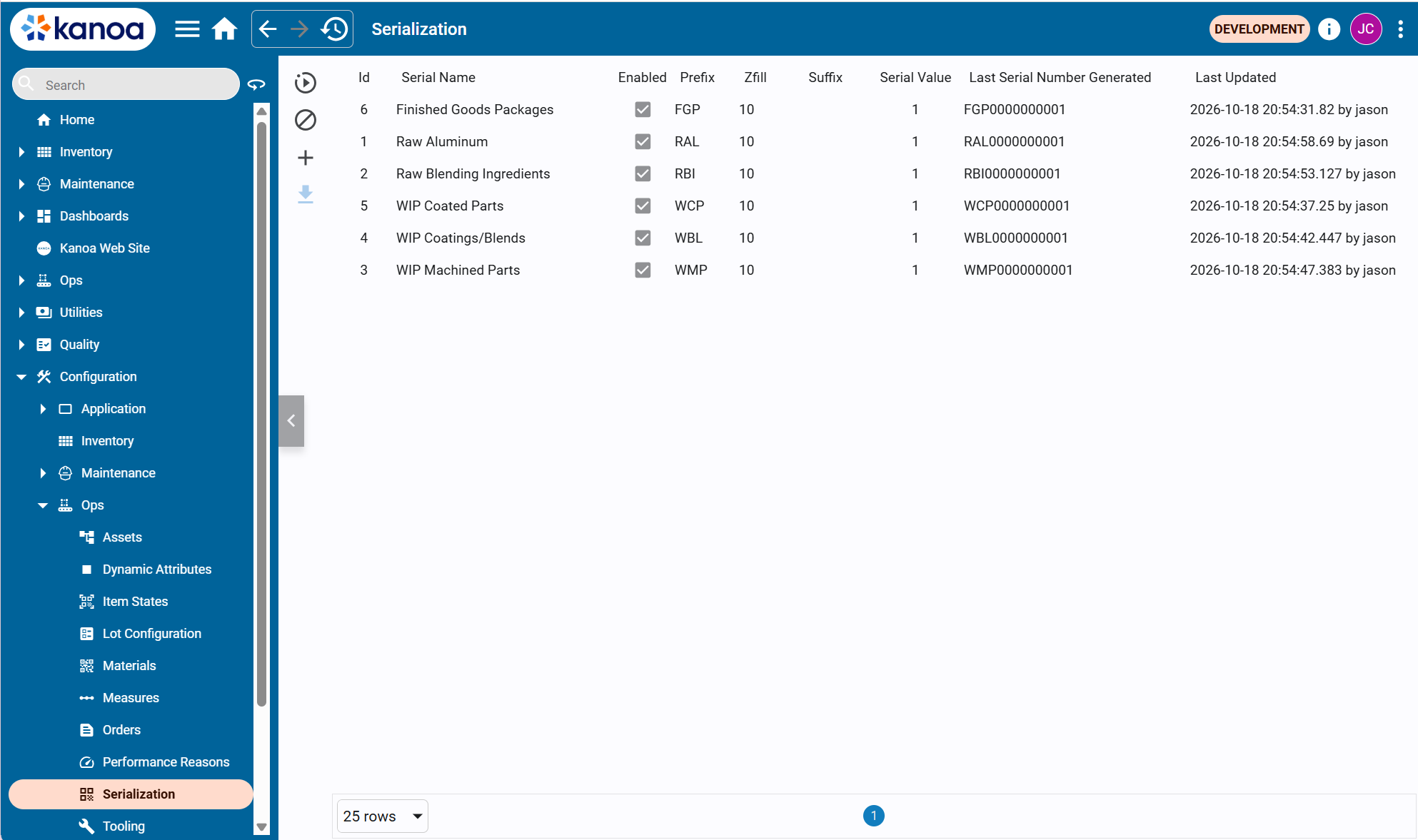
| Column | Description |
|---|---|
| Id | The serialId, used by the system.kanoa.serial functions |
| Serial Name | Unique name of the serialization |
| Enabled | Whether the serialization is available for use |
| Prefix | Text added before the number |
| Zfill | Total number of digits; the number is padded with leading zeros |
| Suffix | Text added after the number |
| Serial Value | The current counter value |
| Last Serial Number Generated | The current counter value formatted with the prefix, zfill and suffix |
| Last Updated | When the serialization last changed, and by whom |
Use the buttons on the left to refresh the table, clear it, and add a serialization. Select one or more rows to edit, delete or export them. Exported serializations are saved as a JSON file that can be imported on another gateway.
Creating and Editing Serializations
Click the  button to add a serialization, or select a row and edit it, to open the serialization editor.
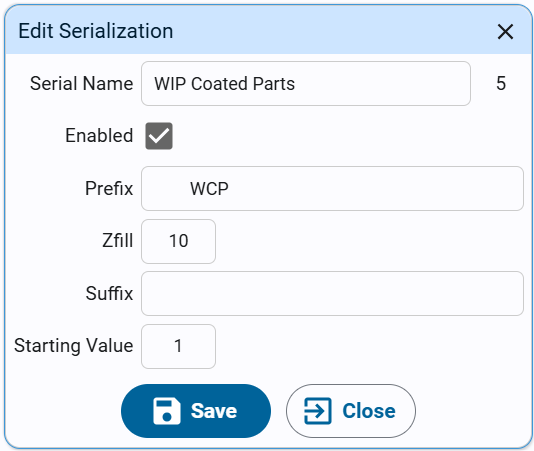
| Setting | Description |
|---|---|
| Serial Name | Unique name of the serialization. The serialId appears on the right once it's saved |
| Enabled | Makes the serialization available for use |
| Prefix | Optional text added before the number, e.g. WCP |
| Zfill | Optional total number of digits. If left empty, no zeros are added |
| Suffix | Optional text added after the number, e.g. -A |
| Starting Value | Sets the counter. Each new serial number adds 1 to the counter before it's formatted |
Click Save to save the serialization.
The counter is incremented before each serial number is generated, so the first serial number is one higher than the Starting Value. To start at ...0001, set the Starting Value to 0. Changing the Starting Value on an existing serialization resets its counter, which can produce duplicate names if you set it lower than numbers already used.
Generating Serial Numbers in Scripts
Use system.kanoa.serial.getNextSerialNumber() to increment the counter and return the next serial number.
userId = system.kanoa.security.getIDPUserId({'userName': 'SYSTEM'})
serialId = system.kanoa.utilities.getFieldValue('serialId', system.kanoa.serial.getSerialNumbers({'serialName': 'WIP Coated Parts'}))
serialNo, msg = system.kanoa.serial.getNextSerialNumber(serialId, userId)
print serialNo, msg
>>>WCP0000000002 None
The other serial functions add, update and delete serializations.