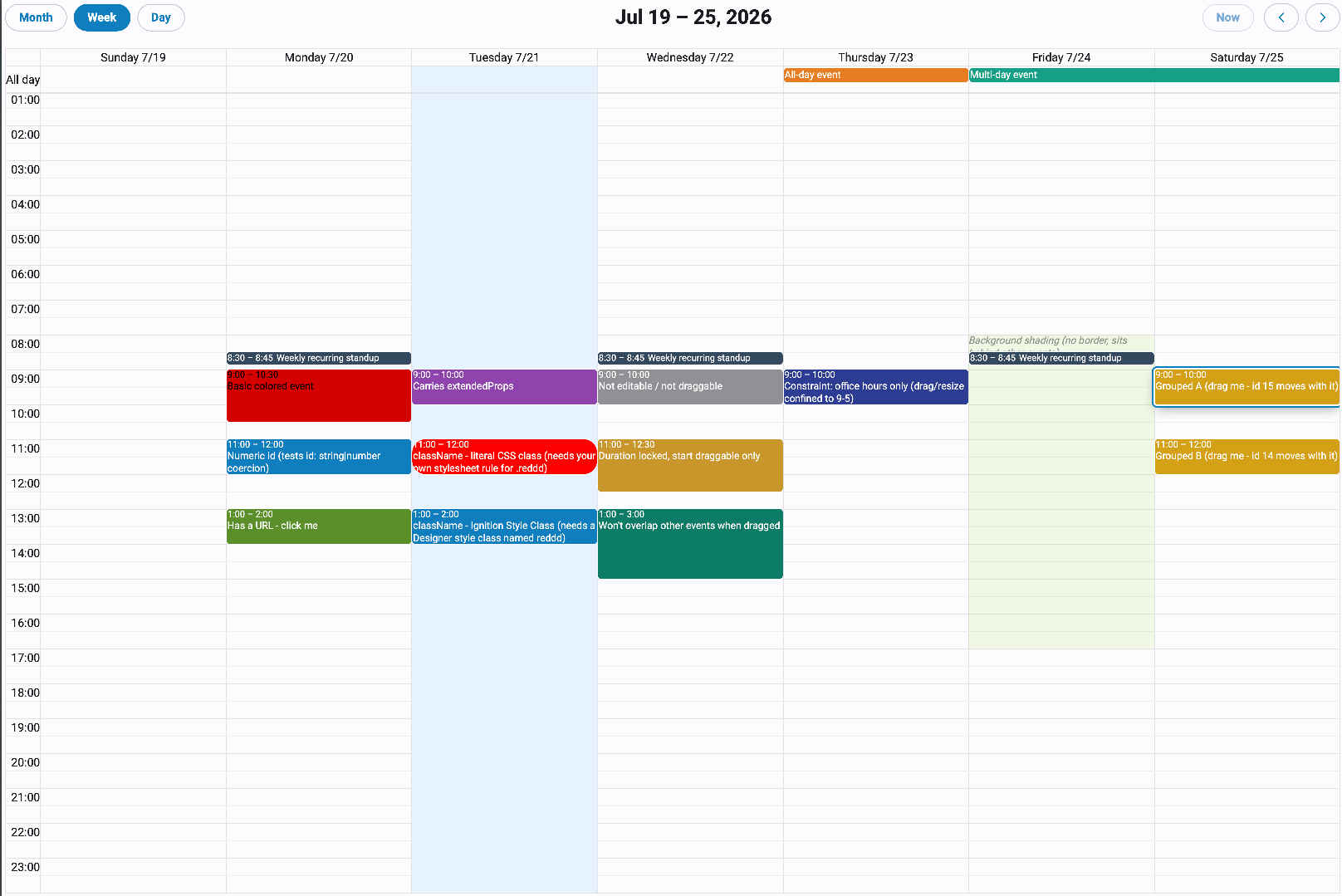
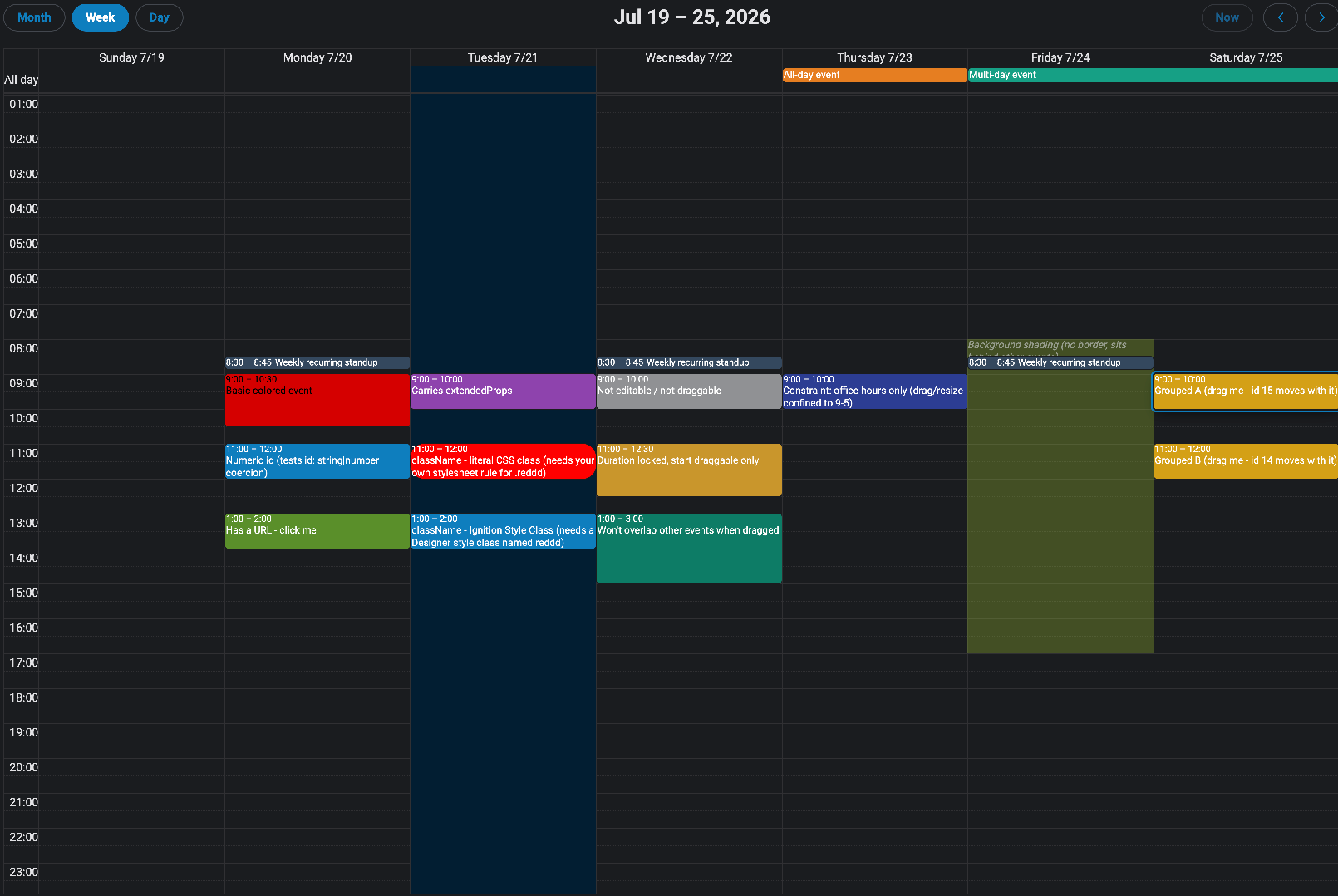
The Calendar component is an implementation of FullCalendar (version 7) as a Perspective component. It supports multiple calendar views, event display and interaction, drag-and-drop scheduling, and built-in popups for creating and editing events. Resource views (Columns and Timeline) let you lay events out per resource, such as a line, machine, or person.
Two optional built-in popups are available but disabled by default. The Event Popup appears when an event is clicked and can optionally allow editing. The Create Event Popup appears when a date or time block is clicked. Neither popup modifies the calendar directly — all changes are surfaced through component events for handling in scripts.
The Calendar component works alongside the External Event Box component to support drag-and-drop scheduling from an external list of events onto the calendar.
Properties
| Name | Description | Property Type |
|---|
| editable | Allows events to be dragged to new times and resized. | boolean |
| selectable | Allows selecting a single date or a range of dates. | boolean |
| selectedDate | When selectable is true and a selection is made, reflects the current selection with start and end string properties. | object |
| selectedEvents | The currently selected events. A single click selects an event (replacing the current selection); Ctrl/Cmd or Shift-click toggles individual events. Can also be written to programmatically to drive the selection. Each item contains id, title, start, end, allDay, resourceId, resourceIds, backgroundColor, textColor, and extendedProps. | array |
| timeline | Resource and layout configuration for the Columns and Timeline views. See Timeline Properties below. | object |
| defaultView | The initial calendar view displayed when the component loads. Default is dayGridMonth. | string |
| currentView | The currently displayed view. Writing to this property will change the view. If an invalid view name is written, the component will reset to the current view. Valid options are: dayGridMonth, dayGridWeek, dayGridDay, dayGridYear, timeGridWeek, timeGridDay, listYear, listMonth, listWeek, listDay, multiMonthYear, resourceTimelineDay, resourceTimelineWeek, resourceTimelineMonth, resourceTimeGridDay, resourceTimeGridWeek, resourceDayGridMonth. | string |
| events | An array of event objects to display on the calendar. See Event Object Properties below. | array |
| longPressDelay | For touch devices, the time in milliseconds the user must hold down before an event becomes draggable or a date becomes selectable. Default is 1000. | integer |
Event Object Properties
Each item in the events array supports the following properties. Only start is required.
| Name | Description | Property Type |
|---|
| id | A unique identifier for the event. Defaults to an empty string if not provided. | string or number |
| groupId | Events sharing the same groupId will be dragged and resized together. | string or number |
| title | The text displayed on the event. | string |
| start | Required. When the event starts, as a parseable date/time string. If no end is defined, the event defaults to all-day on the start date. If start includes a time and end is omitted, the event duration defaults to one hour. | string |
| end | When the event ends. This value is exclusive — an all-day event ending on 2020-09-03 spans through 2020-09-02. | string |
| allDay | When true, the event ignores any time portion of start and end. | boolean |
| color | The background and border color of the event. | string |
| contrastColor | The text color of the event (foreground color that contrasts with color). | string |
| display | Overrides the display style for this individual event. Same options as eventDisplay.eventDisplayType. | string |
| editable | Overrides the component-level editable setting for this specific event. | boolean |
| startEditable | Whether the start date/time of this event can be changed by dragging. | boolean |
| durationEditable | Whether the duration of this event can be changed by resizing. | boolean |
| resourceId | The id of the resource this event belongs to. Used by the Columns and Timeline views. See Timeline Properties. | string |
| resourceIds | An array of resource ids, for events that belong to more than one resource. | array |
| resourceEditable | Whether the event can be dragged between resources in the Columns and Timeline views. | boolean |
| overlap | Whether this event is allowed to overlap other events when being dragged or resized. | boolean |
| constraint | Limits where this event can be dragged or resized. Accepts a constraint object with start/end/daysOfWeek, a group ID string to constrain within matching events, or 'businessHours' to restrict to business hours. | object or string |
| url | A URL that will be navigated to when this event is clicked. | string |
| className | One or more CSS class names (space-separated) to attach to the rendered event element. | string |
| extendedProps | A freeform object for any additional custom properties. Values are accessible in component event handlers. | object |
Example event object:
{
  "id": "1",
  "title": "Production Run A",
  "start": "2026-06-23T09:00:00",
  "end": "2026-06-23T11:00:00",
  "color": "#d40000",
  "contrastColor": "#ffffff"
}
Timeline Properties
Configures the resource-aware views: the Timeline views (resourceTimeline*), where resources are rows, and the Columns views (resourceTimeGrid*, resourceDayGridMonth), where resources are columns. These properties are only visible in the designer while one of those views is the current view. Events are assigned to a resource through their resourceId or resourceIds.
| Name | Description | Property Type |
|---|
| timeline.resources | The resources to display, as rows in the Timeline views or columns in the Columns views. See Resource Object Properties below. | array |
| timeline.resourceColumnsWidth | The width of the resource name area. Only affects the Timeline views. Default is 20%. | string |
| timeline.resourceColumns | Column definitions for the resource area. Only affects the Timeline views. When empty, a single title column is shown. See Resource Column Properties below. | array |
| timeline.rowHeight | The height of each resource row as a CSS length. Only affects the Timeline views. Default is 44px. | string |
Resource Object Properties
| Name | Description | Property Type |
|---|
| id | A stable identifier for the resource. Events reference this through resourceId or resourceIds. | string |
| title | The display text for the resource. | string |
| eventColor | The default background color for events assigned to this resource, unless overridden by the event. | string |
| eventTextColor | The default text color for events assigned to this resource, unless overridden by the event. | string |
| extendedProps | A freeform object carried on the resource. Keys can be displayed through a resource column's field. | object |
| children | Nested sub-resources, displayed indented beneath this resource. | array |
Resource Column Properties
| Name | Description | Property Type |
|---|
| field | The resource field to display, e.g. title or an extendedProps key. Default is title. | string |
| headerContent | The column header text. | string |
| width | The column width, e.g. 120px. | string |
Event Pop Properties
| Name | Description | Property Type |
|---|
| useEventPop | Whether the built-in popup for showing event details will appear when an event is clicked. | boolean |
| canEditEventOnPop | Whether the edit button appears on the built-in event popup. | boolean |
| canExportEventOnPop | Whether the event can be exported as an iCal object from the popup. | boolean |
| useCreateEventPop | Whether the built-in popup for creating events appears when a date or time block is clicked. | boolean |
Event Display Properties
| Name | Description | Property Type |
|---|
| eventDisplayType | Controls the default rendering style for all events. Options: auto (solid block for all-day/multi-day, dot for timed events in daygrid), block (always solid block in daygrid), list-item (always dot in daygrid), background (highlights background), inverse-background (highlights inverse background), none (not rendered). Default colors are set via theme.palette. | string |
| displayEventTime | Whether to show the start time on timed (non-all-day) events. | boolean |
| displayEventEnd | Whether to show the end time on events. | boolean |
| nextDayThreshold | The minimum time that must pass into a day for a spanning event to be rendered on that day in daygrid view. Format: HH:mm:ss. | string |
| eventOrder | Determines display order when events occupy the same space. Uses event property names; prefix with - for descending order. Default is start,-duration,allDay,title. | string |
| slotEventOverlap | Whether timed events in TimeGrid view visually overlap. | boolean |
Current Calendar Date Properties
| Name | Description | Property Type |
|---|
| date | An ISO 8601 string (YYYY-MM-DD) of the current displayed date. Writable when dateIsReadOnly is false. | string |
| dateIsReadOnly | When false, writing to date changes the displayed date. | boolean |
| week | The ISO week number of the year (readonly). | number |
| displayDateStart | The first visible date on the display. In month view this may not be the first of the month (readonly). | string |
| displayDateEnd | The last visible date on the display. This value is exclusive (readonly). | string |
| currentDateStart | The first date of the range the view represents (readonly). | string |
| currentDateEnd | The last date of the range the view represents. This value is exclusive (readonly). | string |
| title | The title string currently generated by the calendar (readonly). | string |
Date and Time Display Properties
| Name | Description | Property Type |
|---|
| firstDay | The first day of the week in day grid views. 0 = Sunday, 1 = Monday, etc. | number |
| minTime | The earliest time displayed in time grid views. Format: HH:mm:ss. Default is 00:00:00. | string |
| maxTime | The latest time displayed in time grid views. Format: HH:mm:ss. Default is 24:00:00. | string |
| navLinks | Whether to make parts of the calendar (e.g., date numbers) into links that navigate to related views. | boolean |
| weekNumbers | Whether to display week numbers when possible. | boolean |
| useISOWeekCalc | Whether to use ISO week numbers rather than localized week numbers. | boolean |
| weekLabel | The label displayed before the week number. Default is W. | string |
| nowIndicator | Whether to show a line indicating the current time on time grid views. | boolean |
| slotDuration | The duration of each time slot in time grid views. Default is 00:30:00. | string |
| slotLabelInterval | The frequency at which time slot labels are shown. Useful when slotDuration is small but you only want labels every hour. | string |
| expandRows | Whether rows expand to fill the full height of the view when they don't naturally fill it. | boolean |
| snapDuration | The time interval at which a dragged event snaps to the time axis. Default is 00:30:00. | string |
| slotLabelFormat | The format of the time labels in time grid views, as a Date Format object. See FullCalendar date formatting. | object |
| allDayText | The text shown on the all-day slot in time grid views. Default is All day. | string |
| weekends | Whether to display weekends on the calendar. | boolean |
| hiddenDays | An array of integers representing days to hide. Days are indexed from 0 (Sunday) to 6 (Saturday). | array |
| businessHours | Highlights business hours on the calendar. Can be an empty object {} to disable, or an object/array of objects with daysOfWeek, startTime, and endTime. Example: {"daysOfWeek": [1,2,3,4,5], "startTime": "09:00", "endTime": "17:00"}. | object |
| timeZone | The time zone of the calendar. Options: local (browser time zone), gateway (pulled from the Perspective session), custom (uses local but allows a custom now), or a time zone identifier string such as America/New_York. | string |
| now | When timeZone is set to custom, sets the current time as an ISO formatted date string. | string |
| Name | Description | Property Type |
|---|
| header | Configures the header toolbar with left, center, and right string properties. Each is a comma-separated list of toolbar elements. Set to false to remove the header entirely. Defaults are left: modeList,modeGrid,modeColumns,modeTimeline granularityMenu, center: title, right: prev,today,next. Available elements: title, prev, next, prevYear, nextYear, today, any valid view name, or any of the mode and granularity elements below. Spaces between commas add gaps between buttons. | object or boolean |
| footer | Same structure as header. Configures the footer toolbar. Defaults to false (hidden). | object or boolean |
| buttons | An object with a key per toolbar button name, each configuring that button's appearance and behavior. See Toolbar Button Properties below. Configurable buttons are: today, prev, next, prevYear, nextYear, dayGridYear, dayGridMonth, dayGridWeek, timeGridWeek, timeGridDay, multiMonthYear, listYear, listMonth, listWeek, listDay. | object |
Mode and Granularity Elements
The default header uses a two-part view switcher. A mode button selects the family of views, and the granularity menu selects Day, Week, or Month within it. The calendar combines the two to pick the actual view, so changing the mode keeps the current granularity and vice versa.
| Element | Description |
|---|
| modeList | Switches to the list views (listDay, listWeek, listMonth). Default label is List. |
| modeGrid | Switches to the standard calendar views (timeGridDay, timeGridWeek, dayGridMonth). Default label is Calendar. |
| modeColumns | Switches to the vertical resource views with resources as columns (resourceTimeGridDay, resourceTimeGridWeek, resourceDayGridMonth). Default label is Columns. |
| modeTimeline | Switches to the horizontal resource views with resources as rows (resourceTimelineDay, resourceTimelineWeek, resourceTimelineMonth). Default label is Timeline. |
| granularityMenu | A popover for choosing Day, Week, or Month at the current mode. |
Each button under toolbar.buttons supports:
| Name | Description | Property Type |
|---|
| text | The display label for the button. | string |
| hint | Tooltip text shown on hover. | string |
| className | A CSS class name to apply to the button. The psc- prefix is applied automatically — enter only the suffix (e.g., enter my-button, not psc-my-button). | string |
| isPrimary | When true, renders the button with primary styling. | boolean |
| display | Controls how the button content is rendered. Options: auto, icon, text, icon-text, text-icon. | string |
Popover Properties
| Name | Description | Property Type |
|---|
| dayMaxEvents | In dayGrid views, the maximum number of events to show per day before a "+more" link appears. Set to true to limit based on cell height. | number or boolean |
| eventMaxStack | In timeGrid views, the maximum number of events that stack left-to-right before overflow is hidden. | number |
| dayPopoverFormat | The format of the date displayed in the "+more" popover, as a Date Format object. | object |
| moreLinkContent | The content of the "+more" link. Default is + more. | string |
| moreLinkClick | The action taken when the "+more" link is clicked. Options: popover, week, day, or any valid view name. | string |
View Properties
| Name | Description | Property Type |
|---|
| day.dayHeaderFormat | Date Format object for column headers in day views. | object |
| day.titleFormat | Date Format object for the view title in day views. | object |
| week.dayHeaderFormat | Date Format object for column headers in week views. | object |
| week.titleFormat | Date Format object for the view title in week views. | object |
| month.dayHeaderFormat | Date Format object for column headers in month views. | object |
| month.titleFormat | Date Format object for the view title in month views. | object |
| month.fixedWeekCount | When true, every month view shows the same number of weeks regardless of how many days the month has. | boolean |
| month.showNonCurrentDates | When true, displays dates from the previous and next months that fill out the grid. | boolean |
| dayGrid.dayHeaders | Whether to show the column header row in day grid views. | boolean |
| dayGrid.eventTimeFormat | Date Format object for the event time display in day grid views. | object |
| timeGrid.dayHeaders | Whether to show the column header row in time grid views. | boolean |
| timeGrid.allDaySlot | Whether to show the all-day slot at the top of time grid views. | boolean |
| timeGrid.eventTimeFormat | Date Format object for the event time display in time grid views. | object |
| list.listDayFormat | Date Format object for the day label on the left side of list view day headers. Set to false to hide. | object or boolean |
| list.listDaySideFormat | Date Format object for the day label on the right side of list view day headers. Set to false to hide. | object or boolean |
| list.noEventsContent | Message displayed when there are no events to show in the current list view range. Default is No events to display. | string |
| list.eventTimeFormat | Date Format object for the event time display in list views. | object |
| multiMonth.multiMonthMaxColumns | The maximum number of month columns in the multi-month year view. Default is 3. | number |
| multiMonth.singleMonthMinWidth | The minimum pixel width of each month in the multi-month view before columns are reduced. Default is 350. | number |
| multiMonth.singleMonthTitleFormat | Date Format object for the title of each individual month in the multi-month view. | object |
Theme Properties
The theme property controls the visual appearance of the calendar through border options, a color palette, and CSS class slots.
theme.borders
| Name | Description | Property Type |
|---|
| borderlessTop | Removes the top border of the calendar. | boolean |
| borderlessBottom | Removes the bottom border of the calendar. | boolean |
| borderlessX | Removes the left and right borders of the calendar. | boolean |
theme.palette
Controls the color system for the calendar. Individual event colors set via the event's color and contrastColor properties take precedence over these defaults.
| Name | Description | Property Type |
|---|
| primary | The default background and border color for events. | color |
| primaryForeground | The default text color for events. | color |
| content.backgroundEvent | The fill color used for background-display events. | color |
| content.backgroundEventOpacity | The opacity of background-display event fills. Default is 15%. | string |
| content.backgroundEventForegroundOpacity | The opacity of text/foreground content on background-display events. Default is 50%. | string |
| content.highlight | The color used to highlight a date/time range while it is being selected. | color |
| content.today | The background color of the cell representing today's date. | color |
| content.now | The color of the current-time indicator line in time grid views. | color |
| content.smallDotWidth | The diameter of the small event dot used in list-item/dot displays. Default is 8px. | string |
| content.largeDotWidth | The diameter of the large event dot. Default is 10px. | string |
| button.color | The background color of toolbar buttons in their default state. | color |
| button.border | The border color of toolbar buttons in their default state. | color |
| button.strong | The background color of a toolbar button when hovered or pressed. | color |
| button.strongBorder | The border color of a toolbar button when hovered or pressed. | color |
| button.outline | The focus outline color of toolbar buttons. | color |
| button.foreground | The text/icon color of toolbar buttons. | color |
| neutral.background | The main background color of the calendar surface (light mode). | color |
| neutral.faint | A very subtle background tint applied to disabled days and non-business hours (light mode). | color |
| neutral.muted | A muted background used for secondary surfaces like the all-day divider and popover headers (light mode). | color |
| neutral.strong | A stronger neutral fill used for emphasized surfaces (light mode). | color |
| neutral.foreground | The primary text color for day headers and time-axis labels (light mode). | color |
| neutral.faintForeground | A faint text color for de-emphasized content (light mode). | color |
| neutral.mutedForeground | A muted text color for secondary labels like week numbers (light mode). | color |
| neutral.border | The color of grid lines and cell borders (light mode). | color |
| neutral.strongBorder | A stronger border color for emphasized dividers (light mode). | color |
| dark.background | The main background color of the calendar surface (dark mode). | color |
| dark.faint | A very subtle background tint applied to disabled days and non-business hours (dark mode). | color |
| dark.muted | A muted background used for secondary surfaces like the all-day divider and popover headers (dark mode). | color |
| dark.strong | A stronger neutral fill used for emphasized surfaces (dark mode). | color |
| dark.foreground | The primary text color for day headers and time-axis labels (dark mode). | color |
| dark.faintForeground | A faint text color for de-emphasized content (dark mode). | color |
| dark.mutedForeground | A muted text color for secondary labels like week numbers (dark mode). | color |
| dark.border | The color of grid lines and cell borders (dark mode). | color |
| dark.strongBorder | A stronger border color for emphasized dividers (dark mode). | color |
| dark.backgroundEvent | The fill color used for background-display events (dark mode). | color |
| dark.backgroundEventOpacity | The opacity of background-display event fills (dark mode). Default is 25%. | string |
| dark.backgroundEventForegroundOpacity | The opacity of text/foreground content on background-display events (dark mode). Default is 50%. | string |
| dark.highlight | The color used to highlight a date/time range while selecting (dark mode). | color |
| dark.today | The background color of today's date cell (dark mode). | color |
theme.classes
Named CSS class slots for applying Perspective style classes to specific parts of the calendar. Enter the style class name without the psc- prefix — it is applied automatically. For example, to apply a style class defined as .psc-my-title, enter my-title.
| Name | Description |
|---|
| toolbarTitle | Applied to the toolbar title element. |
| navLink | Applied to navigation links (e.g., day numbers in month view when navLinks is enabled). |
| eventClass | Applied to the outer wrapper of each event. |
| eventInnerClass | Applied to the inner content element of each event. |
| listItemEventClass | Applied to the outer wrapper of each event in list views. |
| listItemEventInnerClass | Applied to the inner content element of each event in list views. |
| dayHeaderClass | Applied to the inner content of each day column header. |
| slotLabelClass | Applied to the inner content of each time slot label in time grid views. |
| allDayClass | Applied to the inner content of the all-day slot header in time grid views. |
Locale Settings
| Name | Description | Property Type |
|---|
| locale | A language code that changes the calendar's displayed text and date formats. Default is en. | string |
| dir | Text direction. ltr (default), rtl, or auto. Use rtl for right-to-left languages such as Arabic and Hebrew. | string |
Component Events
onDateClick
Triggered when a date or time block is clicked on the calendar.
| Property | Type | Description |
|---|
| event.date | object | A date object containing the date and time of the block clicked. |
| event.dateStr | string | An ISO 8601 formatted string representing the block clicked. |
| event.resourceId | string | The id of the resource that was clicked. null outside the Columns and Timeline views. |
| event.resourceTitle | string | The title of the resource that was clicked. null outside the Columns and Timeline views. |
| event.view | string | The name of the view that was active when the block was clicked, e.g. resourceTimelineWeek. |
| event.altKey | boolean | Whether the Alt key was held when the event fired. |
| event.shiftKey | boolean | Whether the Shift key was held when the event fired. |
onEventClick
Triggered when an event on the calendar is clicked.
| Property | Type | Description |
|---|
| event.id | string | The id of the event. |
| event.title | string | The title of the event. |
| event.start | string | The start of the event. |
| event.end | string | The end of the event. |
| event.allDay | bool | Whether the event spans full days. |
| event.resourceId | string | The id of the resource row or column that was clicked, falling back to the event's first resource. null if the event has no resources. |
| event.resourceIds | array | The ids of every resource the event is assigned to. |
| event.view | string | The name of the view that was active when the event was clicked, e.g. resourceTimelineWeek. |
| event.backgroundColor | string | The event's background color. |
| event.textColor | string | The event's text color. |
| event.extendedProps | object | The event's extendedProps, including any custom fields supplied with the event. |
| event.altKey | boolean | Whether the Alt key was held when the event fired. |
| event.shiftKey | boolean | Whether the Shift key was held when the event fired. |
onEventDropped
Triggered when an event is moved by dragging. Dates are returned as YYYY-MM-DD HH:mm:ss.
| Property | Type | Description |
|---|
| event.id | string | The id of the event. Returns an empty string if not supplied. |
| event.startDate | string | The new start date of the event. |
| event.startTime | string | The new start time as HH:mm:ss. |
| event.endDate | string | The new end date of the event. |
| event.endTime | string | The new end time as HH:mm:ss. |
| event.allDay | bool | Whether the event spans full days. |
| event.resourceIds | array | The ids of every resource the event is assigned to after the change. |
onEventResized
Triggered when an event is resized and the final size differs from the original. Dates are returned as YYYY-MM-DD HH:mm:ss.
| Property | Type | Description |
|---|
| event.id | string | The id of the event. Returns an empty string if not supplied. |
| event.startDate | string | The start date of the event. |
| event.startTime | string | The start time as HH:mm:ss. |
| event.endDate | string | The end date of the event. |
| event.endTime | string | The end time as HH:mm:ss. |
| event.allDay | bool | Whether the event spans full days. |
| event.resourceIds | array | The ids of every resource the event is assigned to after the change. |
onSelectionMade
Triggered when selectable is true and a range of dates has been selected.
| Property | Type | Description |
|---|
| event.selectStart | object | The start of the selection. |
| event.selectEnd | object | The end of the selection. |
| event.altKey | boolean | Whether the Alt key was held when the event fired. |
| event.shiftKey | boolean | Whether the Shift key was held when the event fired. |
onEventCreated
Triggered when the built-in Create Event Popup is submitted. Dates are returned as YYYY-MM-DD HH:mm:ss.
| Property | Type | Description |
|---|
| event.title | string | The title entered for the new event. |
| event.startDate | string | The start date of the new event. |
| event.startTime | string | The start time as HH:mm:ss. |
| event.endDate | string | The end date of the new event. |
| event.endTime | string | The end time as HH:mm:ss. |
| event.eventColor | string | The event color as a hex code. |
| event.eventTextColor | string | The event text color as a hex code. |
| event.allDay | bool | Whether the event spans full days. |
onEventEdited
Triggered when the built-in Event Popup's edit mode has been submitted. Dates are returned as YYYY-MM-DD HH:mm:ss.
| Property | Type | Description |
|---|
| event.title | string | The updated title of the event. |
| event.startDate | string | The updated start date. |
| event.startTime | string | The updated start time as HH:mm:ss. |
| event.endDate | string | The updated end date. |
| event.endTime | string | The updated end time as HH:mm:ss. |
| event.eventColor | string | The event color as a hex code. |
| event.eventTextColor | string | The event text color as a hex code. |
| event.allDay | bool | Whether the event spans full days. |
onEventDeleted
Triggered when the delete button is pressed in the built-in Event Popup.
| Property | Type | Description |
|---|
| event.id | string | The id of the event to delete. Returns an empty string if not supplied. |
onEventReceived
Triggered when an event is dragged from an External Event Box and dropped onto the calendar.
| Property | Type | Description |
|---|
| event.title | string | The title of the received event. |
| event.startDate | string | The start date of the event. |
| event.startTime | string | The start time of the event. |
| event.endDate | string | The end date of the event. |
| event.endTime | string | The end time of the event. |
| event.allDay | boolean | Whether the event is an all-day event. |
| event.eventColor | string | The background and border color of the event. |
| event.eventContrastColor | string | The text color of the event. |
| event.extendedProps | string | Any additional custom properties on the event. |
onDatesRender
Triggered whenever the calendar's visible date range changes (e.g., navigating to a different month or switching views).
| Property | Type | Description |
|---|
| event.activeStart | string | The first visible date. In month view this is often before the 1st of the month. |
| event.activeEnd | string | The last visible date. This value is exclusive. |
| event.currentStart | string | The first date of the period the view represents (disregards hidden days). |
| event.currentEnd | string | The last date of the period the view represents. This value is exclusive. |
onWindowResize
Triggered when the calendar is re-rendered following a window resize.
| Property | Type | Description |
|---|
| event.view | string | The current FullCalendar view object. |