Install the Kanoa MES Module
Install Modules
Kanoa MES is a single module that contains licensed features for ops, quality, maintenance, trace and inventory. Some of our views use charting components from the Embr/Apex Charts component and that is also required to be installed.
Click here to download Kanoa MES and other required modules.
Install modules in the Gateway
To install the module, go to Config → Modules on the Ignition Gateway.
- Installing or Upgrading a Module (Ignition 8.1 docs)
- Installing or Upgrading a Module (Inductive University video)
It is not important in which order the modules are installed, but they all need to be installed for all aspects of Kanoa MES to function properly.
On a clean install, the module will create the database schema and add system functions, react components, tag UDTs and tags, themes, custom python libraries, projects.
Kanoa Projects and Inheritance
On module updates, kanoaAPP is the only project that will be updated. A backup of kanoaAPP is created prior to being over-written.
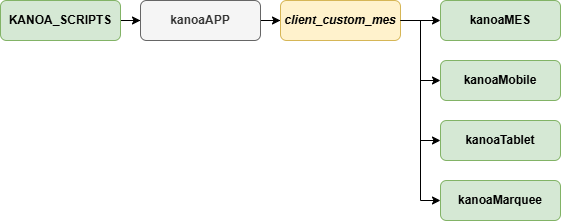
KANOA_SCRIPTS
Contains client custom scripts used by tags, ERP interface and can be customized specific to the implementation. This project is only ever installed once and is never over-written. This is yours to customize.
If you want scripts in this project to be available to tag change event scripts, set the Gateway Scripting Project to point to this project under Config → Gateway Setting on the Gateway Console page.
kanoaAPP
Contains views for security, utilities, and configuration of assets, materials, production orders, shifts, and quality checks, as well as analysis and operator screens.
This project should never be modified as it over-written on module updates. Views can opened in the designer to see how they were implemented and then copied to create custom solutions.
If you edit views directly in this project, those changes will be overwritten on each module update.
Runnable Kanoa Projects
The runnable projects inherit from kanoaAPP. These projects do not contain any views or scripts, they simply provide the ability to create url links to views and to set specific
security requirements when launched. For example Marquees generally do not want to have users log in to them. Kiosks will want to point to specific views and may want to have an auto login.
Users generally interact with one of these, not with kanoaAPP directly.
kanoaMES
Simply contains custom project settings such as security and page links. This project is only ever installed once and is never over-written. This is yours to customize.
kanoaMarquee
This is a runnable project to be used to display marquees and dashboards that link to the dashboard viewer, passing parameters in the URL to show different dashboards around a plant.
This project is only ever installed once and is never over-written. This is yours to customize.
kanoaMobile
This is a runnable project that makes use of different project settings to modify header and navigation panels for reduced space on a mobile device. This project is only ever installed once and is never over-written. This is yours to customize.
kanoaTablet
This is a runnable project that makes use of different project settings to modify header and navigation panels for reduced space on a mobile device. This project is only ever installed once and is never over-written. This is yours to customize.
It is recommended that you create a project called _client_custom_mes where your custom views and scripts (other than those that you put in KANOA_SCRIPTS) will reside. client\custom\mes_ should inherit from kanoaAPP and be inherited by the runnable projects kanoaMES, kanoaMobile, kanoaTablet, kanoaMarquee.