Schedule Optimization
Created using: Kanoa MES 1.14.3 Last updated: February 18, 2026
Coming Soon
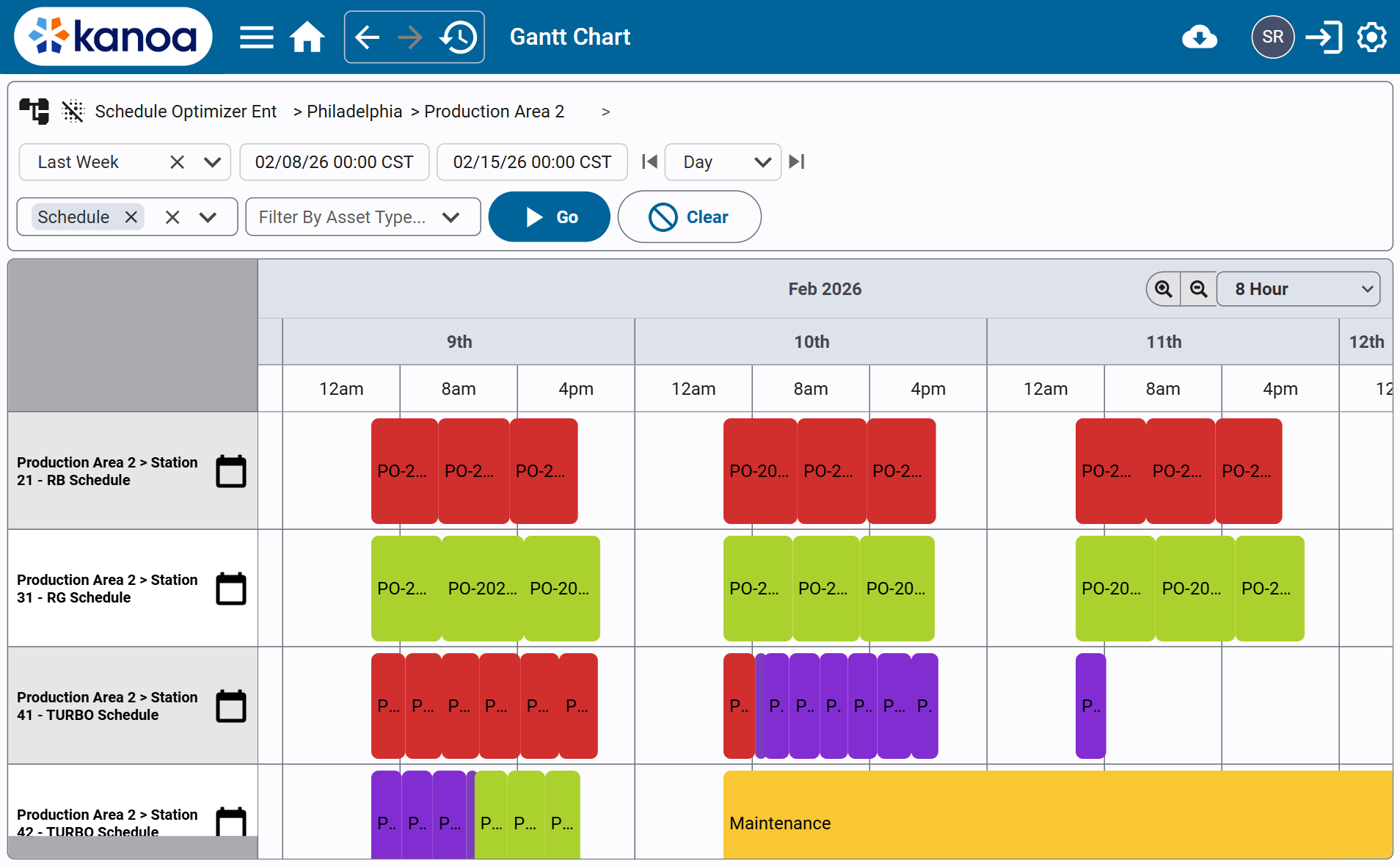
Overview
The Schedule Optimization Accelerator is a deterministic, fully transparent reference implementation that demonstrates how production scheduling logic can be built directly on top of Kanoa MES data structures using Ignition Perspective and Jython scripting.
This accelerator is not intended to be a black-box optimization engine. Instead, it provides clear, explainable scheduling heuristics that operate using core MES data that is already available in Kanoa:
- Production Orders
- Asset–Item rate mappings
- Existing production/downtime events
- Shift availability windows
The goal is to show how structured MES data can drive algorithmic scheduling outputs that are immediately usable in the Kanoa Ops Scheduler.
What this accelerator is
- A practical “how-to” reference for pulling scheduling inputs from Kanoa, running a scheduling heuristic, and committing events back into Kanoa.
- A framework designed for clarity and customization.
What this accelerator is not
- A one-size-fits-all scheduling optimizer.
- A replacement for enterprise-grade optimization solvers (OR tools, MILP, etc.).
How It Works
This accelerator implements a complete scheduling loop:
- Gather schedule inputs
- Pull production orders to schedule.
- Pull asset–item rate capabilities (what can run where, and at what rate).
- Gather calendar constraints
- Pull existing scheduled events (maintenance, downtime, scheduled production).
- Pull shift calendars to determine asset availability windows.
- Run a deterministic scheduling heuristic
- Apply one of the included algorithms (below).
- Generate a list of proposed schedule events (including optional explicit changeover blocks, when needed).
- Commit results back into Kanoa
- Convert proposed events into Kanoa schedule blocks.
- Optionally clear existing schedule blocks first (for repeatable demo runs / iteration).
- Update affected orders to Scheduled after they are placed.
Kanoa MES Features Used
This accelerator is intentionally built on “standard primitives” that exist in most Kanoa deployments:
- Production Orders
- Items + Asset–Item relationships (rates)
- Scheduling / production calendar events
- Shift calendars (availability windows)
Input Data Model
The accelerator collects structured datasets in JSON-like form from Kanoa System Function calls:
1) Orders
Using system.kanoa.order.getProductionOrders(...)
Each order includes:
workOrderIditemIdreqdQtydueDate
2) Asset Item Rates
Using system.kanoa.item.getAssetItems(...)
Defines production capability per asset/item:
assetIditemIdscheduleRate(units/hour)
3) Existing Events
Using system.kanoa.schedule.getCalendarEvents(...)
Represents pre-blocked time (maintenance, downtime, previously scheduled production).
4) Shift Events
Using system.kanoa.schedule.getCalendarEvents(...)
Defines when assets are available for production.
Core Scheduling Rules
All included algorithms respect these hard constraints:
- An order may only run on assets configured for its item.
- Production must occur within defined shift windows.
- Proposed events may not overlap existing blocked time.
- Runs are contiguous within a single window (no automatic splitting).
Implemented Scheduling Algorithms
This accelerator currently includes four deterministic heuristics.
1) Baseline EDD (Simple First-Fit)
Purpose: Fast, minimal-complexity baseline.
Behavior: Sort by Earliest Due Date, schedule into the first eligible asset where the order fits.
2) On-Time EDD (Best Slot per Order)
Purpose: Improve due-date performance while maintaining EDD ordering.
Behavior: For each order (EDD sequence), evaluate all eligible assets and choose the earliest feasible completion slot; prioritize on-time completion.
3) Global Least-Slack Priority
Purpose: Maximize the number of orders completed on time.
Behavior: Globally greedy selection based on tightest slack (urgency) rather than strict EDD ordering.
4) Item Batch Dispatch (Changeover-Friendly Scheduling)
Purpose: Reduce changeovers while maintaining due-date sensitivity.
Behavior: Builds same-item batches within a lookahead window, simulates candidate schedules on all eligible assets, and selects the best plan using deterministic scoring.
Changeover Handling
Item Batch Dispatch will auomatically insert changeovers between produciton runs of different items.
- Changeover duration is configurable (uniform duration for the demo).
- Changeovers are explicitly inserted as schedule events (for traceability and accurate utilization modeling).
Implementation & Configuration
Included Resources
This accelerator package contains:
Perspective View
accelerators/scheduleOptimizer/main— planner view used to run the optimizer and commit schedule events.
Script Module
accelerators/autoSchedule— scheduling helpers + the four algorithm implementations described above.
Step 1 — Import the View and Scripts
Import the provided Perspective view and the accelerators/autoSchedule script module into your Ignition project.
The scripts are Jython 2.7 compatible and do not rely on external libraries.
Step 2 — Ensure You Have Schedulable Assets and Shifts
This demo expects:
- A set of assets (typically under an “Area” asset) that are intended to be scheduled
- Shift events defined so the optimizer can compute availability windows
Step 3 — Ensure Asset–Item Rates Are Defined
The optimizer requires each scheduled item to have at least one eligible asset with a defined schedule rate (units/hour).
Step 4 — Run the Optimizer and Commit Schedule Blocks
Open the Schedule Optimization Accelerator planner view and:
- Select the target Area you want to schedule.
- Choose an optimization algorithm:
- Baseline EDD
- On-Time EDD
- Global Least-Slack Priority
- Item Batch Dispatch (changeover-friendly)
- Select your date range / horizon window.
- (Optional) Enable “Clear Schedule First” if you want repeatable runs for demos and testing.
- Run the optimization.
- Review logs/output and confirm that schedule blocks were created.
If the optimizer cannot schedule all orders, the view reports which orders were unscheduled (typically due to capacity or eligibility constraints).
Detailed Walkthrough
accelerators/scheduleOptimizer/main
Purpose
Planner-facing view used to:
- Gather input data from Kanoa
- Run a selected scheduling heuristic
- Write resulting schedule blocks to the production calendar
What the view does
At a high level, the view:
- Loads the selected asset scope (usually an Area and its children)
- Pulls:
- Orders to schedule
- Asset–item rates
- Existing schedule conflicts
- Shift availability windows
- Runs the selected algorithm and produces proposed schedule events
- Inserts changeover events (for the batch dispatch approach)
- Commits the resulting events as schedule blocks in Kanoa
Operator / Planner controls
- Select Area: defines which assets will be considered
- Select Algorithm: chooses the scheduling heuristic
- Date Range: scheduling horizon
- Changeover Duration: used by changeover-aware scheduling
- Clear Schedule First: optional reset for demo/testing
accelerators/autoSchedule
Purpose
Script module containing:
- Helper utilities (interval merging/subtraction, slot finding, eligibility filtering, duration math)
- The four deterministic scheduling heuristics
Design principles
This module is explicitly designed to prioritize:
- Determinism (same inputs → same outputs)
- Transparency (no black-box solver)
- Educational value (easy to read, modify, and extend)
- No external dependencies (Ignition-native, Jython 2.7 compatible)
Conclusion
Common Use Cases
This accelerator is useful for:
- Demonstrating how to pull scheduling inputs from Kanoa MES and produce actionable schedules
- Showing the tradeoffs between “simple and fast” vs “better on-time performance” heuristics
- Providing a starting point for implementation teams to design plant-specific scheduling rules
Expansion Opportunities
Common next steps for real-world deployments:
- Add constraint modeling (sequence-dependent changeovers, tooling, labor, material availability)
- Allow run splitting across multiple windows (optional partial scheduling is a first step)
- Add “what-if” comparisons (multiple scenarios without committing schedule blocks)
- Add scoring outputs (tardiness, total changeovers, utilization, schedule stability)
Summary
The Schedule Optimization Accelerator demonstrates a practical pattern for:
- Programmatically accessing orders, asset capability, schedule conflicts, and shift windows in Kanoa MES
- Running deterministic optimization heuristics (clear, explainable logic)
- Committing recommended schedules back into the Kanoa production calendar for immediate use