KanoaMES v1.15
Release Date - 8/7/26
Summary
Version 1.15 is our first release to support Maintenance Management and Inventory Management.
** Added new feature - Cp, Cpk, cpu, cpl, Pp, Ppk, Ppu and Ppl, attribute charting p, np, c, u, Pre-Control charting and Multi-Variate T2 charting to SPC Analysis. ** Added new feature - Overall Labor Effectiveness (OLE) and Production Overall Labor Effectiveness (POLE), and crew management. ** Added new feature - Measures
Kanoa Maintenance
Kanoa Maintenance delivers a fully integrated, Ignition-native maintenance solution designed to connect maintenance operations directly with production, quality, and plant performance data—eliminating the need for disconnected systems and enabling a unified operational view. At its core, Kanoa Maintenance provides comprehensive asset and equipment management, allowing organizations to model plant hierarchies, track equipment history, and manage maintenance activities across all levels of the operation. Maintenance workflows are driven through a robust work order lifecycle, supporting creation, prioritization, scheduling, assignment, execution tracking, and technician feedback in a single system. The platform captures detailed labor and activity tracking, enabling visibility into technician utilization, work performed, and time spent across maintenance tasks.
Integrated parts and inventory tracking links material usage directly to work orders, providing insight into consumption, availability, and maintenance cost drivers. Kanoa Maintenance is designed for real-world operations with mobile-optimized interfaces, allowing technicians to create, update, and complete work orders directly from the field on tablets or handheld devices. This ensures timely data capture and improves responsiveness across maintenance teams. A key strength of the system is its deep integration with the Kanoa MES platform and Ignition ecosystem. Maintenance workflows operate within the same environment as production execution, quality management, and operational analytics, enabling real-time, event-driven maintenance tied directly to plant conditions. The system is fully extensible, allowing teams to customize workflows, dashboards, and integrations using Ignition’s development tools.
Kanoa Maintenance includes built-in maintenance analytics and KPI tracking, providing visibility into performance metrics such as:
- Mean Time to Repair (MTTR)
- Mean Time to Acknowledge (MTTA)
- Mean Time Between Failures (MTBF)
- Backlog aging and workload distribution
- Work order flow (created vs completed vs open)
These analytics enable teams to monitor responsiveness, identify bottlenecks, manage backlog health, and drive continuous improvement across maintenance operations. Under the hood, the system leverages Kanoa’s open SQL-based architecture and extensive system.kanoa API framework, allowing seamless integration, reporting, and advanced analytics across the enterprise.
Kanoa Inventory
Kanoa Inventory provides a complete set of functions for managing parts, stock levels, locations, suppliers, and bill of materials (BOM) across your asset hierarchy.
All functions are available under the system.kanoa.inventory namespace.
Measures
The Measures feature allows you to capture, aggregate, and statistically analyze process measurements at scale. Rather than storing every raw sample, measurements are collected over a configurable window — by count or by duration — and summarized into a single database record that preserves key statistical properties.
Implementation Guidance
The BIJC calendar component has now been fully incorporated into the kanoaMES module. It is no longer required to installed the BIJC calendar component. You can deactivate the BIJC license and uninstall the module.
Ignition 8.1 Version
The minimum required version of Ignition is 8.1.33
This release package has been tested against Ignition 8.1.54.
- kanoaMES_1_15_0.modl
- ApexCharts-signed 1.0.17.modl
Ignition 8.3 Version
The minimum required version of Ignition is 8.3.3
This release package has been tested against Ignition 8.3.8.
- KanoaMES_83_1.15.0.modl
- Embr-Charts-Ignition83-3.1.0
You may need to update the MSSQL Driver to mssql-jdbc-13.4.0.jre11.jar. You'll know this if you start seeing 'failed. com.microsoft.sqlserver.jdbc.SQLServerException: A result set was generated for update.' errors in the gateway logs. Click here to download
In 8.1 go to Config > Database > Database Drivers & Settings and 'Choose File' in the JAR File(s) settings. In 8.3 go to Connections > Database > Settings and click the three dots to the right of the Microsoft SQLServer JDBC Drivers. Choose 'Manage JAR Files' and select the new jar file.
If the kanoaCore database is faulted after updating the driver, you may need to add ";trustServerCertificate=true" to the extra connection properties, i.e. 'databaseName=kanoaCore;trustServerCertificate=true'
If you are updating from an early version of Kanoa MES, you may see a project script error after updating or restarting the module that refers to the core.appChange table, this was a schema and set of devOp functions that have been removed in 1.15.1. They were only used to track changes to views triggered by the Ignition onUpdate event. We have implemented an entirely mechanism for tracking changes and we are 'cleaning up' unnecessary parts of the application. This error is minor.
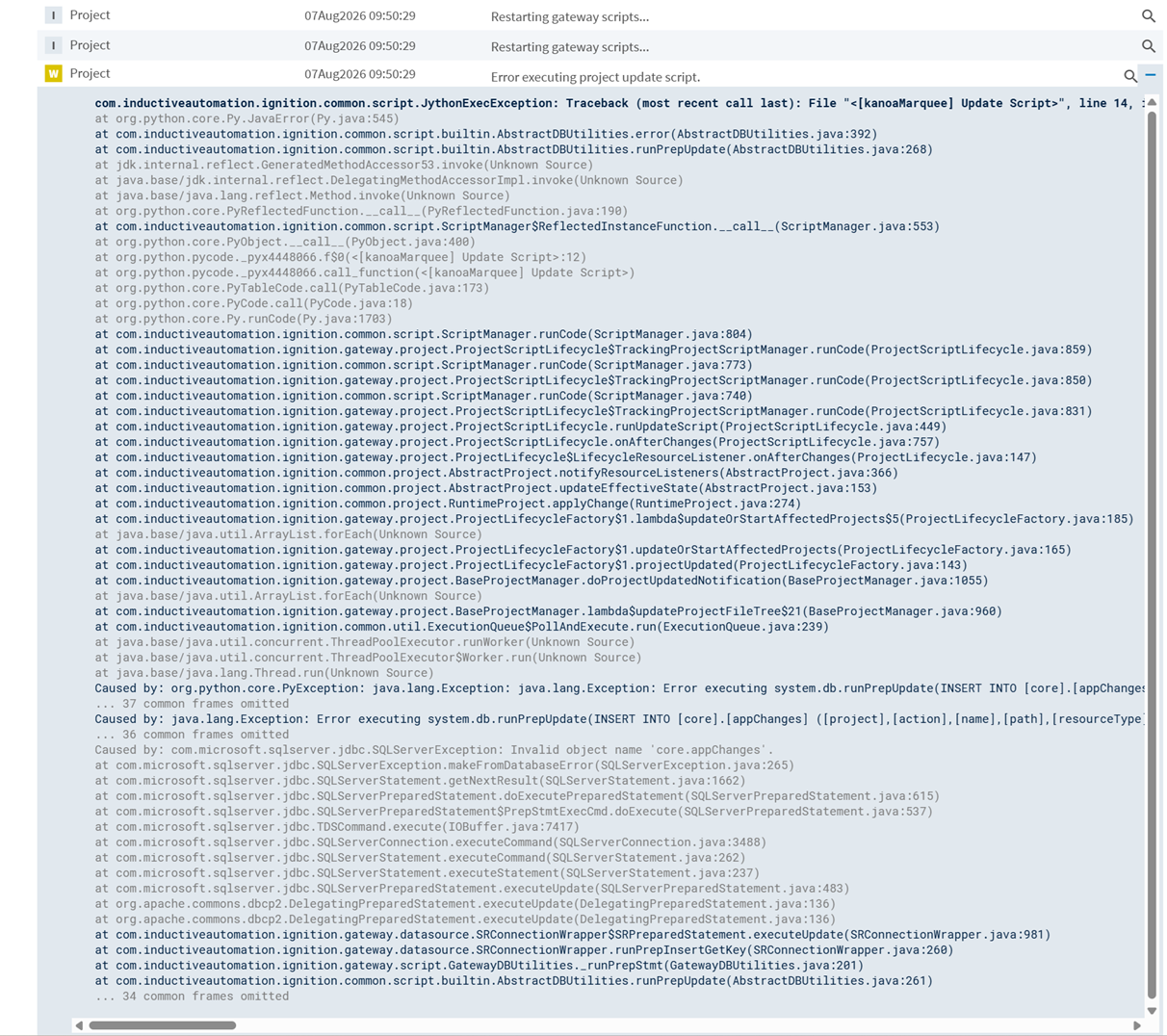
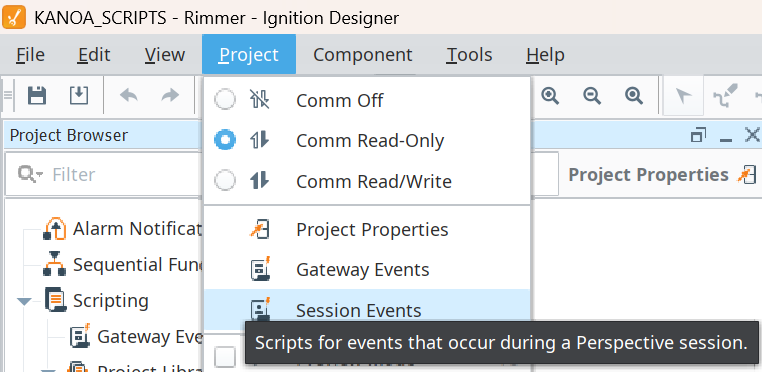
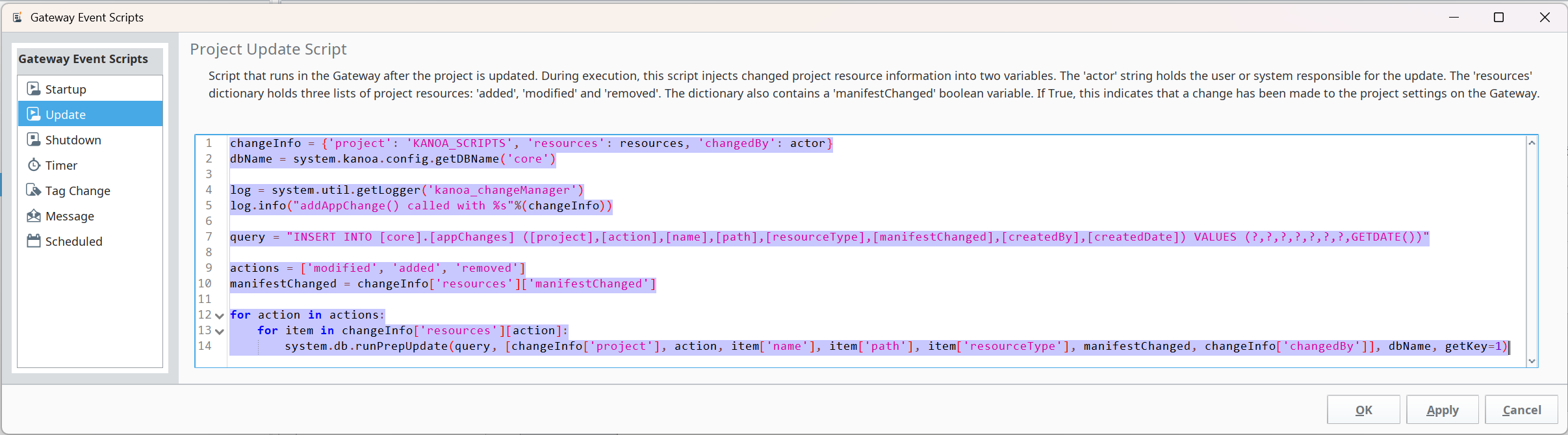
To prevent it, you can delete the onUpdate script from the KANOA_SCRIPTS project.
One of the changes has been to show archived and released check sheet checks together on the check sheet details. In order to do this, we have had to change the signature of the following functions...
- system.kanoa.quality.analysis.getChkItemEventsByColumn()
- system.kanoa.quality.analysis.getChkItemEventsByRow()
- system.kanoa.quality.analysis.queryChkItemEventData()
- system.kanoa.quality.analysis.getHistogramData()
... to take in the masterChkShtId and the chkItemPath rather than the chkShtId and chkItemId. If you are using these functions in custom screens or script, they will need to be modified.
The qds/assetInfo tag UDT has been removed as it's functionality has been incorporated into the main assetInfo UDT. If you have created instances of this UDT, you can simply delete them.
1.15.12 - 10/16/26
Changed
- Ops: Force-deleting an asset now keeps its work order events and screen dashboards, with their link to the deleted asset cleared.
Fixed
- Ops: Fixed an issue where users with the Schedule Operations permission who weren't gateway admins got errors when creating, editing or deleting operations in the operations calendar.
- Ops: Fixed an issue where force-deleting an asset failed when the asset had operators assigned to shifts.
- Ops: Fixed force-deleting an asset leaving behind records that still referenced it, such as shift assignments, crews, item state and attribute links, loggers, operator sessions, lot operation links and BOM rows.
- Ops: Fixed an issue where a failed force delete could leave the asset tree partly deleted and renamed to
_forDeletion<id>. The whole delete now succeeds or fails as one step. - Maintenance: Fixed work order status change dates being recorded in UTC instead of the server's local time, which also corrects how long a work order shows in its current status.
1.15.11 - 10/14/26
Starting with 1.15.11, release notes follow the Keep a Changelog format. Changes are grouped by type (Added, Changed, Deprecated, Removed, Fixed, Security), and each entry starts with the product area it applies to.
Added
- Platform: Added
system.kanoa.schedule.rruleToDates()andsystem.kanoa.schedule.validateRrule()to list the upcoming dates for a recurrence rule and check that a rule is valid. - Quality: Added a Recurring check sheet trigger type. Recurring triggers create checks on a daily, weekly or monthly schedule with an optional end date, and the trigger editor previews the next five occurrences.
- Quality: Added a Schedule column to the triggers table in the check sheet editor, showing each trigger's schedule or interval in plain text.
- Quality: Added the
kanoa/timers/qdsRecurringTimertag, which creates checks for Recurring triggers and can be enabled or tuned separately fromqdsIntervalTimer.
Changed
- Platform: A user's first name, last name and email in Kanoa are now updated at login when they change in the user source. Blank values never overwrite a stored name.
Fixed
- Platform: Fixed an issue where a gateway admin with no first or last name, or with no roles assigned, could log in but could not do anything.
- Platform: Fixed comments written by a user with no first or last name breaking the comments panel.
- Platform: Fixed an issue where a user's first login could fail when they logged in from two sessions at the same time.
- Ops: Fixed marquees showing "View not found" after the page was refreshed, and fixed Marquee Editor previews and marquee display links not opening.
- Quality: Fixed an issue where selecting a check item cleared the check sheet instructions and document from the open Instructions popup.
- Quality: Fixed check sheet instructions and check item instructions appearing on each other's tabs in the Instructions popup.
- Quality: Fixed the Instructions popup still showing the previous check item's instructions when no item, or several items, were selected.
- Quality: Fixed an issue where a check could be created twice when two scheduled runs happened at the same time.
- Quality: Fixed filtering check sheet triggers by check sheet name.
Security
- Platform: Fixed an issue where the first user to log in could be made gateway admin even though an admin already existed, if that admin had no first or last name.
1.15.10 - 10/7/26
Quality
- Fixed an issue where barcode scans into check sheet cells were saved as a few scattered characters instead of the full value. This affected the check sheet editor, the mobile check sheet editor and the operator panel.
- Fixed the check value popup submitting a scanned value before the scanner finished, or also submitting it to the next check.
- Fixed the check sheet table showing every data field as a column.
1.15.9 - 10/6/26
Platform
- Added toast notifications to the Kanoa module. Use
system.kanoa.toast.show(),system.kanoa.toast.update()andsystem.kanoa.toast.dismiss()to show toasts on any Perspective page without adding a component to a view. - Added
system.kanoa.date.localizeDateFormat(). Date columns across Ops, Quality, Maintenance, Inventory and Scheduler views now show day, month and year in the order used by the session's locale.
Ops
- Added drag and drop to the Item Class Editor so item classes can be moved to a new position.
- Added drag and drop to the Item State Class Editor so item state classes can be moved to a new position.
- Added a PLC measure source type.
- Added item states to asset import.
- Added performance states to asset export, import and duplicate.
- The operations calendar now opens in the week view by default.
- Changing a measure's attribute now updates its tag and reloads its spec limits.
- The Operator Login Panel now shows its asset selector on dashboards.
- The Asset Tree Editor refresh button now rebuilds the asset hierarchy table.
- Removed the Target % column from the performance reason table.
- Fixed an issue where a new asset group created in the State Editor did not appear in the Asset Group dropdown.
- Fixed an issue where an asset could not be deleted if it was linked to a shift event shared with another asset.
- Fixed the Clear and Delete buttons being hidden in the Item State Class Editor.
- Fixed an issue where clicking a date on the operations calendar cleared the selected asset.
- Fixed the Close button on the operations calendar asset confirmation popup.
- Fixed an issue where renaming or deleting a measure affected every measure tag on the asset.
- Fixed the Measure Manager being locked to a single asset.
- Fixed the Operator Sessions Table widget not allowing an asset to be selected.
- Fixed the Performance State Editor name field not updating as you type.
- Fixed scrolling of the marquee URL row.
- Updated system.kanoa.schedule.calcEventDuration() to cap duration at 3 months rather than 7 days. This wil be extended in next release to make it configurable.
Quality
- quality.schedule.intervalTimerEvent - updated logic in querying relevant check sheet event data
1.15.8 - 9/29/26
Platform
- Certain functions couldn't be called from the script console in Ignition 8.3. This is fixed.
Ops
- OEE By Interval is picking up an extra count. This is fixed.
- Added Line Scheduler to Calendar component.
Quality
- Added new check sheet status 'In Progress'. This is set whenever a check item value is entered. Check sheets 'In Progress' are now distinguishable from those that are 'Due'.
- Security issue - Unbounded image decode in createThumbnail. This is fixed.
- Setting multiple items to check sheet breaks data collection. This is fixed.
- Timed Interval Schedule bug for Check Sheets with no asset. This is fixed.
Maintenance
- Added ability to import and export procedures.
- Procedures Move step function isn't working. This is fixed.
1.15.7 - 9/15/26
Maintenance
- MWOs in draft status are still getting scheduled based on conditions. This is fixed.
- RunHour condition based MWOs are generating new missed events every minute. This is fixed.
- Fixed null condition info in workOrderEvent.
Trace
- Adjust Node Display to display Asset and assetTransport.
1.15.6 - 9/14/26
Ops
- Added system.kanoa.operator.getOLEDataByCrew().
- system.kanoa.operator.assignCrewToShift() overlap fix. Assigning a new crew to a shift didn't close out a prior crew's still-open assignment for that shift, so two crews could end up simultaneously "active" with no error. Now closes any prior active assignment (setting its endDate) before inserting the new one, wrapped in a transaction.
- Operator Login Widget now points to the correct view.
- Maintenance is mis-spelt in navigation. This is fixed.
- Added export/import for serializations.
- Asset OEE Summary does not handle areas within areas from site level. This is fixed.
- Import assets now allows for updating assets.
Quality
- Trigger configuration disappearing after revision. This is fixed.
- Unable to save a check with a Trigger check in version 1.15.3. This is fixed.
- Failed tolerance check displayed as check ok. This is fixed.
- Barcode Scanner Input not working. This is fixed.
- addChkShtType Popup is not checking to see if chkShtType already exists correctly. This is fixed.
Maintenance
- Analysis Screen fixes. Analysis can now be filtered asset. Note!! Function signatures have been changed to a paramsDict for analysis get functions.
- No permissions on any of the CMMS screens for guest user. This has been fixed.
- Added configureMaintenance and configureProcedures user functions to security.
- Creating a recurring work order doesn't work if serialization is not created. This is fixed.
- Can now track multiple personnel working on the same MWO.
- Miss MWOs when an open MWO is not completed. This is fixed.
- Multiple MWOs are no longer generated from 'Generate Ahead Days'
- Cannot delete an unused procedure if it has steps. This is fixed.
1.15.5 - 9/8/26
Platform
- Resolved issue with inventoryTransactionType static data.
Quality
- Quality Check Sheets not replicating to assets. This is fixed.
1.15.4 - 8/24/26
Platform
- Resolved an issue on clean installations where
changeset inv:inventoryTransactionType:1would fail to run causing a total Hawthorn failure. - Resolved
Failed to resolve schema ref 'urn:ignition-schema:schemas/style-properties.schema.json', validation will not succeed!errors on Kanoa module startup.
1.15.3 - 8/14/26
Ops
- Added import/export utility for serialization.
- Added lucide icons.
1.15.2 - 8/11/26
Ops
- Fix for getDBName().
- Station Counts widget now defaults to 'Current Run' so add counts show up straight away.
- Logging out does not clear session security settings. This is fixed.
- Total rows are off in Run Review when shift is selected. This is fixed.
Maintenance
- Added serialization configuration to maintenance type.
- Cannot add another Work Order template after saving a new one. This is fixed.
- Monthly Recurrence Options Do Not Match Selected Start Date. This is fixed.
1.15.1 - 8/7/26
Platform
- Added new reactor breadcrumb component.
- Updates to license checker.
- Removed scanKeyword() function (CVE).
- Added Breadcrumb react component.
Ops
- Added FEATURE - ADD OLE, POLE for Operator KPIs
- Operations calendar dark mode does not show shifts (business hours). This is fixed
- Operations calendar can now show business hours per day.
- Shift patterns that overlap days breaks calendar business hours.
- Production orders now uses event object for increased styling capability in the operations calendar.
- system.kanoa.security.getUsers() updated to support functionName param.
- Updated iconPicker to use localhost. This was causing issues within a container.
- getLogs() was throwing an error when gateway installed in a container. This is fixed.
- Asset Deletion would leave assets set in a 'for_delete' state if they had been used as asset transports in a lot event. This has been fixed.
- Refactored system.kanoa.config() functions.
Quality
- Added Cp, Cpk, cpu, cpl, Pp, Ppk, Ppu and Ppl to SPC Analysis.
- Added Attribute charting p, np, c, and u to SPC Analysis.
- Added Pre-Control charting to SPC Analysis.
- Added Multi-Variate T2 charting to SPC Analysis.
Inventory
- Server Incorrectly Reports Kanoa MES Trial Expired Despite Valid License. This is fixed.
- Changes made to inventory as issues found during documenting system functions. Removed getAssetBomItem(), inventoryBin and inventoryLocation functions. Updated getPartCategories(), changeset inv:vwPartInventoryBalance:1, getPartInventoryBalances(), addInventoryTransactionType(), changeset inv:inventoryTransactionType:1, changeset inv:inventoryTransactionType:2.
- Added Inventory dashboards.
Maintenance
- system.kanoa.cmms.addProcedure() does not list all required parameters. Documentation is fixed. Functions have also been changed to default them if not all dictionary keys are passed.
- Updates made to checkWorkOrderConditions() and addWorkOrderScheduleEvent() functions as issues were found during updating the documentation.
- Added Maintenance dashboards.
1.15.0 - 7/14/26
Platform
- Kanoa Calendar component released! This implementation replaces the BIJC calendar component. The BIJC calendar component can now be removed.
- Circular reference error in Kanoa themes. This is fixed.
- KanoaMES now supports Azure SQL Edge database server.
- Hawthorn Installer now requests a project scan for all clients if projects are changed.
- Changes to the Hawthorn Installer now make redundant gateway server configuration possible.
Inventory
- Inventory Management has now been added to Kanoa MES. Added 62 new functions.
Maintenance
- Maintenance Management has been added to Kanoa MES. Added 106 new system functions, 24 tables, 21 views, 14 stored procedures, 1 table function and 39 perspective views.
Ops
- Added widget parameter editor.
- Added measures feature.
- Calendar shows ghost event artifacts when dragging an event. This is fixed.
- Calendar component has been upgraded from 4.0 to 7.0 version of fullCalendar.io.
- Dynamic Attribute asset selector freaks out. It doesn't anymore.
- Asset Selector breadcrumb selection inconsistent. This is fixed.
- Asset Editor - Item Classes importing incorrectly. This is fixed.
- Asset Import - Import Fails when asset names have leading or trailing spaces. This is fixed.
- Item custom attribute editor is too small. Now it is bigger.
- Cursor is Text rather than cursor in breadcrumb. This is fixed.
- Dashboard selector still doesn't initialize properly on the asset Operation screen. This is fixed. Breadcrumb has been disabled for now.
- Added Mobile bit to asset types. This is primarily used by trace for assigning asset transports to lotEvents.
- Maybe I'm being OCD but it bugs me that some of the Inherited checkboxes are on the left and some are on the right, it's a bit confusing. This is fixed.
- Item Class creation bug. This is fixed.
- Dark Mode Theme Issues. These are fixed.
- Added itemStates to importAsset() function.
- system.kanoa.attribute.getAttributeEvents() no longer returns the 'current attribute value. This is fixed.
- Asset Operation dashboard is still not always loading when you navigate to that screen. This is fixed.
- Unused tags [Kanoa]types/Kanoa/ProductionSchedule, qds/assetInfo and [Kanoa]kanoa/mes have been removed.
- Added check in importAssets() for itemAssetRate and itemClasses before adding.
- Save button in User Edit view is grey. This is fixed.
- Error with trace graph when trace include lotEvents with no assetId. This is fixed.
- Scheduled events do not show show up in calendar if eventColor is a var. This is fixed.
- Can't turn on "Shift Time Only" for a site. This is fixed.
- When making a new asset, there are 'null' values in the Production Day fields. This is fixed.
- Spacing still not quite right on breadcrumb. This is fixed.
- breadcrumb dropdown is not sizing correctly. This is fixed.
- getItemPeriod shows up twice in intellisense. This is fixed.
- Asset Selector not Cleared Out in Performance Events view. This is fixed.
- system.kanoa.event.assetOperationChange() throwing error. Have added a guard to prevent us from continuing script execution in assetOperationChange() if addModeEvent throws an error. Also switched to log.trace in addModeEvent() and updateModeEvent() functions.
- Cannot link states to non OEEEnabled cells. This is fixed.
- Editing a state leaves the state info view blank. This is fixed.
- Adding a new user through the Kanoa interface does not add them to Ignition if they do not meet the complex password requirements. This is fixed.
- Optimized system.kanoa.attribute.getAttributeEvents().
- assetDowntimeBarChart widget throws error on 'Interval' selection. This is fixed.
- Updated Scrap Charts to include all waste counters.
- Clicking on an asset in the Main overview screen sometimes causes the assetCard to move its position preventing navigation to it. This is fixed.
- Marquee Preview isn't working. This is fixed.
- Marquee throwing timer error. This is fixed.
- Need a work order title from the UI, otherwise empty space is added and wo doesn't show up. This is fixed.
- Item classes don't show up if they are not enabled. This is fixed.
- Enabled item state categories by default.
- When I save the production order it says "Work Order Updated" instead of "Production Order Updated". This is fixed.
- Duration is cut off on downtime editor. This is fixed.
- Updated system.kanoa.attribute.getAttributeEvents() is throwing an error when endDate of null is passed. This is fixed.
- Labels are cropping i.e. Target Rate on right on the Production view. This is fixed.
- Asset State link UPSERT is failing when a row already exists for that assetId and stateCode. This is fixed.
- spPopulateAssetHierarchy performance improvements.
- Improve consistency of navigation menu updates. We now check if a viewPath is already referenced before adding a new entry. We no longer force an UPDATE.
- Updating navigation throws error. This is fixed.
- Downtime by interval function is broken. This is fixed.
- Production Analytics report doesn't display cell counts. This is fixed.
- Reliability KPIs report does not include cell level data if a line is selected. This is fixed.
- The "Asset Group" dropdown in the Reliability KPIs report doesn't do anything. This is fixed.
- Added workOrderId to getOEESummary().
- Can't switch environment in new application config page. This has been added.
- system.kanoa.event.getCounterEventTotals() should take counterTypeName as a parameter to be able to pickup extra waste counters. This is fixed.
- spGetLotActivity now returns assetTransportId.
- Added selection option to Summary State view to show state pie by state category, state type or state.
- Schedule time issue in the Operation Event editor when DST occurs. This is fixed.
- system.kanoa.event.getAssetPerformanceEventsByShift() is not returning any data. This is fixed.
- We no longer set the workOrderId on childAssets in the system.kanoa.event.assetOperationChange() function.
- If you enable Cells on a line to Display on Main Overview, the Line disappears. This is fixed.
- Improved jsonToMarkdown function
- Contiguous Scheduled runs do not switch. This is fixed.
- Run control scheduled tab doesn't show percent complete and thinks all of runs of the same re-occurring runs are active. This is fixed.
- AssetTreeEditor Changes for custom attributes.
- Make order, item, mode configurable for the Run Control screen.
- Hawthorn - Added check for invalid workOrderId in scheduleBlock.
- Removed duplicate countBarChart kanoa/mes/analytics/countBarChart.
- Added info on who created a schedule/shift block on their respective editing popups.
- Operation calendar selection is broken. This is fixed.
- kanoa/button/outlined css prevent color from being applied to the icon on a button. This is fixed.
- Updated system.kanoa.utilities.convertDictListToDataset() to address RuntimeError: dictionary changed size during iteration
- Info bar not showing on Production view. This is fixed.
- Summary state pie chart breaks unplanned downtime into multiple states. This is fixed.
- Updated system.kanoa.attribute.getAttributeEventsTotals() and added appropriate indexes to improve query performance.
- Updated Application settings page to simplify configuration.Added navigation filtering based on enabled kanoa MES module attribute selection.
- Added measure tag UDT.
- Improved performance of [mes].[spGetAssetStateEventSummary] and [mes].[fnGetAssetStateEvents].
- Prevent filter binding firing several times on widgets topDowntimeBy, assetDowntimeBarChart, downtimePieChart and assetPieChart
- Deleting a general counter deletes all general counter tags for that asset. This is fixed.
- Extra counter fields being displayed in Count Editor. This is fixed.
- Handle processTypeId and oeeEnabled not being passed to addAsset().
- Prevent filter binding firing several times on all widgets. This is fixed.
- Added ability to switch a scheduled event to a different asset in the eventViewer.
- Scheduling->Operations "Shift Time Only" label is not visible in dark mode. This is fixed.
- Run Chart is now using the new dateSelector.
- Reliability KPIs report shows Scheduled Production as Unscheduled Production. This is fixed.
- Add "Notes/Comments" as a column in the Asset Downtime Table Widget.
- Live Production Counts Dashboard shows improper data. This is fixed.
- Summary report shows an extra empty day. This is fixed.
- system.kanoa.utilities.jsonToMarkdown() now handles more complex payloads.
- Custom user functions can now be created and assigned to users in security.
Quality
- Check Sheet Details - Hide Trend button if selected column isn't a check item.
- Check Sheet Details Filter by Item does not work. This is fixed.
- Adding a duplicate checksheet trigger throws error that it cannot be saved. It is no longer possible to add a duplicate trigger.
- Deleting an ItemSet shows an error toast even though it was successful. This is fixed.
- New quality attributes are now enabled by default.
- Check Details Sparkline and Trend View are different graphs. This is fixed.
- Alert group editor shows extra columns. This is fixed.
- Check Detail Filter by Item does not work. This is fixed.
- Added a cap of 500 data points to quality.analysis.getChkItemEventsByRow() to prevent sql max row size error.
- Filtered data in the table does not affect the charts. This is fixed.
- Added spc to measures.
- Add searchDate parameterization to getChkShtEvents.
- system.kanoa.quality.event.getChkShtEventItems() now returns chkShtName.
- Quality Shift Heat Map isn't working. This is fixed.
- Checks in Check Details seem to be titled 'Group - Group Check Item Name'. This is fixed.
- Check Details Item Info, Statistics, and Item Spec checkboxes don't seem to do anything. This is fixed.
- Check Detail Display options (Item Info, Statistics, Item Spec, Show Production Info) don't work in Row view. This is fixed.
- Check X showing up as an option in Test Fail Actions - Issue Check Sheet. This is fixed.
- Convert to float before dividing in calculation. This is fixed.
- Check Details - Why does Diameter show up 9 times in this report? This is fixed.
- chkShtTrigger UDT referenceTag script doesn't work. This is fixed.
- Hide scroll bar on data source attribute editor. This is fixed.
- Triggers are now enabled by default.
- chkShtId tooltip showing up on Folder selection in chkShtEditor. This is fixed.
- Entering an out of spec value breaks the check Sheet Event Editor. This is fixed.
- Added auto filter to check sheet table.
- Changing a trigger did not show up in the Change Log. This is fixed.
- Added new chkShtTrigger tag UDT that can be used for triggering check sheets to be executed based on a tag change.
- Removed qds/assetInfo tag UDT as it's functionality is now built into the assetInfo tag UDT.
- Null values are now set to 0 for trigger delayMins etc.
- Updated calculators to support passing more key values in the custom functions args parameter. Keys are productId, assetId, measurements, chkShtInfo, chkItem, formula.
- Local chkItem tolerances aren't being used in the chkShtDetails screen. This is fixed.
- Attribute Editor is a bit confusing when clearing and updating tolerances. This has been improved.
- Can't scroll through multiple results in row view. This is fixed.
- Check details doesn't show checks that do not have a pass/state state. This is fixed.
- Hawthorn - Fix for checkShtVersionHistory table creation.
- Check Table uses the Submitted Date for the Taken Date and doesn't show the Taken Date. This is fixed.
- 'Taken Date' does not work for manual checks. This is fixed.
- Reporting inconsistencies with taken dates vs submitted date on Check details screen. This is fixed.
- Renaming a checksheet when it is in revision doesn't keep the new name when it is released. This is fixed.
- Can't add a tolerance to a calculated check item. You can now.
- Show archived and released checksheets together on the check sheet details.
- Keep stable Id in chkShtVersionHistory. chkShtVersionGroupId has been added.
Trace
- Issue with displaying lot trace when lotStateColor has not been defined. This is fixed.
- Added colors to lotStateReasons.
- Fixed extra column in Lot Table and removed blue background.
- Added Mobile bit to asset types. This is primarily used by trace for assigning asset transports to lotEvents.
- Added markdown popup to lot attributes table. Makes it easier to read lotAttribute values when they are json.
- View settings on the Lot Configuration - Lot Operations Page got a little weird. This is fixed.
- Enable Lot operation by default and add default colors. This is done.
- Fixed lotAttribute height in Trace graph lotInfo panel.
- Lot Manager used a different lot than what was selected for the input lot. This is fixed.
- Added check for enabled lots in spGetLotActivity.
- Order by date on getLotAttributes()
- Add configuration to hide elements of the trace graph like the zoom, and the miniview.
- Bug with smoothStep. This is fixed.
- Add color to lotStates.