Attributes for Tag Data
Reference Materials: Attribute Data Sources
Data Sources
If the value for the attribute can be pulled directly from an asset, configure the Data Source settings. To add a new data source, click the
Add Data Source button on the left.Use the Asset Selector and Tag Browser to select the tag. Scale Factor and Ignore zero values parameters are specific to tag collector values, scaling the PLC value and preventing the storage of zero values if not required. Use the Enabled checkbox to enable or disable a data source.
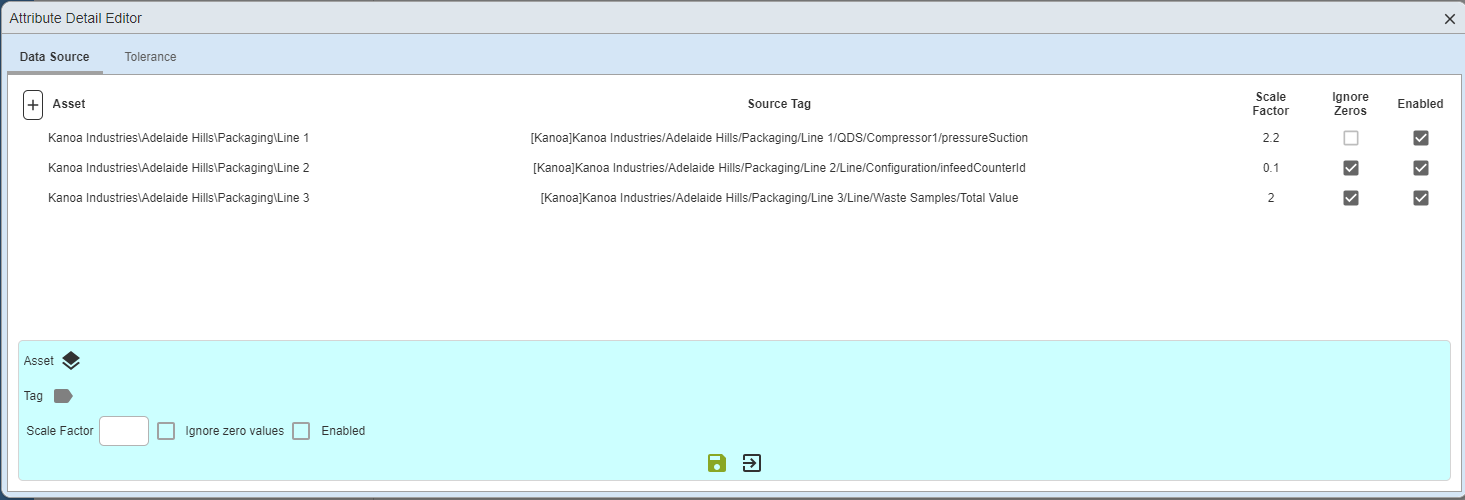
In the First Article Inspection check sheet, an attribute held tolerances. An attribute can also have data sources: for each asset, the tag that holds that attribute's value. A check item asks for Flow Rate, and Kanoa uses the check's asset to find the right tag. One check sheet design can then serve every spray line, and the people building check sheets don't need to know tag paths.
By convention, quality data source tags go in a qds folder under the asset's folder in the Kanoa tag provider. The data source tag browser opens in the asset's folder, so they're easy to find.
sprayLine1QDSTags.json: a qds folder with simulated thickness, flowRate and lineSpeed tags for Spray Line 1.
- Navigate to Configuration → Ops → Assets, select
CoreForge\Philadelphia\Coating\Spray Line 1, select Enable Quality Triggers, and save. - In the Ignition Designer, in the
Kanoatag provider, select theCoreForge/Philadelphia/Coating/Spray Line 1folder and importsprayLine1QDSTags.json. The file creates theqdsfolder, so don't create it first. - Confirm the three tags under
qdsare changing.
- Navigate to Configuration → Quality → Attributes
- Create a
Coatingfolder underCoreForge. - In the Coating folder, create the attributes
Thickness,Flow RateandLine Speed. - Open
Flow Rate, go to its Data Source tab, and add a data source: assetSpray Line 1, tagqds/flowRate, enabled. Save. - Do the same for
Thickness(qds/thickness) andLine Speed(qds/lineSpeed).
To use the same attributes on Spray Line 2, you'd add a second data source to each one pointing at Spray Line 2's qds tags. The check sheet wouldn't change.
Copy this script into the Ignition Designer Script Console (Tools → Script Console) and run it. It checks that Spray Line 1 has Enable Quality Triggers selected, that its three qds tags exist and are changing, and that the Thickness, Flow Rate and Line Speed attributes in CoreForge\Coating each have an enabled data source on Spray Line 1 that reads the right tag. Each check prints PASS or FAIL with what to fix. It doesn't change anything.
Show the check script
# Kanoa Quality Training - check "Attributes for Tag Data" (Coating Line SPC, lesson 1)
#
# Run in the Ignition Designer Script Console (Tools > Script Console), in the
# project that inherits KANOA_SCRIPTS. It only reads; it changes nothing.
# Every check prints PASS or FAIL with what to fix, then a summary.

import time

ASSET = 'CoreForge\\Philadelphia\\Coating\\Spray Line 1'
ATTRIBUTES = [
	# attribute path, data source tag under the asset's folder
	('CoreForge\\Coating\\Thickness', 'qds/thickness'),
	('CoreForge\\Coating\\Flow Rate', 'qds/flowRate'),
	('CoreForge\\Coating\\Line Speed', 'qds/lineSpeed'),
]

results = []

def check(ok, what, fix=None):
	results.append(bool(ok))
	if ok:
		print 'PASS  %s' % what
	else:
		print 'FAIL  %s' % what
		if fix:
			print '      -> %s' % fix

def note(what):
	print 'NOTE  %s' % what

def field(row, *names):
	for n in names:
		if n in row and row[n] is not None:
			return row[n]
	return None

def text(v):
	return '' if v is None else unicode(v).strip()

def key(v):
	return ' '.join(text(v).lower().split())

def truthy(v):
	return str(v).lower() in ('true', '1', 'yes')

def rows(data):
	# Kanoa returns a dataset, a list of dictionaries, or None
	if data is None:
		return []
	if hasattr(data, 'getRowCount'):
		cols = list(data.getColumnNames())
		return [dict((c, data.getValueAt(i, c)) for c in cols) for i in range(data.getRowCount())]
	return [dict(r) for r in data]

def exists(path):
	try:
		return bool(path) and system.tag.exists(path)
	except:
		return False

def normTag(path):
	return text(path).replace('\\', '/').strip('/').lower()

def enableQuality(assetPath):
	"""The asset's Enable Quality Triggers setting, stored in its Line/Enable Quality tag."""
	try:
		qv = system.tag.readBlocking([system.kanoa.asset.getAssetTagPath({'assetPath': assetPath}) + '/Line/Enable Quality'])[0]
		return qv.value if qv.quality.isGood() else None
	except:
		return None

print '=' * 70
print 'Kanoa Quality Training - Attributes for Tag Data check'
print '=' * 70

# 1. Spray Line 1 and its qds tags
print '\n-- Spray Line 1'
check(truthy(enableQuality(ASSET)), 'Spray Line 1 has Enable Quality Triggers selected',
	'In Configuration > Ops > Assets, select Spray Line 1, select Enable Quality Triggers and save.')

base = text(system.kanoa.asset.getAssetTagPath({'assetPath': ASSET}))
tags = [base + '/' + tag for attr, tag in ATTRIBUTES]
missing = [t.split('/')[-1] for t in tags if not exists(t)]
check(not missing, 'The qds tags exist under Spray Line 1 (%s/qds)' % base,
	"Missing: %s. In the Designer, select the Spray Line 1 folder in the Kanoa provider and import sprayLine1QDSTags.json "
	"(don't create the qds folder first)." % ', '.join(missing))
if not missing:
	first = system.tag.readBlocking(tags)
	time.sleep(2)
	second = system.tag.readBlocking(tags)
	bad = [t.split('/')[-1] for t, qv in zip(tags, first) if not qv.quality.isGood()]
	check(not bad, 'The qds tags read good values', 'Bad quality on %s. Check the tags imported as expression tags.' % ', '.join(bad))
	still = [t.split('/')[-1] for t, a, b in zip(tags, first, second) if a.value == b.value]
	check(not still, 'The qds tags are changing', "%s didn't change in 2 seconds. Check their expressions use now(1000)." % ', '.join(still))

# 2. The Coating attributes and their data sources
print '\n-- Coating attributes'
attrs = rows(system.kanoa.quality.config.getAttributes({}))
for path, tag in ATTRIBUTES:
	name = path.split('\\')[-1]
	attr = ([a for a in attrs if text(field(a, 'path')) == path] or [None])[0]
	if attr is None:
		elsewhere = [text(field(a, 'path')) for a in attrs if key(field(a, 'attributeName')) == key(name)]
		check(False, 'Attribute %s exists' % path,
			("Found it at '%s'. Move it to the CoreForge\\Coating folder." % elsewhere[0]) if elsewhere else
			'In Configuration > Quality > Attributes, add a Coating folder under CoreForge and create %s in it.' % name)
		continue
	check(True, 'Attribute %s exists' % path)
	sources = [s for s in rows(system.kanoa.quality.config.getDataSource({'attributeId': field(attr, 'attributeId')}))
		if text(field(s, 'assetPath')) == ASSET]
	if not sources:
		check(False, '%s has a data source on Spray Line 1' % name,
			"Open %s, go to its Data Source tab and add asset Spray Line 1 with tag %s." % (name, tag))
		continue
	s = sources[0]
	source = normTag(field(s, 'sourceTagPath'))
	check(source == normTag(tag) or source.endswith('/' + normTag(tag)), '%s reads %s' % (name, tag),
		"Its tag is '%s'. Edit the data source and browse to %s." % (text(field(s, 'sourceTagPath')) or 'blank', tag))
	check(truthy(field(s, 'enabled')), "%s's data source is enabled" % name, 'Edit the data source and select Enabled.')

passed = results.count(True)
print '\n' + '=' * 70
print 'Result: %d of %d checks passed' % (passed, len(results))
if passed == len(results):
	print 'All good. The Coating attributes read the Spray Line 1 tags.'
else:
	print 'Fix the FAIL items above, then run this again.'
print '=' * 70