Execute the Trace
Reference Materials: Executing Lot Operations
Executing Lot Operations
The Lot Manager screen (Ops → Lots → Lot Manager) shows the location and state of all lots. Filter the table by asset, date, item, lot, source, transport or order, and select Active to hide lots with no remaining quantity. Lot Operations can be executed from this screen, however, it is primarily intended to demonstrate how lot operations can be executed and it is expected that custom operator screens would be created using this screen as an example.
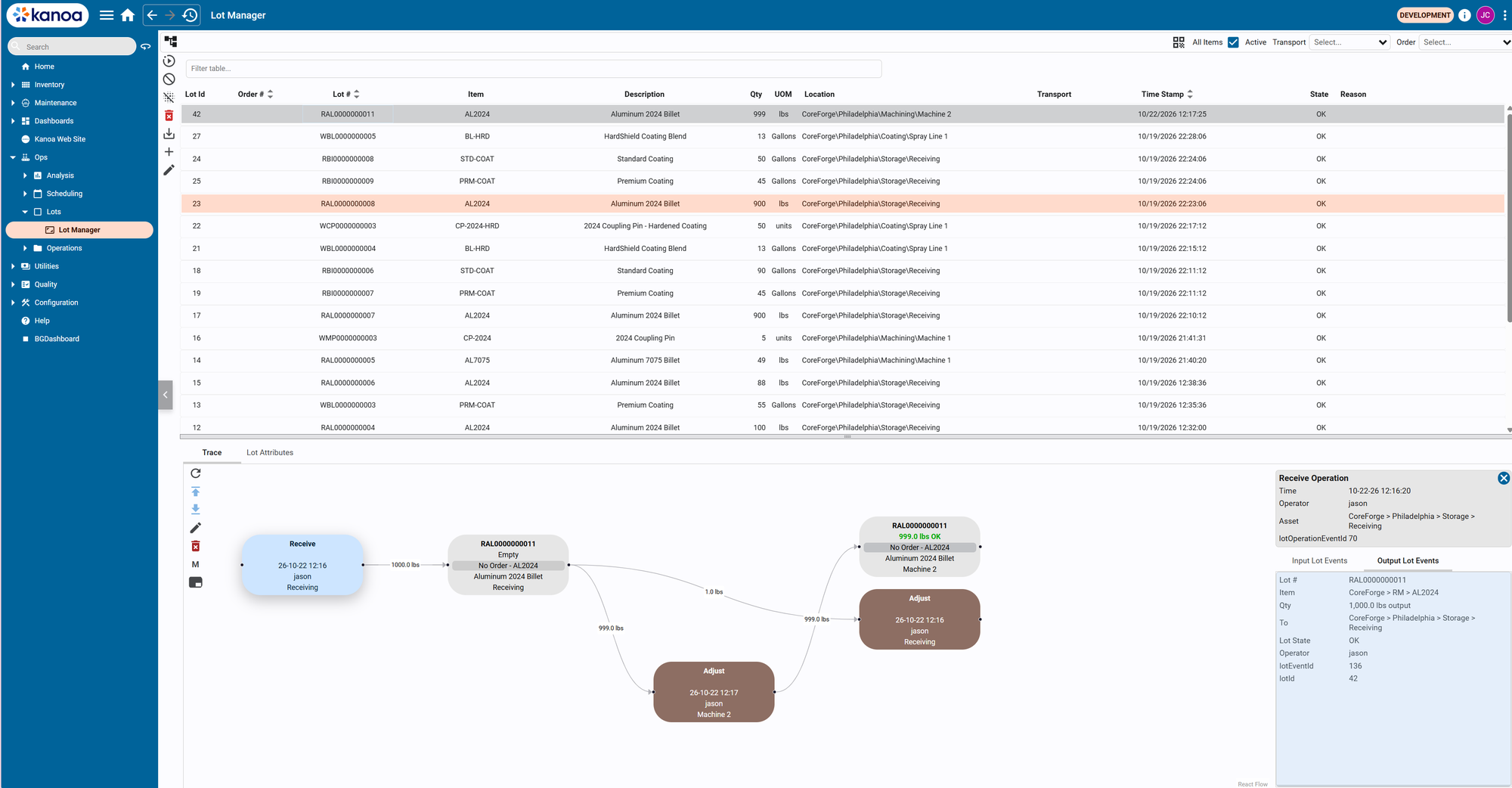
Select a lot to show its Trace and Lot Attributes tabs below the table. With no lot selected, the table fills the screen.
Adding a lot operation
Click Add Lot Operation (+) to open the Add A Lot Operation popup. When a lot is selected, it's filled in as the first input lot.
-
Choose the Operation and its Asset. Leave Use current time checked, or clear it to enter the Time Stamp. Enter an Order # if the operation belongs to an order.
-
On the Input Lots tab, choose a Lot and its Qty, then click Add input. Choosing a lot fills in its available quantity. Only lots with quantity are listed.
-
On the Output Lots tab, choose what the output is:
- Same lot as the input lot - the input lot continues at the operation's asset, for example after a Transfer.
- New lot - choose the Item and a Serialization to name the lot, or type its name.
- No output - the operation only consumes its inputs.
Enter the Qty, Transport, Lot State, Reason and Comment, then click Add output.
-
Click Execute. You can then add another input or output to the same operation, or click Done.
The tabs follow the operation: Receive has no Input Lots tab, and Scrap has no Output Lots tab. Select a row in either table to load it into the form below it, change it, and click the button again to update it. Select rows and click Remove to take them off the list.
Editing a lot
Click Edit Lot to change the selected lot's name, item and units. The Stock box shows where the lot is and how much is there:
- A new Qty is recorded as an Adjust lot operation at that location, with the Comment you enter.
- A new Location is recorded as a Transfer of the lot's quantity to it.
Both are lot operations, so corrections show up in the lot's trace instead of rewriting its history.
You'll follow 2024 aluminum all the way to a shipped package of hardened coupling pins. Every step is a lot operation in Ops → Lots → Lot Manager.
Each lot operation is run from the Add A Lot Operation popup. Click Add Lot Operation (+) above the lot table to open it. If a lot is selected in the table, it's already filled in as the input lot.
- Choose the Operation and the Asset where it happens.
- For an operation that takes input lots, on the Input Lots tab choose the input Lot, if it isn't filled in already, and its Qty. Choosing a lot fills in all of its quantity, so change it when you take only part.
- On the Output Lots tab, choose Same lot as the input lot to keep the lot, as a transfer does, or New lot to make one: choose its Item and Serialization, which shows the lot's name, then its Qty and unit, and its Lot State.
- Click Execute. The popup then asks whether to add another input or output to the operation. Click Add another input or Add another output to add one, or Done to close the popup. The lot the operation made or moved is selected in the table, with its trace on the Trace tab.
You can also list several inputs before you execute: on the Input Lots tab, click Add after each lot to move it to the list above the form. Once the list has entries, Execute records only the list, so add the last one too. A new operation's Output Lots tab has one output; add more with Add another output after Execute.
Lot names below end in x, such as WMP000000000x: replace the x with your lot's number. The number depends on what you've run before, so it can be longer than one digit; use the lot table to find your lot's full name.
- Navigate to Ops → Lots → Lot Manager, and click Clear selection if a lot is selected.
- Click Add Lot Operation (+). Choose
ReceiveatStorage\Receiving. On the Output Lots tab, choose itemAL2024, serializationRaw Aluminumand Qty1000lbs, and click Execute. Click Done. - Click + again and choose
ReceiveatStorage\Receiving. Output itemSTD-COAT, serializationRaw Blending Ingredients, Qty100Gallons, and click Execute. - Click Add another output, and add item
PRM-COAT, serializationRaw Blending Ingredients, Qty50Gallons. Click Execute, then Done. OneReceivenow has two output lots.
- Select the aluminum lot (
RAL000000000x) atStorage\Receivingin the lot table and click +. ChooseTransferatMachining\Machine 1. On Input Lots, change the Qty to100. On Output Lots, choose Same lot as the input lot with Qty100. Click Execute, then Done. Receiving now holds 900 lbs and Machine 1 holds 100 lbs. - Select
RAL000000000xatMachine 1and click +. ChooseMachineatMachining\Machine 1, input Qty100, and a New lot of itemCP-2024, serializationWIP Machined Parts, Qty50units. Click Execute, then Done. - Select the
STD-COATlot (RBI000000000x) atStorage\Receivingand click +. ChooseBlendatMixing\Mixer 1and change the input Qty to10. Click Add another input, choose thePRM-COATlot (RBI000000000x) atStorage\Receivingin the Lot list, and enter Qty5. On Output Lots, choose a New lot of itemBL-HRD, serializationWIP Coatings/Blends, Qty15Gallons. Click Execute, then Done. OneBlendnow has two input lots.
- Select the blend lot (
WBL000000000x) atMixer 1and click +. ChooseTransferatCoating\Spray Line 1, input Qty15, output Same lot as the input lot with Qty15, and click Execute, then Done. - Select the machined parts lot (
WMP000000000x) atMachine 1, and transfer all50units toCoating\Spray Line 1the same way. - Select the blend lot at
Spray Line 1and click +. ChooseCoatatCoating\Spray Line 1and change the input Qty to2. Click Add another input, choose the machined parts lot atSpray Line 1in the Lot list, and enter Qty50. On Output Lots, choose a New lot of itemCP-2024-HRD, serializationWIP Coated Parts, Qty50units. Click Execute, then Done.
- Select the coated parts lot (
WCP000000000x) atSpray Line 1and click +. ChooseInspectatFinishing\QA Station, input Qty50, and output Same lot as the input lot with Qty45and Lot StateOK. Click Execute. - Click Add another output for the parts that failed. Choose New lot and item
CP-2024-HRD. Leave Serialization empty and type the lot name: your coated lot's name followed by-SCRAP, such asWCP0000000001-SCRAP. Enter Qty5units, Lot StateScrapand ReasonFailed visual inspection, and click Execute, then Done. - Select your
-SCRAPlot and click +. ChooseScrapatFinishing\QA Station, input Qty5, and click Execute, then Done. Scrap has no output, so the lot leaves current inventory.
- Select the coated parts lot at
QA Stationand click +. ChoosePackatFinishing\Auto Pack 1, input Qty45, and a New lot of itemFG-CP-2024-HRD-250, serializationFinished Goods Packages, Qty1Cases. Click Execute, then Done. - Select the package lot (
FGP000000000x) and click +. ChooseShipatStorage\Shipping, input Qty1, and click Execute, then Done. Ship has no output.
Select the lot, open its Trace tab, click the wrong operation and click Edit. The operation opens in the same popup: change it and click Save, or click Delete. To correct only a lot's quantity or location, click Edit Lot instead: Kanoa records the change as an Adjust or a Transfer, so the lot's history stays complete.
Copy this script into the Ignition Designer Script Console (Tools → Script Console) and run it. It checks that the coating items exist, then looks for each lot operation in this lesson at its asset, with the right input and output lots, items and quantities: the two receives, the transfer, machine and blend, the two transfers to Spray Line 1 and the coat, the inspect and scrap, and the pack and ship. Lots are matched by serialization prefix and item, so the numbers your lots got don't matter. Each check prints PASS or FAIL with what to fix. It doesn't change anything.
Show the check script
# Kanoa Trace Training - check "Execute the Trace"
#
# Run in the Ignition Designer Script Console (Tools > Script Console), in the
# project that inherits KANOA_SCRIPTS. It only reads; it changes nothing.
# Every check prints PASS or FAIL with what to fix, then a summary.
#
# Lots are matched by their serialization prefix and item, so the check works
# whatever numbers your lots were given.

ITEMS = ['STD-COAT', 'PRM-COAT']
FG_ITEM = 'FG-CP-2024-HRD-250'

# Each lot operation the lesson adds:
#   inputs/outputs are (lot prefix, item, quantity); 'same' means the output is
#   the input lot itself, 'state' is the lot state an output must have.
STEPS = [
	('Receive the raw materials', [
		dict(what='Receive of 1000 lbs of AL2024', op='Receive', asset='Storage\\Receiving',
			inputs=[], outputs=[('RAL', 'AL2024', 1000)]),
		dict(what='Receive of 100 gallons of STD-COAT and 50 gallons of PRM-COAT', op='Receive', asset='Storage\\Receiving',
			inputs=[], outputs=[('RBI', 'STD-COAT', 100), ('RBI', 'PRM-COAT', 50)]),
	]),
	('Machine and blend', [
		dict(what='Transfer of 100 lbs of the aluminum lot to Machine 1', op='Transfer', asset='Machining\\Machine 1',
			inputs=[('RAL', 'AL2024', 100)], outputs=[('RAL', 'AL2024', 100)], same=True),
		dict(what='Machine of 100 lbs of aluminum into 50 CP-2024', op='Machine', asset='Machining\\Machine 1',
			inputs=[('RAL', 'AL2024', 100)], outputs=[('WMP', 'CP-2024', 50)]),
		dict(what='Blend of 10 gallons of STD-COAT and 5 of PRM-COAT into 15 gallons of BL-HRD', op='Blend', asset='Mixing\\Mixer 1',
			inputs=[('RBI', 'STD-COAT', 10), ('RBI', 'PRM-COAT', 5)], outputs=[('WBL', 'BL-HRD', 15)]),
	]),
	('Coat', [
		dict(what='Transfer of the 15 gallons of blend to Spray Line 1', op='Transfer', asset='Coating\\Spray Line 1',
			inputs=[('WBL', 'BL-HRD', 15)], outputs=[('WBL', 'BL-HRD', 15)], same=True),
		dict(what='Transfer of the 50 machined parts to Spray Line 1', op='Transfer', asset='Coating\\Spray Line 1',
			inputs=[('WMP', 'CP-2024', 50)], outputs=[('WMP', 'CP-2024', 50)], same=True),
		dict(what='Coat of 2 gallons of blend and 50 parts into 50 CP-2024-HRD', op='Coat', asset='Coating\\Spray Line 1',
			inputs=[('WBL', 'BL-HRD', 2), ('WMP', 'CP-2024', 50)], outputs=[('WCP', 'CP-2024-HRD', 50)]),
	]),
	('Inspect', [
		dict(what='Inspect of 50 coated parts into 45 OK and 5 scrap', op='Inspect', asset='Finishing\\QA Station',
			inputs=[('WCP', 'CP-2024-HRD', 50)],
			outputs=[('WCP', 'CP-2024-HRD', 45, 'OK'), ('WCP', 'CP-2024-HRD', 5, 'Scrap', '-SCRAP')]),
		dict(what='Scrap of the 5 scrap parts', op='Scrap', asset=None,
			inputs=[('WCP', 'CP-2024-HRD', 5, None, '-SCRAP')], outputs=None),
	]),
	('Pack and ship', [
		dict(what='Pack of 45 coated parts into 1 case of %s' % FG_ITEM, op='Pack', asset='Finishing\\Auto Pack 1',
			inputs=[('WCP', 'CP-2024-HRD', 45)], outputs=[('FGP', FG_ITEM, 1)]),
		dict(what='Ship of the case with no output', op='Ship', asset='Storage\\Shipping',
			inputs=[('FGP', FG_ITEM, 1)], outputs=[]),
	]),
]

results = []

def check(ok, what, fix=None):
	results.append(bool(ok))
	if ok:
		print 'PASS  %s' % what
	else:
		print 'FAIL  %s' % what
		if fix:
			print '      -> %s' % fix

def note(what):
	print 'NOTE  %s' % what

def field(row, *names):
	for n in names:
		if n in row and row[n] is not None:
			return row[n]
	return None

def text(v):
	return '' if v is None else unicode(v).strip()

def key(v):
	return ' '.join(text(v).lower().split())

def num(v):
	try:
		return float(v)
	except:
		return None

def rows(data):
	# Kanoa returns a dataset, a list of dictionaries, or None
	if data is None:
		return []
	if hasattr(data, 'getRowCount'):
		cols = list(data.getColumnNames())
		return [dict((c, data.getValueAt(i, c)) for c in cols) for i in range(data.getRowCount())]
	return [dict(r) for r in data]

def fmt(q):
	q = num(q)
	if q is None:
		return '?'
	return str(int(q)) if q == int(q) else str(q)

def atAsset(path, asset):
	path = key(path).replace('/', '\\')
	return asset is None or path == key(asset) or path.endswith('\\' + key(asset))

def lotMatches(ev, spec):
	"""Whether a lot event is the lot (prefix, item, qty[, state[, suffix]]) the step expects."""
	prefix, item, qty = spec[:3]
	state = spec[3] if len(spec) > 3 else None
	suffix = spec[4] if len(spec) > 4 else None
	name = text(field(ev, 'lotName'))
	if not name.upper().startswith(prefix):
		return False
	if suffix and not name.upper().endswith(suffix):
		return False
	if not suffix and name.upper().endswith('-SCRAP'):
		return False
	if key(field(ev, 'itemName')) != key(item):
		return False
	if num(field(ev, 'lotEventQty')) is None or abs(abs(num(field(ev, 'lotEventQty'))) - qty) > 0.001:
		return False
	if state and key(field(ev, 'lotStateName')) != key(state):
		return False
	return True

def assign(events, specs):
	"""Match every spec to a different lot event; None if they can't all be matched."""
	if not specs:
		return []
	for i, ev in enumerate(events):
		if lotMatches(ev, specs[0]):
			rest = assign(events[:i] + events[i + 1:], specs[1:])
			if rest is not None:
				return [ev] + rest
	return None

def describe(op):
	def side(evs):
		return ', '.join('%s %s %s%s' % (text(field(e, 'lotName')), text(field(e, 'itemName')), fmt(field(e, 'lotEventQty')),
			(' (%s)' % text(field(e, 'lotStateName'))) if text(field(e, 'lotStateName')) else '') for e in evs) or 'none'
	return 'in: %s; out: %s' % (side(op['inputs']), side(op['outputs']))

def matches(op, step):
	ins = assign(op['inputs'], step['inputs'])
	if ins is None or len(op['inputs']) != len(step['inputs']):
		return False
	if step['outputs'] is None:
		return True
	outs = assign(op['outputs'], step['outputs'])
	if outs is None or len(op['outputs']) != len(step['outputs']):
		return False
	if step.get('same') and text(field(ins[0], 'lotName')) != text(field(outs[0], 'lotName')):
		return False
	return True

def specText(specs):
	out = []
	for s in specs:
		label = '%s... %s %s' % (s[0], s[1], fmt(s[2]))
		if len(s) > 4 and s[4]:
			label = '%s...%s %s %s' % (s[0], s[4], s[1], fmt(s[2]))
		if len(s) > 3 and s[3]:
			label += ' (%s)' % s[3]
		out.append(label)
	return ', '.join(out) or 'none'

print '=' * 70
print 'Kanoa Trace Training - Execute the Trace check'
print '=' * 70

# 1. The items the trace uses
print '\n-- Items'
items = rows(system.kanoa.item.getItems({}))
names = set(key(field(i, 'itemName')) for i in items)
for name in ITEMS + [FG_ITEM]:
	check(key(name) in names, 'Item %s exists' % name,
		('Import items-coat.json in Configuration > Ops > Items, as in Lot Configuration.' if name in ITEMS else
			'It comes from the Ops course: run the script in Scaling Across The Enterprise > Create Items with Scripting.'))

# Group every lot event into its lot operation event
ops = {}
for ev in rows(system.kanoa.lot.getLotEvents({})):
	opId = field(ev, 'lotOperationEventId')
	if opId is None:
		continue
	op = ops.setdefault(text(opId), {'id': num(opId), 'name': text(field(ev, 'lotOperationName')),
		'asset': text(field(ev, 'operationAssetPath')), 'inputs': [], 'outputs': []})
	(op['inputs'] if key(field(ev, 'itemSourceName')) == 'input' else op['outputs']).append(ev)
ops = sorted(ops.values(), key=lambda o: o['id'])

def lotNames(evs):
	return set(key(field(e, 'lotName')) for e in evs)

# Follow your lots forward from the newest matching Receive of each kind, so lots left
# over from earlier runs don't count: each later step must use lots this run made.
stepList = [step for section, steps in STEPS for step in steps]
fits = [[o for o in ops if key(o['name']) == key(step['op']) and atAsset(o['asset'], step['asset']) and matches(o, step)]
	for step in stepList]
chain, found, used = set(), {}, set()
for n, step in enumerate(stepList):
	if step['inputs']:
		on = [o for o in fits[n] if o['id'] not in used and lotNames(o['inputs']) <= chain]
	else:
		on = fits[n][-1:]
		if on:
			note('Following %s from the newest %s (operation %s).'
				% (', '.join(sorted(text(field(e, 'lotName')) for e in on[0]['outputs'])), step['what'], fmt(on[0]['id'])))
	if on:
		found[n] = on[-1]
		used.add(on[-1]['id'])
		chain |= lotNames(on[-1]['outputs'])

# 2. The lot operations, section by section
n = -1
for section, steps in STEPS:
	print '\n-- %s' % section
	for step in steps:
		n += 1
		if n in found:
			check(True, step['what'])
			continue
		candidates = [o for o in ops if key(o['name']) == key(step['op'])]
		here = [o for o in candidates if atAsset(o['asset'], step['asset'])]
		expected = 'Expected in: %s; out: %s.' % (specText(step['inputs']),
			'any' if step['outputs'] is None else specText(step['outputs']))
		if fits[n]:
			fix = ('No %s on the lots from your newest receive yet. %s Matching %s operations on older lots '
				"don't count: use the lots your newest receive made." % (step['op'], expected, step['op']))
		elif here:
			fix = 'Found %d %s at %s, but none match. %s Yours: %s' % (len(here), step['op'], step['asset'], expected, describe(here[-1]))
		elif candidates:
			fix = 'Found a %s at %s, not %s. Add it at %s.' % (step['op'], text(candidates[-1]['asset']) or 'no asset', step['asset'], step['asset'])
		else:
			fix = 'No %s operation found%s. %s' % (step['op'], (' at %s' % step['asset']) if step['asset'] else '', expected)
		check(False, step['what'], fix)

passed = results.count(True)
print '\n' + '=' * 70
print 'Result: %d of %d checks passed' % (passed, len(results))
if passed == len(results):
	print 'All good. The lot has gone from raw aluminum to a shipped package.'
else:
	print 'Fix the FAIL items above, then run this again.'
print '=' * 70
Trace Your Lots
Reference Materials: Lot Traceability
Lot Traceability
The Kanoa Node Chart component provides a way to visually trace all the operations, lots and events associated with a lot. In Lot Manager, select a lot and open the Trace tab below the table.
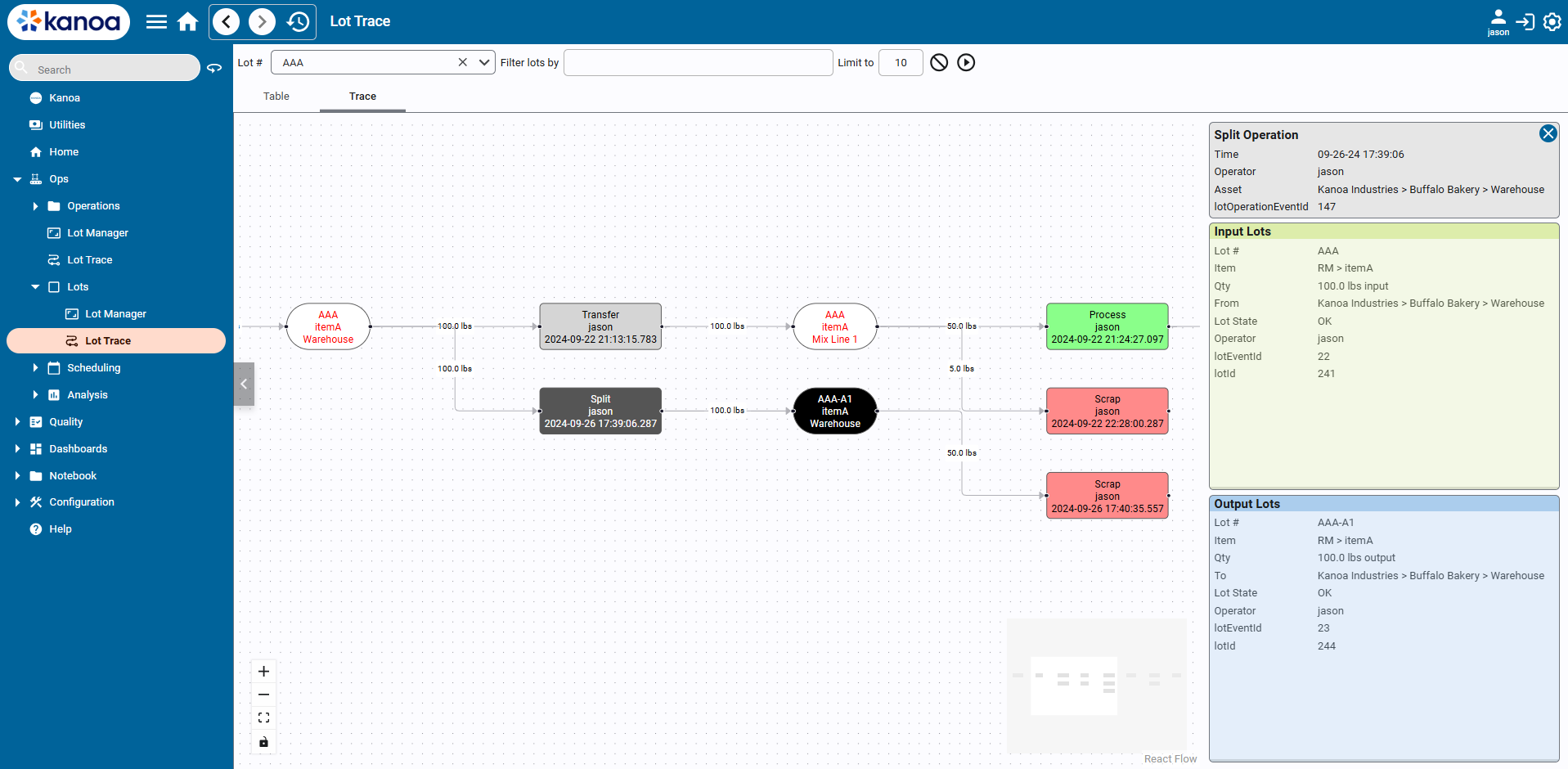
To correct an operation, click its node in the trace and click Edit. The operation opens in the Edit Lot Operation popup, where you can change its time stamp, order, input lots and output lots and click Save, or click Delete to remove it.
Scrap and Ship remove material from current inventory, but not from the trace history. Lot Manager shows both.
-
In Ops → Lots → Lot Manager, make sure Active is selected, to show only lots that still have material. Click Get lots (the refresh button above the table) to reload it.
-
Confirm the remaining quantities:
Lot Remaining RAL000000000x(AL2024)900 lbs at Receiving RBI000000000x(STD-COAT)90 gallons at Receiving RBI000000000x(PRM-COAT)45 gallons at Receiving WBL000000000x(BL-HRD)13 gallons at Spray Line 1 -
Clear Active to see every lot, including the machined, coated, scrapped and shipped ones. A date range appears in the filters: click Get lots to reload the table, and widen the date range if it doesn't cover the day you ran the operations.
-
With Active cleared and the table reloaded, select the shipped package
FGP000000000xand open the Trace tab below the table. The Trace tab draws one graph of the lot's genealogy, both what went into it and where it went. -
The depth button above the graph sets how far the trace reaches. It starts on
M(medium), which stops before the raw materials. Click it until it showsD(deep) to see the whole genealogy:FGP000000000x←WCP000000000x←WMP000000000x+WBL000000000x←RAL000000000x+RBI000000000x+RBI000000000x -
Select the aluminum lot
RAL000000000x. With the depth still onD, its graph shows everywhere that aluminum went: machined, coated, inspected, split into passed and scrap, packed and shipped. -
Select your
-SCRAPlot and confirm the scrap branch is still connected to its inputs.
Tracing forward from a raw material lot is what you do when a supplier reports a bad batch: it tells you which products, and which shipments, contain that material.