Trace Fundamentals
Kanoa Trace is built on four objects:
| Object | What it is | Example |
|---|---|---|
| Lot operation | A configured type of operation | Transfer, Machine, Ship |
| Lot operation event | One time an operation was carried out; groups its inputs and outputs | Transferring 100 lbs to Machine 1 at 9:05 |
| Lot | The identity of a quantity of material: just an ID, a name, an item and a unit | RAL0000001, AL2024, lbs |
| Lot event | A lot taking part in an operation event as an input or an output, with a quantity, asset, state and time | Input: 100 lbs of RAL0000001 at Receiving |
A lot doesn't store its quantity, location or state. When Lot Manager shows "RAL0000001, 900 lbs, Receiving, OK", it's adding up that lot's events. Current inventory is a view of the event history, which is also what makes tracing possible.
Inputs remove material from somewhere; outputs add it somewhere. That covers every pattern you'll build:
| Pattern | Inputs → outputs | Example |
|---|---|---|
| Transfer | A lot → the same lot at a new location | Receiving → Machine 1 |
| Transformation | One or more lots → a new lot | Aluminum → machined pins |
| Multi-input | Several lots → one lot | Two ingredients → one blend |
| Split | One lot → several lots | Inspected parts → passed and scrap |
A backward trace follows outputs back to their inputs ("what went into this package?"). A forward trace follows inputs to their outputs ("where did this aluminum go?").
Reference Materials: Managing Lots
Managing Lots
Lot Management consists of a lot schema, lot functions and a pre-built user interface (views and components).
In essence, there are several objects...
- Lot Operation - This is any operation that touches a lot such as receiving, transferring, splitting etc. We provide some basic operations out of the box, but you can create any operations you need.
- Lot - This is the Lot itself. It describes the material and units for this lot.
- Lot Event - The lot event is the input to or output from a lot operation. It contains the quantity in or out, the lot state, and where it came from or went to.
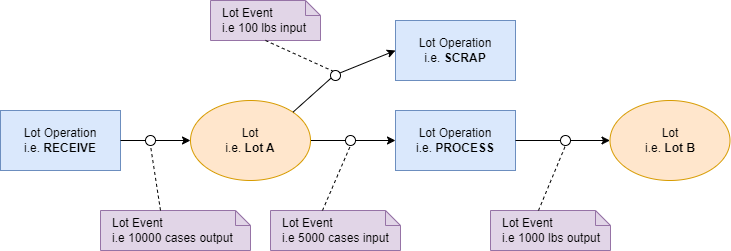
Lot Operations
We provide the following operations for you...
- Process - Consumes input lots and creates or adds to output lots
- Receive - Creates or adds to output lots only
- Scrap - Consumes from input lots only
- Split - Consumes from input lots and creates or adds to output lots
- Transfer - Consumes from input lots and creates or adds to output lots
Lot Operations and Lot States are configurable. See Lot Configuration for more details.
Executing Lot Operations
The Lot Manager screen shows the location and state of all lots. Lot Operations can be executed from this screen, however, it is primarily intended to demonstrate how lot operations can be executed and it is expected that custom operator screens would be created using this screen as an example.
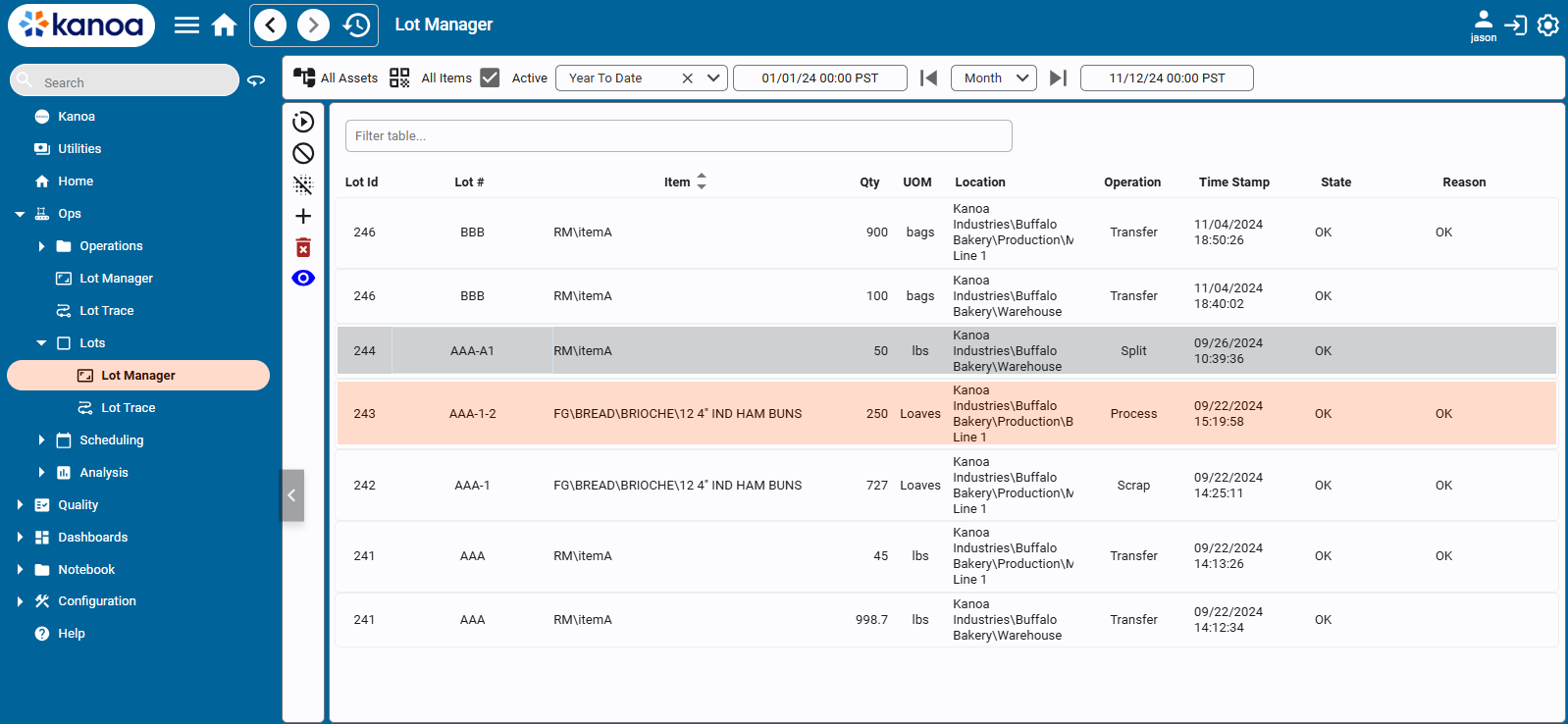
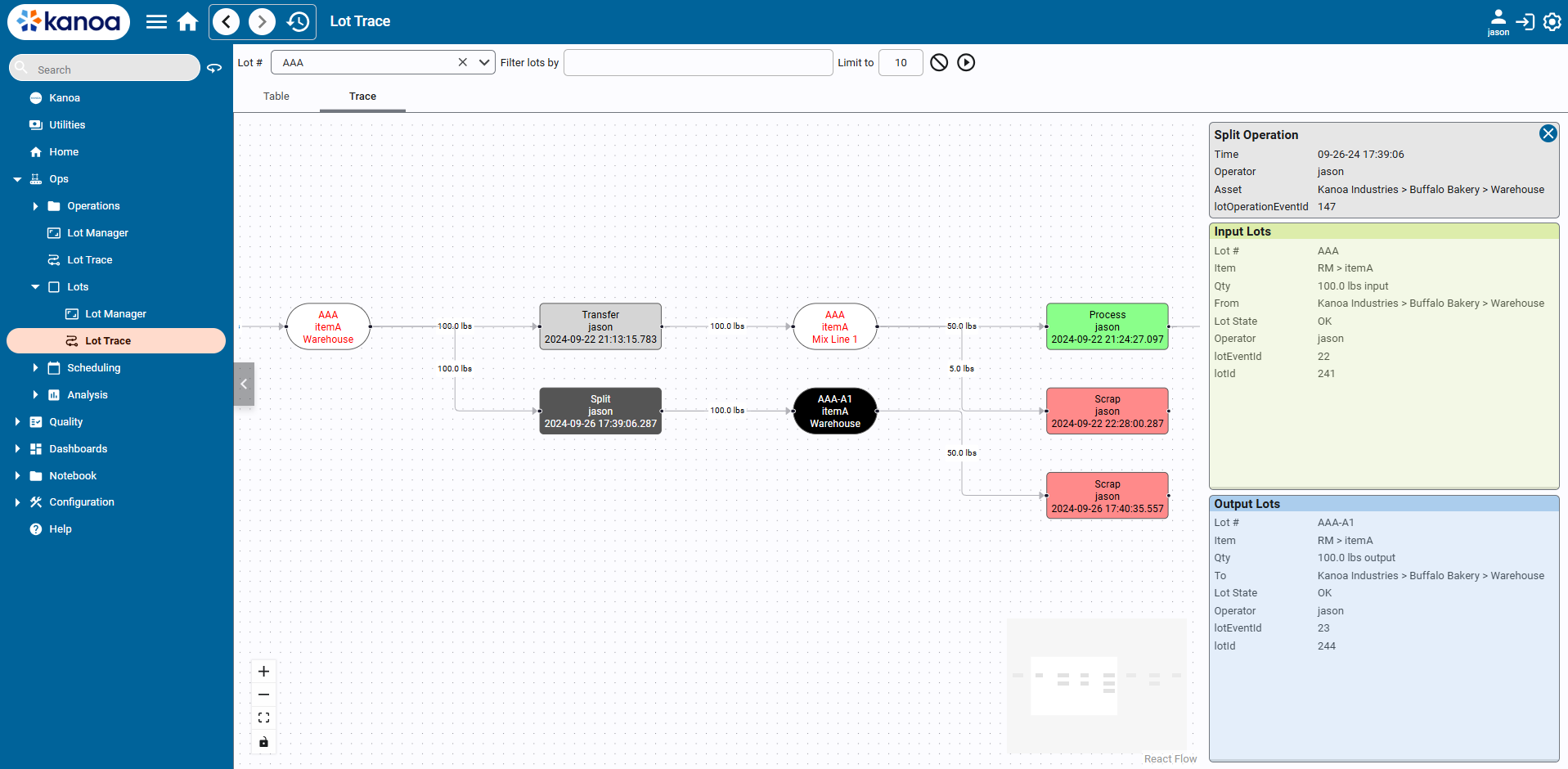
Lot Traceability
The Kanoa Node Chart component provides a way to visually trace all the operations, lots and events associated with a lot.
In this section you will:
- Configure the lot operations, lot naming and storage locations the CoreForge flow needs.
- Run the complete flow by hand in Lot Manager, from receiving to shipping.
- Check inventory and run backward and forward traces.