Procedures
Maintenance procedures define the step-by-step instructions technicians follow when executing maintenance work. Once a procedure has been defined, it can then be attached to a maintenance work order.
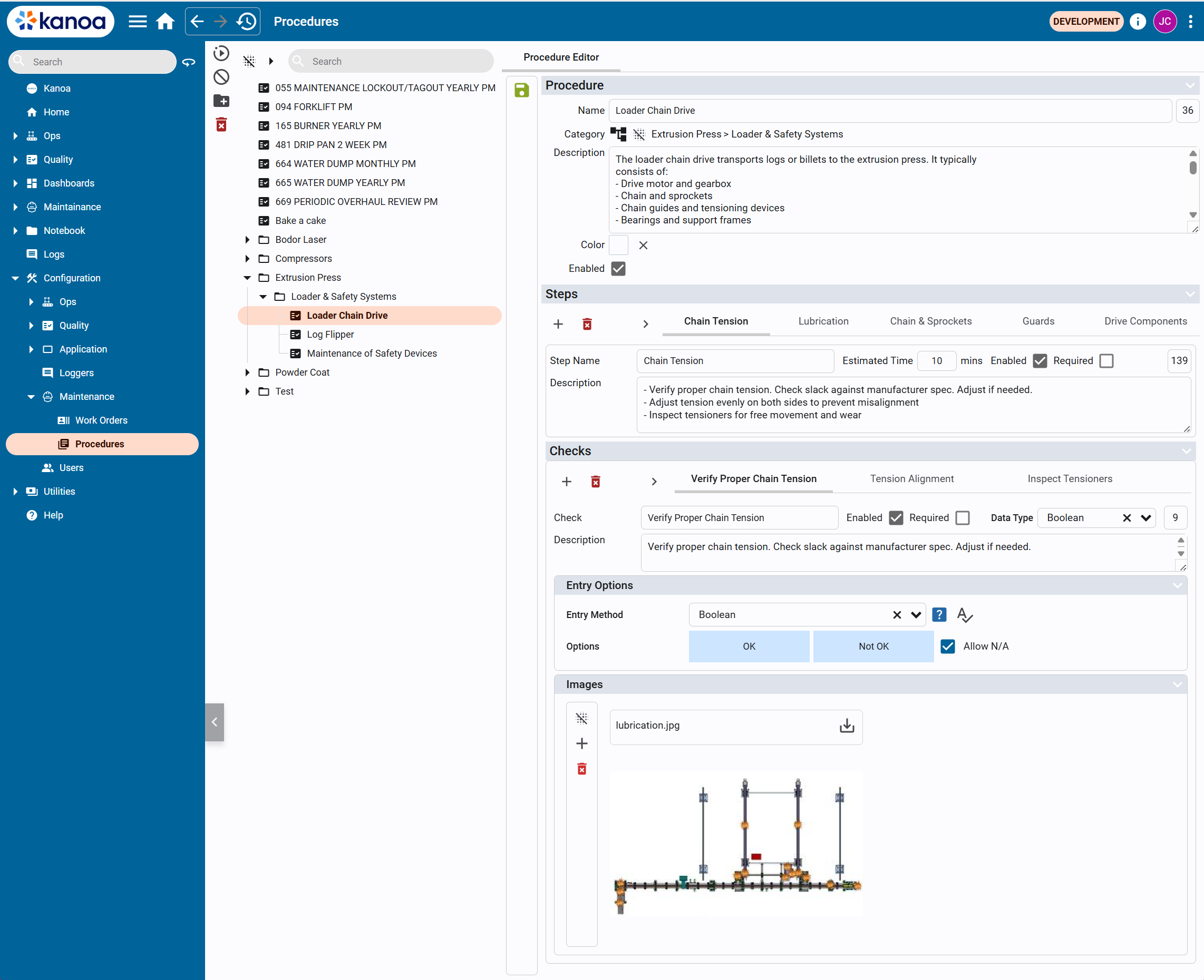
A procedure is composed of:
- General Information (name, category, description)
- Steps (high-level phases of work)
- Checks (detailed verification tasks within each step)
- Entry Options (how technicians record results)
- Images (visual references)
The general workflow is that:
- User defines a procedure
- Procedure is attached to a work order template
- Work orders are generated from the template
- Technicians execute the procedure step-by-step
- Results are recorded through checks
Steps
Steps represent the major phases of a procedure. Each step includes:
- Step Name (e.g., Chain Tension)
- Estimated Time (in minutes)
- Enabled / Required flags
- Description
Steps are typically sequential and guide the technician through the overall workflow.
Checks
Checks are detailed tasks or validations within each step.
They define exactly what the technician must verify or perform.
Each check includes:
- Check Name
- Description
- Enabled / Required flags
- Data Type (how results are captured)
- Entry Options define how the technician records the result of a check.
- Images can be attached to a check to provide visual guidance, reference diagrams and/or inspection points.