Routes
A route is the planned sequence of lot operations for an item or item class. It's a guide, not a lock: your screens and scripts decide how strictly to follow it. Route events record what actually happened, so you can compare plan and actual.
-
Navigate to Configuration → Ops → Lot Configuration, open the Routes tab, and add a route named
Hardened Coupling Pinfor the itemCP-2024-HRD, and enable it. -
Add the steps, numbering them in tens so you can insert steps later:
Step Operation Description 10MachineMachine raw aluminum into WIP 20CoatApply coating blend to machined part 30InspectInspect coated parts 40PackPack passed parts into finished goods -
Optionally, give step
10parameters that a custom screen could read:{"defaultAssetPath": "CoreForge\\Philadelphia\\Machining\\Machine 1", "requiredInputClass": "CoreForge\\RM", "requiredOutputClass": "CoreForge\\WIP\\Machined"}
Step parameters are free-form JSON. Kanoa stores them; your screens and scripts decide what they mean.
Reference Materials: Lot Routing
Lot Routing
Lot routing coordinates the execution of lot operations in a structured sequence. A route defines the path that a lot follows through a sequence of assets and operations within a production workflow. It ensures that material moves through the system in a consistent and traceable manner by introducing an ordered set of steps that define how lots are consumed, transformed, and produced. Routes by themselves do not enforce what can and cannot happen to a lot, but can be used to filter what options an operator can choose to perform on a lot.
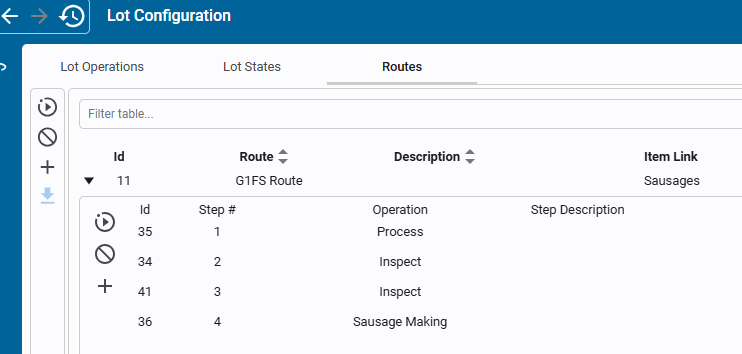
Key aspects of lot routing include:
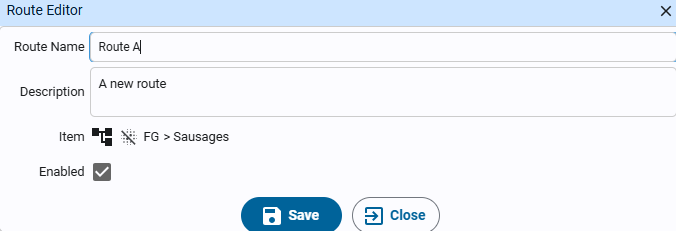
- Route: Defines the overall process flow that a lot should follow (e.g., Receive → Process → Transfer). A route represents a reusable template for material movement and transformation. Each route is associated with an item or item class.
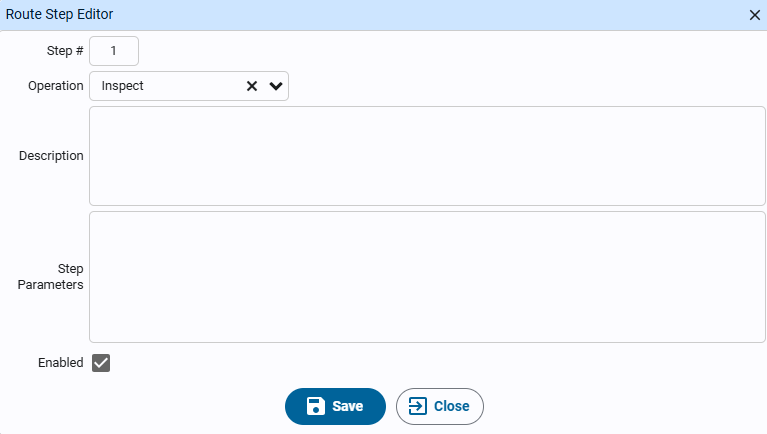
- Route Step: Represents an individual step within a route. Each step is associated with a lot operation (e.g., Process, Transfer, Receive)
Route Events
When a lot passes through a lot operation as defined in a route step, that can be recorded as a routeEvent/routeStepEvent, to indicate that that step has been completed. A routeStepEvents can be linked to a lotOperationId and/or a lotOperationEventId.
Relationship to Lot Operations
Lot routing does not replace lot operations—it orchestrates them.
- Lot Operations define the type of material interaction (e.g., Process, Transfer, Split).
- Lot Routing defines the sequence and location of those operations.
Each route step typically maps to a lot operation, ensuring that:
- Material flow follows the intended process
- Operations are executed in the correct order
- Lot events are consistently structured for traceability
Example
The following example illustrates a simple routing configuration:
Item: Wafer
-
Inspect
-
Process
-
Split
-
Clean
Each step generates both route step events, providing full traceability of material movement and transformation.