Set Up for Maintenance
Before you raise work orders, agree the lists that classify them. They drive the filters, the KPIs and the backlog. A standard install already has a working set, so most of this lesson is review.
Know the Four Lookups
| Lookup | Classifies | Out of the box |
|---|---|---|
| Maintenance type | The work order | Corrective, Inspection, Predictive, Preventive, Project |
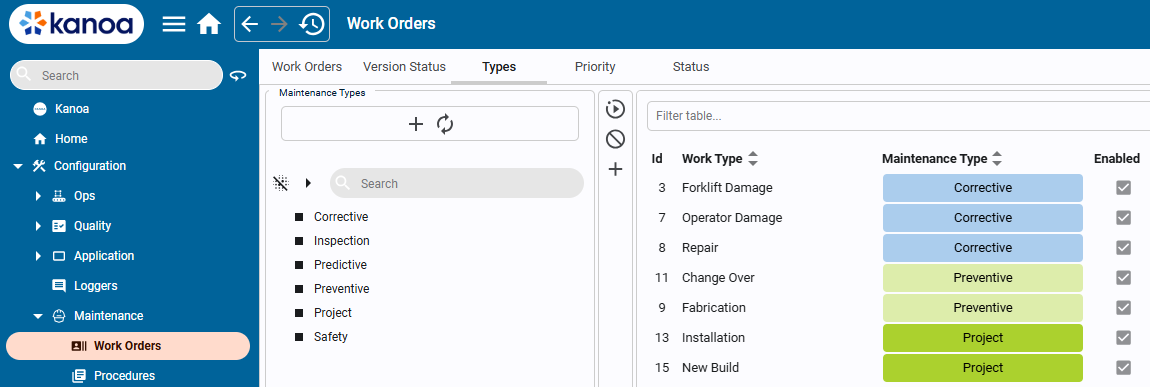
| Work type | A technician's labor on a work order | Added under a maintenance type, such as Corrective\Forklift Damage |
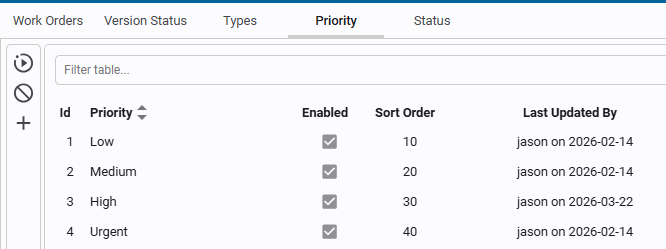
| Priority | How urgent the work order is | Low, Medium, High, Urgent |
| Status | Where the work order is in its workflow | Open, Assigned, In Progress, On Hold, Completed, Cancelled |
Maintenance types and work types are separate on purpose. A Preventive work order can still have one technician log Repair time and another log Inspection time.
Open the Lookups
- Open Configuration → Maintenance → Work Orders.
- Use the tabs across the top: Work Orders, Version Status, Types, Priority and Status.
- On the Types tab, review the maintenance types and their work types.
- On the Priority tab, review the priorities.
- On the Status tab, review the statuses and the category each one belongs to.
You can change a priority or add a new one, and add custom maintenance types and statuses.
Keep Statuses in the Right Category
Statuses fall under categories. This lets several statuses count as the same thing, such as two states that both mean Closed, or two that both mean Waiting. You can add your own statuses and the analytics still work, as long as each one is in the right category.
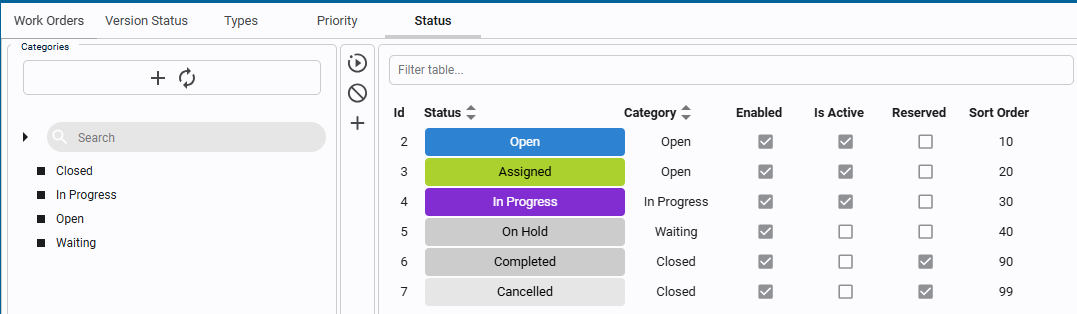
Reference Materials: Work Flow Status - Statuses and their categories.
Work Flow Status
As Work orders are created, assigned etc., they move through a workflow. These states are used for filtering, KPI segmentation and Backlog analysis. Default status types are Open, Assigned, In Progress, On Hold, Completed and Cancelled. Custom states can also be added.
Workorder statuses fall under categories. This allows multiple states to be considered 'Closed' or 'Waiting'.
Reference Materials: Priority - The default priorities and how to change them.
Priority
Work orders can be set a priority. Out of the box you get 'Low', 'Medium', 'High', Urgent'. You can modify these or add new priorities as you see fit.
Reference Materials: Maintenance Types - Types and the work types under them.
Maintenance Types
Work orders are categorized by maintenance type, such as Corrective, Inspection, Predictive, Preventive, Project, and custom maintenance types can be added. These categories are used for filtering, KPI segmentation and Backlog analysis. Under Maintenance types, 'Work Types' can be added for a technician to select such as Corrective\Forklift Damage or Project\Installation.
Add Technicians
Technicians are Kanoa users. They log in, they're assigned work orders, and each one logs their own time against a work order. The work types they choose come from the Work Type lookup.
What You Need: Configure Security
Adding a user and giving them a role both need the Configure Security security function. Out of the box, the Maintenance Manager role doesn't have it, so an administrator adds technicians for you. If your plant wants you to add your own technicians, your administrator can add Configure Security to the Maintenance Manager role. They only need to do this once.
- Open Configuration → Users, and go to the Roles tab.
- Find the Maintenance Manager row and tick Configure Security. The change is saved as soon as you tick the box.
- Make sure each Maintenance Manager has the Maintenance Manager role on the assets their technicians look after, such as their area. The Users screen only lets you give roles on the assets where you have Configure Security.
Kanoa has no narrower function just for adding technicians. Configure Security also lets the user:
- edit and delete users, and give them any role on their assets, including Administrator;
- create and delete roles, and change which functions a role has, for every user who has that role, on every asset.
Only a Gateway Admin can make someone a Gateway Admin. If that's more than a Maintenance Manager should have, leave the role as it is and keep adding technicians through your administrator. Another option is a custom role, such as Maintenance Lead, that has Configure Security, given only to the people who need it. See Users and Roles.
Add a Technician
Once you have Configure Security:
- Open Configuration → Users, and go to the Users tab.
- Click the + button, enter the technician's first name and last name, and save the user.
- Select the new user and click the edit button, or double-click the user.
- Open the Roles tab, select Maintenance Technician, and use the asset selector to pick the assets they look after.
The technician can now sign in, and you can assign them work orders on those assets. When someone leaves, take away their roles, or delete the user. The Administrator track's Users and Roles lesson covers each step in more detail.
Worked Example
The CoreForge sample plant adds three work types, the same as Developer Training. It also adds a technician user with
the Maintenance Technician role on Machine 1.
Review and Extend the Lookups
-
Navigate to Configuration → Maintenance → Work Orders. The tabs across the top are Work Orders, Version Status, Types, Priority and Status.
-
On the Types tab, review the maintenance types. Then add these work types:
Work type Maintenance type ToolingCorrective LubricationPreventive Spindle ServicePreventive -
On the Priority tab, review the priorities
Low,Medium,HighandUrgent. -
On the Status tab, review the statuses and the category each one belongs to.
Status categories let several statuses count as the same thing. For example, Completed and Cancelled can both count as closed, so the backlog and KPIs treat them alike. You can add your own statuses without breaking the analytics, as long as each one is in the right category.
Work types are separate from maintenance types on purpose. A Preventive work order might involve one technician logging Lubrication time and another logging Spindle Service time.
Reference Materials: Maintenance Types and Work Types
Maintenance Types
Work orders are categorized by maintenance type, such as Corrective, Inspection, Predictive, Preventive, Project, and custom maintenance types can be added. These categories are used for filtering, KPI segmentation and Backlog analysis. Under Maintenance types, 'Work Types' can be added for a technician to select such as Corrective\Forklift Damage or Project\Installation.
Reference Materials: Work Flow Status
Work Flow Status
As Work orders are created, assigned etc., they move through a workflow. These states are used for filtering, KPI segmentation and Backlog analysis. Default status types are Open, Assigned, In Progress, On Hold, Completed and Cancelled. Custom states can also be added.
Workorder statuses fall under categories. This allows multiple states to be considered 'Closed' or 'Waiting'.
Check Your Understanding
- What is the difference between a maintenance type and a work type?
- Why does each status belong to a category?
- Where do you review the priorities?
- What security function do you need to add a technician, and what else does it let you do?
Answers
- A maintenance type classifies the work order. A work type describes the labor a technician logs against it.
- Categories let several statuses count as the same thing, such as Closed or Waiting, for filtering, KPIs and backlog analysis.
- On the Priority tab in Configuration → Maintenance → Work Orders.
- Configure Security. It also lets you edit and delete users, give them any role on your assets, and change which functions each role has.