Build the Molds
Each mold is a tool: an asset of its own, with its own life, that can be mounted on a machine. In this lesson you'll
add M-EC25-4 and M-EC32-2, give each its cavities, tell Kanoa how fast each one runs on Injection Press 1, and link
each cap to the mold that makes it.
A mold is set up in three places:
| What | Where |
|---|---|
| The mold, its cavities and its cycle rate on each machine | Configuration → Ops → Tooling: the tool's Details, Positions and Cycle Rates tabs |
| Which mold each cap needs on the press | Configuration → Ops → Materials, Required Tooling tab |
| A different rate for one cap with one mold (only if it needs one) | Configuration → Ops → Materials, Production Rates tab: edit the cap's rate and pick the Tool |
Add the 4-Cavity Mold
Reference Materials: Adding a tool - Every field on the Details tab.
Adding a Tool
Click +, then fill in the Details tab and save. Choosing a Tooling type fills in that type's defaults for a new tool, such as positions, life unit and calibration interval.
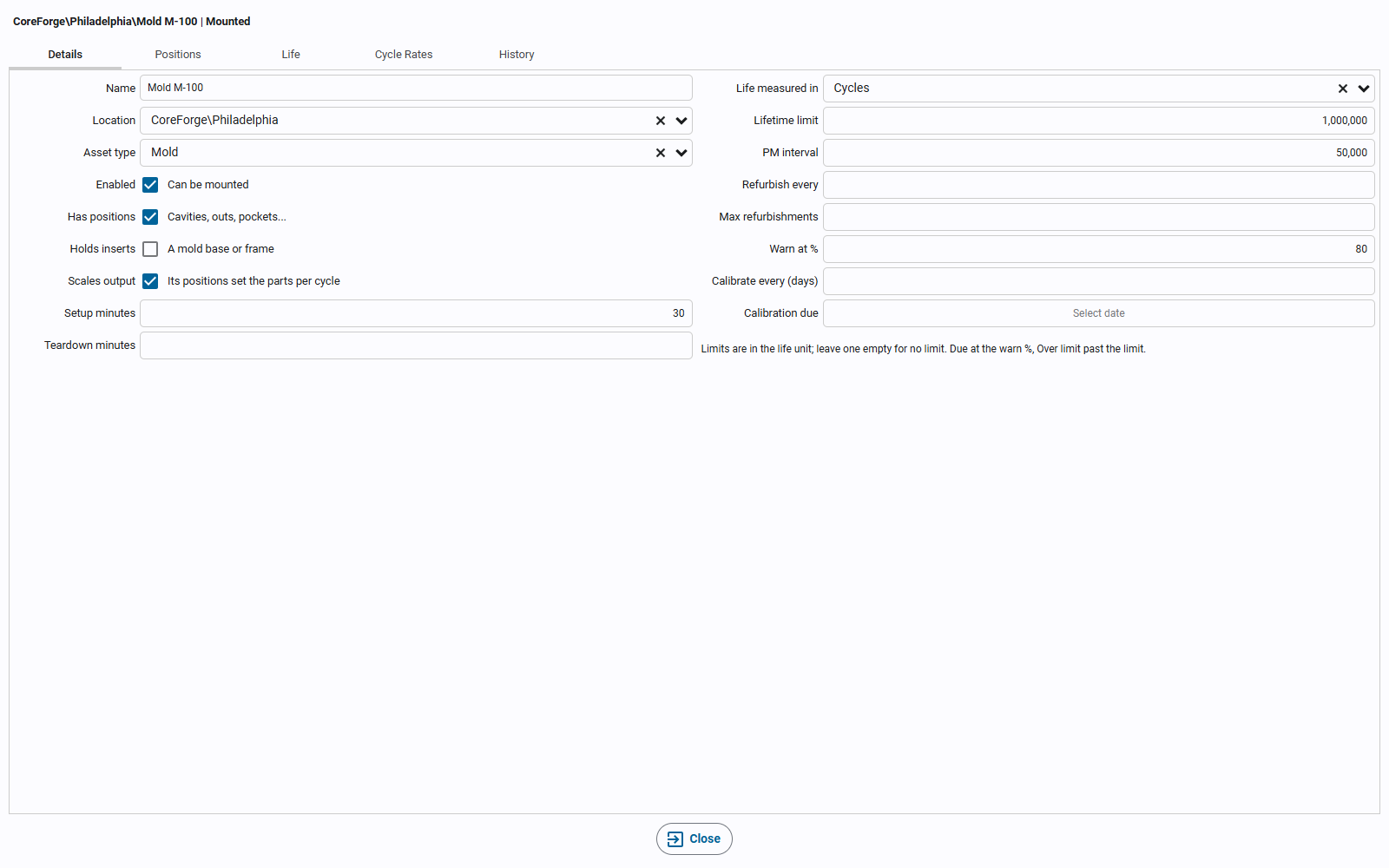
| Field | Meaning |
|---|---|
| Name | The tool's name. Unique within its site, because a machine's tag mounts a tool by name. Any characters are allowed (e.g. Punch #1). |
| Location | Where the tool lives in the asset tree. Its site decides which machines it can be mounted on. |
| Tooling type | The kind of tool (an asset type marked as tooling). Only tooling types are listed. |
| Enabled | A disabled tool can't be mounted and is hidden from the list unless Show disabled tools is ticked. |
| Has positions | The tool has positions (cavities, stations, pockets...). See Positions. |
| Holds inserts | The tool is a mold base or frame with pockets that hold other tools. |
| Scales output | The machine counts cycles, and the tool's positions set the parts per cycle. |
| Setup / Teardown minutes | How long it takes to put the tool on and take it off. |
| Life measured in | Cycles, run minutes or calendar days. The limits on the right are in this unit. |
| Lifetime limit, PM interval, Refurbish every, Max refurbishments | The tool's limits; leave one empty for no limit. |
| Warn at % | How much of a limit is used when the tool comes Due. With a PM interval of 20,000 cycles and Warn at 90%, the tool is Due for PM after 18,000 cycles (2,000 left), and Over limit after 20,000. |
| Calibrate every (days), Calibration due | For gauges and other tools that need calibrating. |
A new tool shows only the Details tab until it is saved. The editor's other tabs are Positions, Life (Tool Life), Cycle Rates (Cycle Rates and Item Rates), Fits On (Fit Rules), History, which lists the tool's mounts, unmounts and corrections, and Maintenance, which lists the tool's Kanoa Maintenance work orders (see Tool Life).
-
Navigate to Configuration → Ops → Tooling and click Add a tool (+).
-
On the Details tab, set Tooling type first, then enter the other fields below. Leave every field that isn't listed at the value it shows.
Field Value Name M-EC25-4Tooling type MoldLocation CoreForge\Philadelphia\MoldingLife measured in CyclesPM interval 20000Warn at % 90 -
Click Save.
Each tooling type has its own defaults for a new tool, set in the Tool types editor (see Tool Types). Picking Mold pre-fills its defaults: Has positions, Holds inserts and Scales output are ticked, and Life measured in is Cycles. Every tooling type uses the same Details tab; only these starting values differ.
The Location puts the mold in the Molding area, but what limits where it can be mounted is the location's site, Philadelphia: the mold can go on any machine in Philadelphia that uses tooling, in any area. Injection Press 1 is the only one today, which is why only it is offered. Its name must also be unique within the site, because a machine's tag can mount a tool by name. With a PM every 20,000 shots and a warning at 90%, it will be Due for PM at 18,000 shots.
Add Its Cavities
Reference Materials: Positions - Cavities, nests and stations, and blocked versus retired.
Positions describe what a tool makes each time the machine cycles: one shot of a mold, one stroke of a die. Add them on the tool editor's Positions tab. The tool needs Has positions turned on.
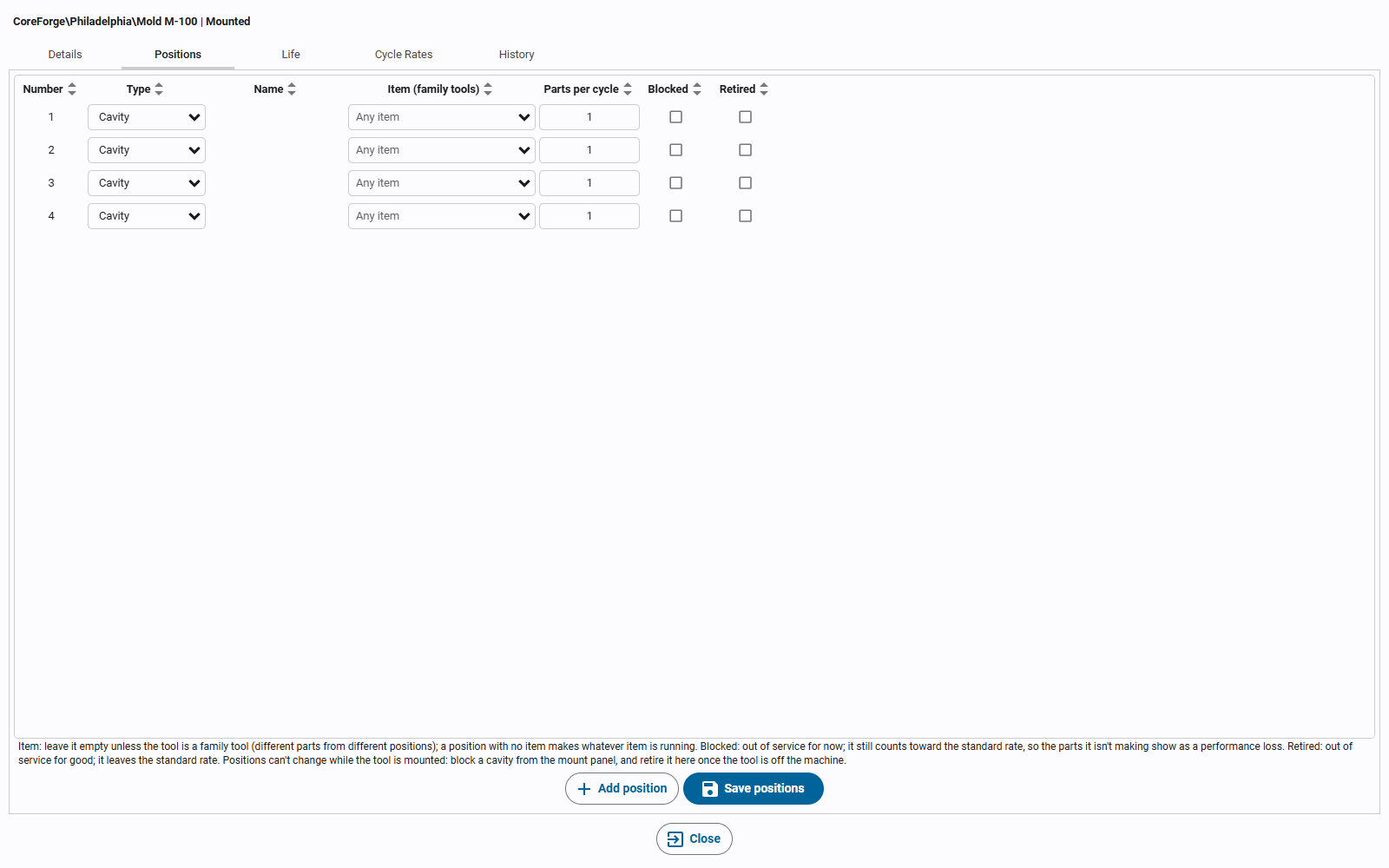
| Field | Meaning |
|---|---|
| Number | The position's number on the tool; unique within the tool. |
| Type | Cavity, out, station, nest, pick, or pocket. A pocket holds another tool (an insert in a mold base or frame). It makes nothing itself, so it has no item and no parts. Pockets need Holds inserts on the tool. |
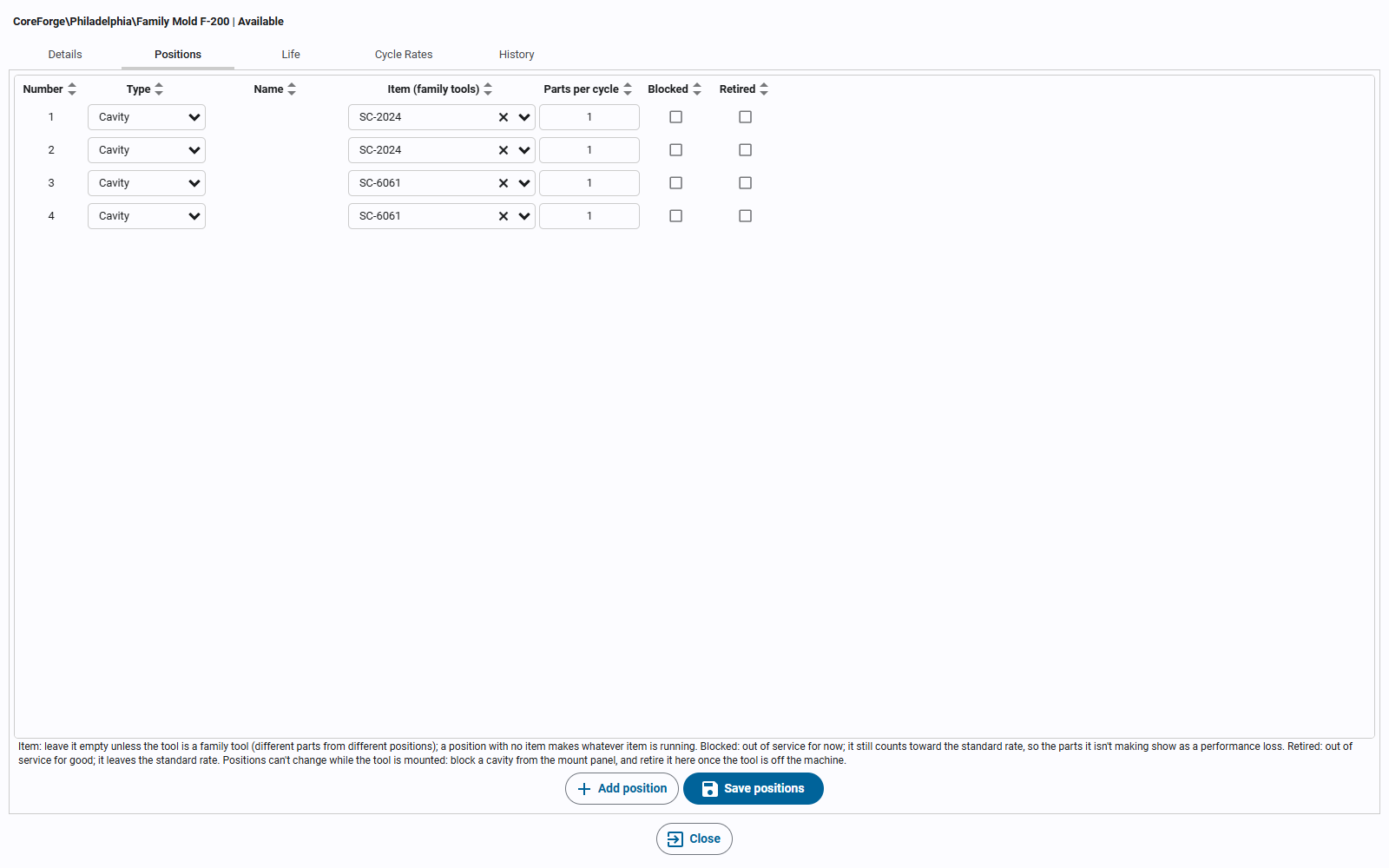
| Item (family tools) | Leave it empty unless the tool is a family tool (different parts from different positions). A position with no item (Any item) makes whatever item is running; one set to an item counts only when that item runs. |
| Parts per cycle | How many parts this position makes each cycle, in the item's outfeed units. The standard rate converts them to the machine's infeed units with the package count (see Cycle Rates and Item Rates). |
| Blocked | Out of service for now: a fault that hasn't been fixed yet. |
| Retired | Out of service for good: for example, a cavity that has been welded shut. |
A family mold sets each position to the item it makes. Here, cavities 1 and 2 make one part and 3 and 4 another, so each item has 2 parts per cycle:
A run is for one item. When the machine's cycles come from its Tooling/Inputs/Cycle Count, the other items a family tool
makes in the same cycles are recorded too, as co-products: production of those items, but not of the run, its OEE or
its work order. See Counting outfeed from cycles. A machine whose
outfeed comes from its own Inputs/Outfeed Count counts only the running item.
Blocked and Retired Positions
The two work differently on purpose:
- Blocked positions still count toward the standard rate. The machine makes fewer parts than its standard, so the missing parts show as a performance loss with the reason Positions blocked (see Speed Loss). Blocking or unblocking doesn't change the rate, so it never starts a new run.
- Retired positions leave the standard rate from the moment they're retired, and keep their history. Retiring a position, or bringing it back, starts a new run if it changes the machine's rate. A retired position can't be blocked.
For example, a mold with 4 cavities at 30 cycles a minute has a standard rate of 120 a minute. Block one cavity and the standard stays at 120 while the machine makes 90: the missing 30 are a speed loss. Retire that cavity and the standard drops to 90 from then on.
Changing Positions
- Positions can't be changed while the tool is mounted. To take a cavity out of service during a run, block it from the mount panel (see Mounting Tools), then retire it on the Positions tab once the tool is off the machine.
- A position that has been part of a mount can't be removed, because the mount's history records the positions the tool had then. Retire it instead. A position that has never been mounted can be removed.
- A pocket that holds a tool must stay a pocket, and can't be retired while it holds one.
Parts per Cycle
A tool's parts per cycle for an item is the sum of the parts of its unblocked positions set to that item or to no item. The standard parts per cycle, used for the standard rate, counts the blocked positions too. Retired positions and pockets never count. A mold base's parts per cycle comes from the inserts in its pockets.
- On the Positions tab, click Add position four times.
- Number the positions
1to4, set each Type toCavityand Parts per cycle to1. - Leave Item (family tools) empty on every cavity, then click Save positions.
Parts per cycle counts parts: each cavity makes one cap a shot. A cavity with no item makes whatever item is running. You'll set items on cavities only for a family mold, where different cavities make different caps, in A Family Mold.
Set Its Cycle Rate on Injection Press 1
- On the Cycle Rates tab, pick
Injection Press 1as the Machine. - Enter a Cycle rate of
6, set Per toMinute, and click Save rate.
The cycle rate is set per machine, because the same mold can run faster on one press than another. Only Philadelphia's machines that use tooling are offered.
With M-EC25-4 mounted, Injection Press 1's standard rate for EC-25 will be 6 shots × 4 caps = 24 a minute,
instead of the 20 from the press maker's quote.
Add the 2-Cavity Mold
M-EC32-2 makes the bigger cap. Its PM interval is set very low, so that you can see it come due in
Tool Life without waiting days. A real mold's interval is tens of thousands of shots.
-
Click Add a tool (+) again and enter:
Field Value Name M-EC32-2Tooling type MoldLocation CoreForge\Philadelphia\MoldingLife measured in CyclesPM interval 60Warn at % 80 -
Click Save.
-
On the Positions tab, add two positions numbered
1and2, each aCavitywith Parts per cycle1and no item, and click Save positions. -
On the Cycle Rates tab, pick
Injection Press 1, enter5perMinute, and click Save rate.
With M-EC32-2 mounted, Injection Press 1's standard rate for EC-32 will be 5 shots × 2 caps = 10 a minute.
Link Each Cap to Its Mold
The cavities say what a mold makes each shot, but nothing so far says that EC-25 is made in M-EC25-4. That link is the
cap's required tooling. With it, an operator who starts an EC-25 run without M-EC25-4 on the press is warned,
and operations scheduled for EC-25 reserve the mold.
- Navigate to Configuration → Ops → Materials and select the Required Tooling tab.
- Pick
EC-25as the Item and click Add a required tool (+). - Set Machine to
CoreForge\Philadelphia\Molding\Injection Press 1, Needs to A specific tool and Tool toM-EC25-4. Leave Required and Enabled ticked, and click Save. - Pick
EC-32as the Item, and addM-EC32-2the same way.
The list's Check column checks that the tool you picked can actually make the item, from the items on the tool's cavities. It's empty when there's nothing to fix, and shows a warning when every cavity of the tool is set to a different item.
Both rows are empty here. You left Item (family tools) empty on every cavity, and a cavity with no item makes
whatever item is running, so either mold can make either cap. It would warn if you required a family mold whose
cavities were all set to, say, EC-32 for EC-25: that mold can never make an EC-25, so the requirement points at the
wrong tool.
Nothing has changed on Injection Press 1 yet: neither mold is mounted.
Keep Each Mold on Its Press
The molds were built for Injection Press 1's platen and clamp. Philadelphia only has the one press today, but when a
second one arrives, nothing would stop someone mounting M-EC25-4 on it. A fit rule says where a tool may be
mounted. A mold with no rules fits any machine in its site that uses tooling; once it has one, it only goes where its
rules allow.
- Navigate to Configuration → Ops → Tooling, select
M-EC25-4and click the edit button. - Select the Fits On tab. It says No rules: this tool fits any machine in its site that uses tooling.
- Leave For as This tool and Fits as A machine, set On to
CoreForge > Philadelphia > Molding > Injection Press 1, leave Enabled ticked, and click Save rule. - Close the editor, open
M-EC32-2, and add the same rule on its Fits On tab.
The tab now says This tool only mounts where one of these rules allows. Mounting either mold on any other machine is refused, and the scheduler won't reserve it for one. Leave For as This tool: Every Mold would put the rule on every mold the plant has, including ones built for other presses.
Copy this script into the Ignition Designer Script Console (Tools → Script Console) and run it. It checks that
M-EC25-4 and M-EC32-2 are enabled Molds in the Molding area with their life in cycles and the PM intervals and
warnings above, that they have four and two cavities making 1 cap each with no item, that their cycle rates on
Injection Press 1 are 6 and 5 a minute, that EC-25 and EC-32 require them on Injection Press 1, and that each
mold has a fit rule for Injection Press 1. Each check prints PASS or FAIL with what to fix. It doesn't change anything.
Show the check script
# Kanoa Ops Training - check "Build the Molds" (Tooling, lesson 2)
#
# Run in the Ignition Designer Script Console (Tools > Script Console). It only
# reads; it changes nothing. Every check prints PASS or FAIL with what to fix.

PRESS = 'CoreForge\\Philadelphia\\Molding\\Injection Press 1'
MOLDING = 'CoreForge\\Philadelphia\\Molding'
tl = system.kanoa.tooling

results = []

def check(ok, what, fix=None):
	results.append(bool(ok))
	if ok:
		print 'PASS  %s' % what
	else:
		print 'FAIL  %s' % what
		if fix:
			print '      -> %s' % fix

def text(v):
	return '' if v is None else unicode(v).strip()

def key(v):
	return ' '.join(text(v).lower().split())

def truthy(v):
	return str(v).lower() in ('true', '1')

def num(v):
	try:
		return float(v)
	except (TypeError, ValueError):
		return None

def near(v, target):
	v = num(v)
	return v is not None and abs(v - target) < 0.001

def rows(data):
	return system.kanoa.utilities.convertDatasetToJSON(data) if data is not None else []

def findTool(name):
	for t in rows(tl.getTools({})):
		if key(t.get('assetName')) == key(name):
			return t
	return None

def positionsOf(tool):
	byNumber = {}
	if tool is not None:
		for p in rows(tl.getPositions({'toolingAssetId': tool['toolingAssetId']})):
			byNumber[int(num(p.get('positionNumber')) or 0)] = p
	return byNumber

def itemId(name):
	items = rows(system.kanoa.item.getItems({'itemName': name}))
	return items[0].get('itemId') if items else None

def standardRate(assetId, itemName):
	item = itemId(itemName)
	if assetId is None or item is None:
		return None
	rate = rows(tl.getStandardRate({'assetId': assetId, 'itemId': item}))
	return rate[0] if rate else None

def mountedNames(assetId):
	return [key(m.get('toolingName')) for m in rows(tl.getMounted({'assetId': assetId}))] if assetId is not None else []

print '=' * 70
print 'Kanoa Ops Training - Build the Molds check'
print '=' * 70

assets = rows(system.kanoa.asset.getAssets({'assetPath': PRESS}))
pressId = assets[0].get('assetId') if assets else None
check(pressId is not None, 'Injection Press 1 exists', 'Import coreforge-press-1-asset-model.json, as in A New Press.')

# M-EC25-4
print '\n-- M-EC25-4'
tool = findTool('M-EC25-4')
check(tool is not None, 'M-EC25-4 exists', 'In Configuration > Ops > Tooling, add a tool named M-EC25-4.')
if tool is not None:
	check(key(tool.get('assetTypeName')) == 'mold', 'Tooling type is Mold', "It's '%s'. Set Tooling type to Mold." % text(tool.get('assetTypeName')))
	check(key(tool.get('assetPath')).startswith(key(MOLDING)), 'Located in %s' % MOLDING,
		"It's at '%s'. Set Location to %s." % (text(tool.get('assetPath')), MOLDING))
	check(truthy(tool.get('enabled')), 'Enabled', 'Open the tool and tick Enabled.')
	check(key(tool.get('lifeUnit')) == 'cycles', 'Life measured in cycles', "It's '%s'. Set Life measured in to Cycles." % text(tool.get('lifeUnit')))
	check(near(tool.get('pmInterval'), 20000), 'PM interval is 20000', "It's %s. Set PM interval to 20000." % text(tool.get('pmInterval')))
	check(near(tool.get('warnPct'), 90), 'Warn at % is 90', "It's %s. Set Warn at %% to 90." % text(tool.get('warnPct')))
	byNumber = positionsOf(tool)
	check(sorted(byNumber.keys()) == range(1, 5), 'Has cavities 1 to 4',
		'Has %s. On the Positions tab, number 4 cavities 1 to 4.' % (sorted(byNumber.keys()) or 'none'))
	expectItems = {}
	for n in sorted(byNumber.keys()):
		p = byNumber[n]
		check(key(p.get('positionType')) == 'cavity', 'Cavity %d is a Cavity' % n, 'Set its Type to Cavity.')
		check(near(p.get('outputQty'), 1), 'Cavity %d makes 1 part a shot' % n, 'Set its Parts per cycle to 1.')
		want = expectItems.get(n) if expectItems else None
		if want:
			check(key(p.get('itemName')) == key(want), 'Cavity %d makes %s' % (n, want), "It's set to '%s'. Set its Item to %s." % (text(p.get('itemName')), want))
		else:
			check(p.get('itemId') is None, 'Cavity %d has no item' % n, 'Clear its Item: only a family mold sets items on cavities.')
	if pressId is not None:
		rates = rows(tl.getCycleRates({'toolingAssetId': tool['toolingAssetId'], 'assetId': pressId}))
		check(len(rates) > 0, 'M-EC25-4 has a cycle rate on Injection Press 1', 'On the Cycle Rates tab, pick Injection Press 1, enter 6 per Minute and click Save rate.')
		if rates:
			r = rates[0]
			check(near(r.get('cycleRate'), 6), 'Cycle rate is 6', "It's %s. Set it to 6." % text(r.get('cycleRate')))
			check(key(r.get('itemPeriodName')).startswith('min'), 'Per Minute', "It's per '%s'. Set Per to Minute." % text(r.get('itemPeriodName')))
			check(truthy(r.get('enabled')), 'The cycle rate is enabled', 'Tick Enabled on the rate and save it.')

# M-EC32-2
print '\n-- M-EC32-2'
tool = findTool('M-EC32-2')
check(tool is not None, 'M-EC32-2 exists', 'In Configuration > Ops > Tooling, add a tool named M-EC32-2.')
if tool is not None:
	check(key(tool.get('assetTypeName')) == 'mold', 'Tooling type is Mold', "It's '%s'. Set Tooling type to Mold." % text(tool.get('assetTypeName')))
	check(key(tool.get('assetPath')).startswith(key(MOLDING)), 'Located in %s' % MOLDING,
		"It's at '%s'. Set Location to %s." % (text(tool.get('assetPath')), MOLDING))
	check(truthy(tool.get('enabled')), 'Enabled', 'Open the tool and tick Enabled.')
	check(key(tool.get('lifeUnit')) == 'cycles', 'Life measured in cycles', "It's '%s'. Set Life measured in to Cycles." % text(tool.get('lifeUnit')))
	check(near(tool.get('pmInterval'), 60), 'PM interval is 60', "It's %s. Set PM interval to 60." % text(tool.get('pmInterval')))
	check(near(tool.get('warnPct'), 80), 'Warn at % is 80', "It's %s. Set Warn at %% to 80." % text(tool.get('warnPct')))
	byNumber = positionsOf(tool)
	check(sorted(byNumber.keys()) == range(1, 3), 'Has cavities 1 to 2',
		'Has %s. On the Positions tab, number 2 cavities 1 to 2.' % (sorted(byNumber.keys()) or 'none'))
	expectItems = {}
	for n in sorted(byNumber.keys()):
		p = byNumber[n]
		check(key(p.get('positionType')) == 'cavity', 'Cavity %d is a Cavity' % n, 'Set its Type to Cavity.')
		check(near(p.get('outputQty'), 1), 'Cavity %d makes 1 part a shot' % n, 'Set its Parts per cycle to 1.')
		want = expectItems.get(n) if expectItems else None
		if want:
			check(key(p.get('itemName')) == key(want), 'Cavity %d makes %s' % (n, want), "It's set to '%s'. Set its Item to %s." % (text(p.get('itemName')), want))
		else:
			check(p.get('itemId') is None, 'Cavity %d has no item' % n, 'Clear its Item: only a family mold sets items on cavities.')
	if pressId is not None:
		rates = rows(tl.getCycleRates({'toolingAssetId': tool['toolingAssetId'], 'assetId': pressId}))
		check(len(rates) > 0, 'M-EC32-2 has a cycle rate on Injection Press 1', 'On the Cycle Rates tab, pick Injection Press 1, enter 5 per Minute and click Save rate.')
		if rates:
			r = rates[0]
			check(near(r.get('cycleRate'), 5), 'Cycle rate is 5', "It's %s. Set it to 5." % text(r.get('cycleRate')))
			check(key(r.get('itemPeriodName')).startswith('min'), 'Per Minute', "It's per '%s'. Set Per to Minute." % text(r.get('itemPeriodName')))
			check(truthy(r.get('enabled')), 'The cycle rate is enabled', 'Tick Enabled on the rate and save it.')

# Required tooling: each cap needs its mold on the press
print '\n-- Required tooling'
for cap, mold in [('EC-25', 'M-EC25-4'), ('EC-32', 'M-EC32-2')]:
	item = itemId(cap)
	check(item is not None, '%s exists' % cap, 'Import coreforge-press-1-asset-model.json, as in A New Press.')
	if item is None or pressId is None:
		continue
	reqs = [r for r in rows(tl.getRequiredTooling({'itemId': item, 'assetId': pressId})) if key(r.get('toolingName')) == key(mold)]
	check(len(reqs) > 0, '%s requires %s on Injection Press 1' % (cap, mold),
		'In Configuration > Ops > Materials, on the Required Tooling tab, pick %s and add %s for Injection Press 1.' % (cap, mold))
	if reqs:
		r = reqs[0]
		check(truthy(r.get('required')), "%s's %s requirement is Required" % (cap, mold), 'Edit it and tick Required.')
		check(truthy(r.get('enabled')), "%s's %s requirement is Enabled" % (cap, mold), 'Edit it and tick Enabled.')
		check(r.get('makesItem') is None or truthy(r.get('makesItem')), '%s can make %s' % (mold, cap),
			"%s's cavities are all set to other items. Clear the Item on its cavities." % mold)

# Fit rules: each mold only goes on Injection Press 1
print '\n-- Fit rules'
for mold in ['M-EC25-4', 'M-EC32-2']:
	tool = findTool(mold)
	if tool is None or pressId is None:
		continue
	rules = [r for r in rows(tl.getCompatibilityRules({'toolingAssetId': tool['toolingAssetId']}))
			 if r.get('ruleFor') == 'tool' and r.get('parentKind') == 'asset' and r.get('parentAssetId') == pressId]
	check(len(rules) > 0, '%s has a fit rule for Injection Press 1' % mold,
		'Open %s, and on its Fits On tab add a rule: For This tool, Fits A machine, On Injection Press 1.' % mold)
	if rules:
		check(truthy(rules[0].get('enabled')), "%s's fit rule is Enabled" % mold, 'Click the rule, tick Enabled and click Save rule.')
	others = [r for r in rows(tl.checkCompatibility({'toolingAssetId': tool['toolingAssetId'], 'assetId': pressId}))]
	check(not others, '%s fits Injection Press 1' % mold,
		'Another rule stops it: %s. Check its Fits On tab.' % '; '.join(text(r.get('message')) for r in others))

passed = results.count(True)
print '\n' + '=' * 70
print 'Result: %d of %d checks passed' % (passed, len(results))
if passed == len(results):
	print "All good. Both molds are ready for Injection Press 1."
else:
	print 'Fix the FAIL items above, then run this again.'
print '=' * 70