Build the Analyzer Check Sheet
- In Configuration → Quality → Attributes, create a
QAfolder underCoreForge, with the attributesParticle SizeandParticle Density. - Give
Particle Sizea data source on assetQA Stationwith tagqds/particleSize, andParticle Densityone with tagqds/density. Enable both and save.
-
In Configuration → Quality → Check Sheets, add
Offline Lab Inspectionin theCoreForge\Operationsfolder. -
On the Settings tab:
- Select Asset Required and choose
QA Station. - Select Sign Off Required.
- Set Issue Check Sheet to
QA Station Inspection Failure. Leave Notifications empty.
- Select Asset Required and choose
-
On the Checks tab, rename the default group
MaintoAnalyzer, and add these items to it. All are Enabled.Check item Type Data type Required Settings Get Analyzer DataTrigger Boolean No Particle SizeCheck Float Yes Attribute Particle Size, unitsnm, triggerGet Analyzer DataParticle DensityCheck Float Yes Attribute Particle Density, units%, format0.0, triggerGet Analyzer DataStandard DeviationCalculated Float No Aggregate: standard deviation of Particle SizeandParticle DensityCoverageCalculated Float No Eval: 'Analyzer\Particle Size'*'Analyzer\Particle Density' -
Add a group named
Calibrationwith one item,Analyzer Calibration Date: TypeCheck, Data TypeDatetime, Required and Persistent. -
Save and release.
What each new feature does:
- Trigger item: works like a button in the check. Every item whose trigger is
Get Analyzer Datareads its attribute's data source at the same moment. - Calculated items: store derived values in the check, either an aggregate across items or a formula. In a formula, refer to items by group and name.
- Groups: split a long check into tabs.
- Persistent: fills in the value entered last time, which suits a calibration date that only changes occasionally.
- Sign Off Required: a submitted check waits in Submitted until someone with the Approve Checks function approves it.
Reference Materials: Calculated Check Items
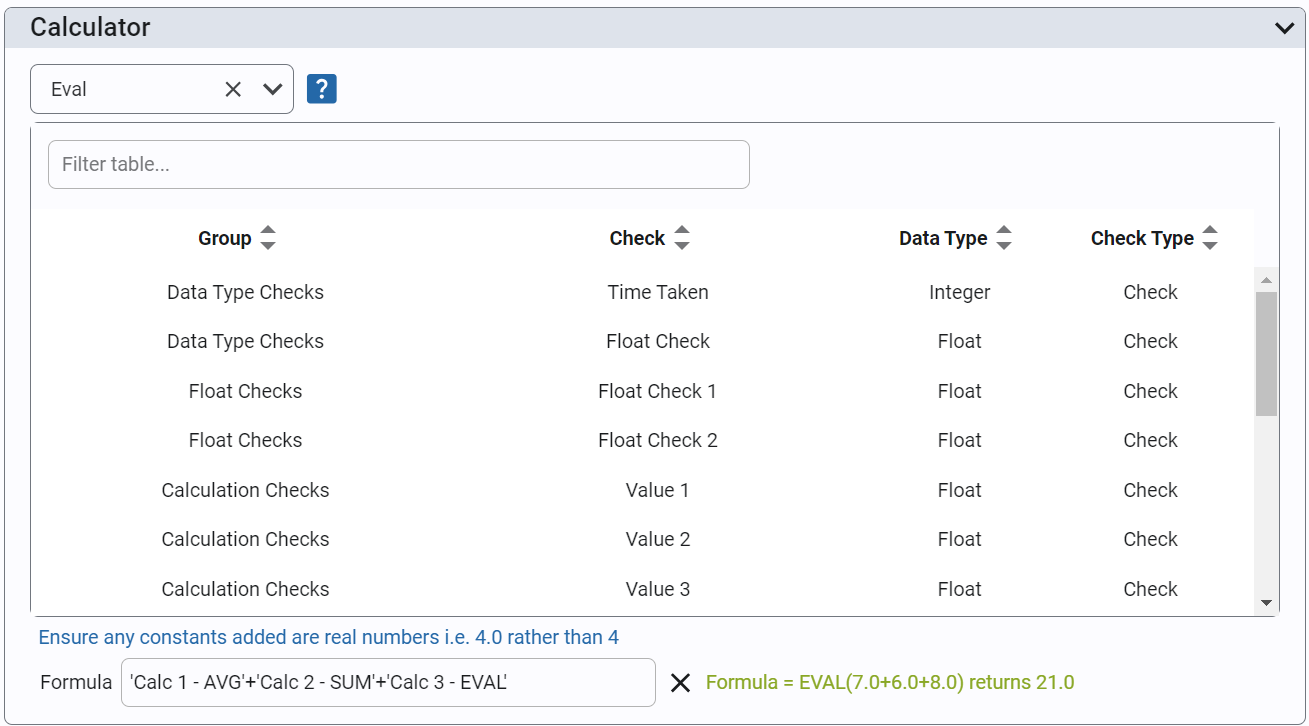
Check Item Settings - Calculator
When a Check Item is of type 'Calculated', you can apply a mathematical formula or a custom python script to any number of check item values in the check sheet.
Aggregates
Select Average, Sum, Range, Min, Max or Standard Deviation from the drop down and then select check items from the table to calculate the aggregated value. Note only check items with a numeric data type are shown in the table.
Eval
Selecting 'Eval' allows check item values to be included into a formula. This option implements the python eval() function allowing formulas such as ('Check Item 1' + 'Check Item 2') / ('Check Item 3' See python eval function for help on this.
Custom Scripts
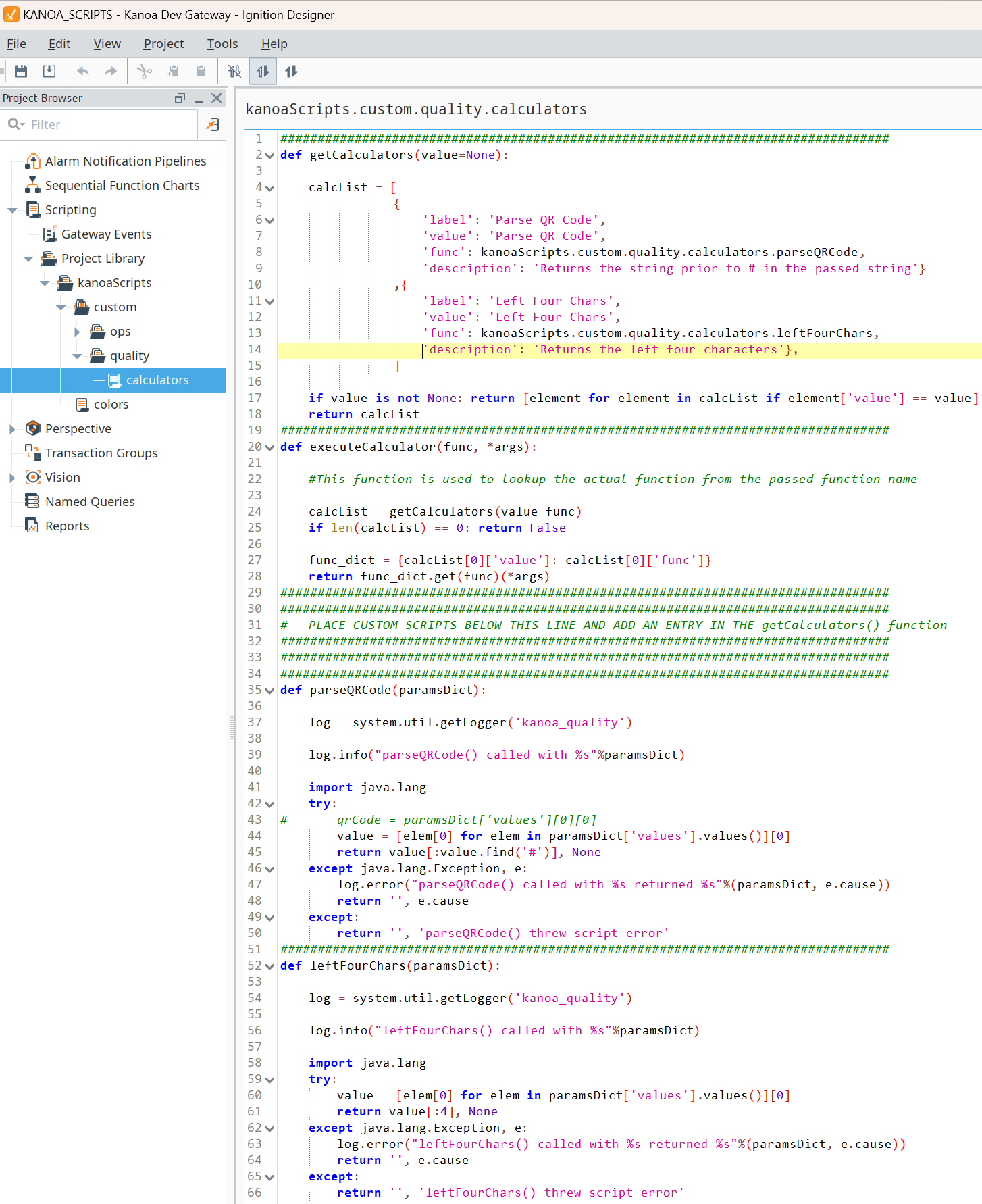
Custom scripts can be written in python unleashing the power of python and Ignition to perform any type of calculation desired.
Select the script option and then select the script you want to run against the selected check items.
Custom scripts can be created in the KANOA_SCRIPTS project. Simply create your function and add any entry in the calcList of the getCalculators() function.
The paramsDict parameter passed to the custom function passes a dictionary containing the chkItemName and list of measurement values for that chkItem.
paramsDict = {'values': {'QR Scan': ['PIC3012017182#2237918#24011503']}
The return value from you custom script must be a tuple containing the returned value and a string message. Return None for a successfully executed script. Return a string to display an error to the user.
example return 'Hello World', None or '', 'An error occurred'
Testing Your Calculated CheckItem.
Dummy values are entered for check item values to verify correct syntax for calculations.

check-sheet-qa-station-inspection-failure.json: the finished helper sheet.check-sheet-offline-lab-inspection.json: the finishedOffline Lab Inspection, after the tolerance you add in the next lesson.