QA Station and the Helper Check
QA Station analyzer tags
qaStationTags.json: a QA Station folder with simulated analyzer tags qds/particleSize and qds/density.
Create the QA Station asset and tags
- Navigate to Configuration → Ops → Assets and, under
CoreForge\Philadelphia\Finishing, add an asset namedQA Stationof typeLine. Leave OEE disabled; the QA Station doesn't produce anything. - In Ignition Designer, in the
Kanoatag provider, select theCoreForge/Philadelphia/Finishingfolder and importqaStationTags.json. The file createsQA Station/qds. - Confirm
particleSizeanddensityare changing.
A test fail action runs when a check fails. It can email a person or team, or issue another check sheet. A follow-up check gives failure handling a structure, such as a photo, a disposition, or a corrective action, rather than relying on a comment.
Build the helper check sheet
- In Configuration → Quality → Check Sheets, add
QA Station Inspection Failurein theCoreForge\Operationsfolder. - Add one check item,
Inspection Image: TypeCheck, Data TypeImage, Enabled and Required. - Close the editor and release the sheet. Only released sheets can be issued by a test fail action.
Helper sheet not in the list?
If the helper doesn't appear when you select it as the main sheet's test fail action in the next lesson, start one from Active Checks, add an image, and submit it. Then try again.
Reference Materials: Check Sheet Settings, including Issue Check Sheet and Notifications
Check Sheet Settings
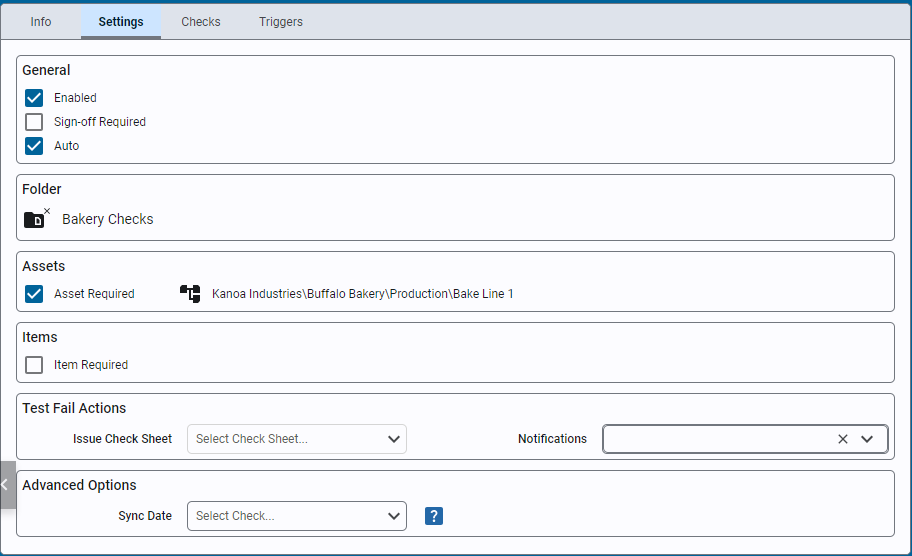
- Enabled: Enable or disable a check sheet.
- Sign Off Required: Require a sign off for approval. If unchecked a submitted check sheet is automatically moved to the 'Approved' Status Only approved checks ar eused in SPC analysis.
- Auto: Indicate that this check sheet only contains checks whose values will be automatically captured when the check sheet is triggered.
- Folder: Saves the check sheet in a specific folder.
- Asset Required: Determines if an asset must be selected for this check sheet.
- Item Required: Determine if an items must be selected for this check sheet.
- Issue Check Sheet: Choose a check sheet to schedule immediately upon test failure.
- Notifications: Select a team or user for email notifications on test failure.
- Sync Date: The 'Taken Date' of the Check Sheet by default is the date the check sheet is submitted. You can override this to force all check items and the check sheet itself to use the datetime picked for a check that is of datetime data type. This can be used when all check items are to be referenced to say the 'code time' printed on a product. To use this feature, simply create a check item that is of data type 'datetime' and then select it in this dropdown. When the user selects the date time, it will now be used for the 'Taken Time'.