Using Item States
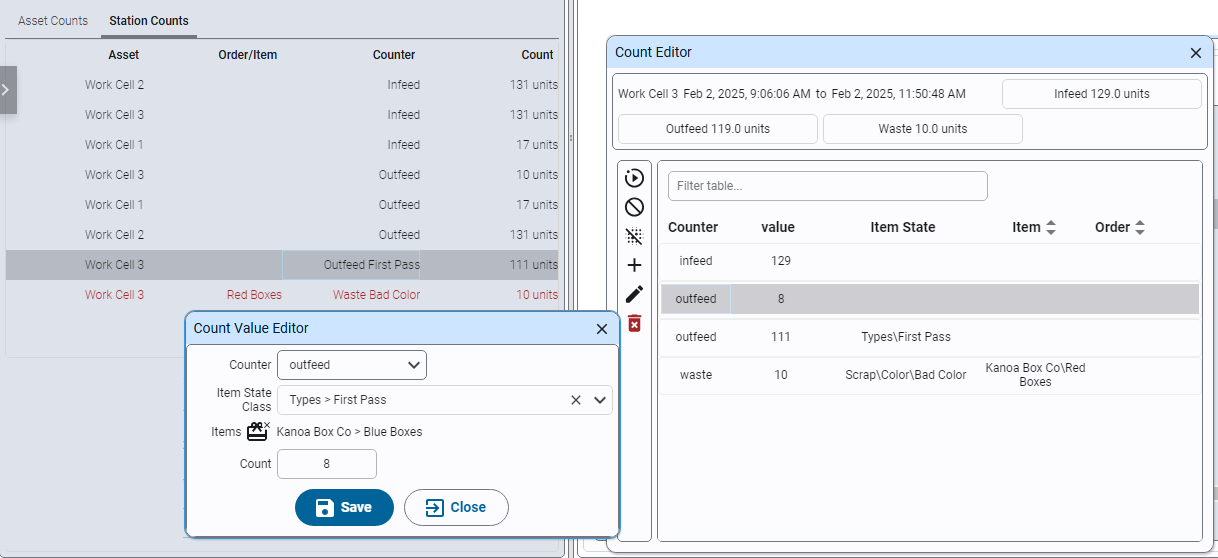
In this section you configure item states so waste counts can be classified by reason, organize them into categories, link them to Manual Pack 1, and record a waste count with a reason. A basic waste count event records a quantity. A richer waste count event is linked to an item state:
Waste count: 5
Waste Reason: Damaged Parts
The result is a waste event you can later analyze by reason.
Reference Materials: Item States - Classify your scrap reasons or define infeed counts as First Pass / Rework.
An item state is a classification applied to count events. In Kanoa Ops, the most common use is waste reason coding: a waste count tells you how much waste occurred, and an item state tells you why. For example, a packaging line might record waste for reasons such as Bad Coating, Insufficient Coating, Damaged Parts, Cosmetic Defect, or Incorrect Item. This gives the quality component of OEE much more detail than a simple waste count. This can be used by operators to code scrap reasons or when connected directly to a plc, to automatically set bottles kicked off a bottling line for say 'Low fill level' or 'Missing bottle cap'. It can also be used to differentiate between say 'First Pass' and 'Rework' on infeed counts.
Categories, counter types, and links
- Categories organize item states into a hierarchy, just as state categories do for downtime.
- Counter type association: item states can be associated with counter types. For waste coding, associate them with waste count events, which tells Kanoa these reasons are appropriate when recording waste.
- Linking: like states, item states can be linked to the assets or items where they apply, so operators don't see irrelevant waste reasons on unrelated assets.
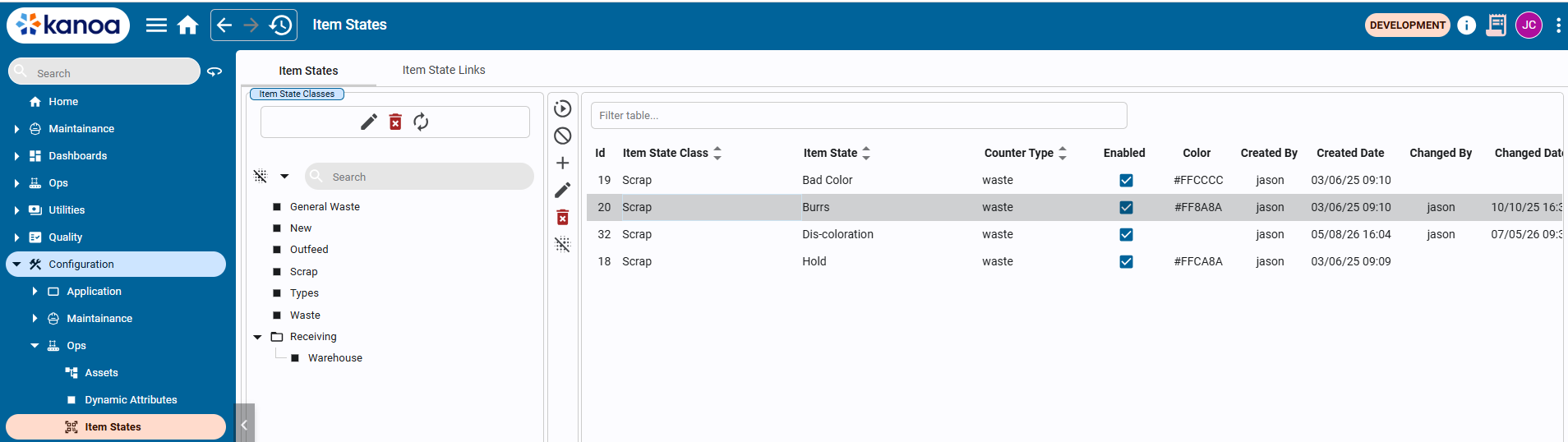
Items States are configurable via the Configuration > Ops > Item States
-
Open Configuration → Ops → Item States.
-
Create the following item state category structure:
QualityQuality\CoatingQuality\HandlingProcess -
Add these item states, and associate each one with the Waste counter type:
Quality\Coating\Bad CoatingQuality\Coating\Insufficient CoatingQuality\Handling\Damaged PartsQuality\Handling\Cosmetic DefectProcess\Incorrect Item -
Open the Item States Link tab.
-
Link the new scrap reasons to
Manual Pack 1. Linking the categories is enough; you do not need to link each reason individually. -
Save the configuration.
- Start a new production run on
Manual Pack 1. - Navigate to Ops → Operations → Run Review and select
Manual Pack 1. - Select the production run and click the eye icon (or double-click the row) to open the run details.
- Open the Counts tab.
- Add a waste count using the button for one of the configured waste reasons.
- Save the event.
- Review the run data and confirm the waste event includes both quantity and reason.
Copy this script into the Ignition Designer Script Console (Tools → Script Console) and run it. It checks the four item state categories, that each scrap reason is in the right category and associated with the Waste counter type, that all five are linked to Manual Pack 1, and that Manual Pack 1 has a waste count with a reason. Each check prints PASS or FAIL with what to fix. It doesn't change anything.
Show the check script
# Kanoa Ops Training - check "Using Item States" (Base Configuration, lesson 9)
#
# Run in the Ignition Designer Script Console (Tools > Script Console), in the
# project that inherits KANOA_SCRIPTS. It only reads; it changes nothing.
# Every check prints PASS or FAIL with what to fix, then a summary.

CATEGORIES = ['Quality', 'Quality\\Coating', 'Quality\\Handling', 'Process']
ITEM_STATES = [
	# item state, category
	('Bad Coating',          'Quality\\Coating'),
	('Insufficient Coating', 'Quality\\Coating'),
	('Damaged Parts',        'Quality\\Handling'),
	('Cosmetic Defect',      'Quality\\Handling'),
	('Incorrect Item',       'Process'),
]
COUNTER_TYPE = 'Waste'
MANUAL_PACK = 'CoreForge\\Philadelphia\\Finishing\\Manual Pack 1'
LOOKBACK_DAYS = 90

results = []

def check(ok, what, fix=None):
	results.append(bool(ok))
	if ok:
		print 'PASS  %s' % what
	else:
		print 'FAIL  %s' % what
		if fix:
			print '      -> %s' % fix

def field(row, *names):
	for n in names:
		if n in row and row[n] is not None:
			return row[n]
	return None

def truthy(v):
	return str(v).lower() in ('true', '1', 'yes')

def text(v):
	return '' if v is None else unicode(v).strip()

def norm(path):
	# accept either separator in paths
	return text(path).replace('/', '\\').strip('\\')

def squash(v):
	return ' '.join(text(v).lower().split())

def rows(fn, params):
	return system.kanoa.utilities.convertDatasetToJSON(fn(params))

def showColumns(label, data, key):
	# if Kanoa names a column differently, show what came back so it's easy to report
	if data and key not in data[0]:
		print 'NOTE  %s has no %s column. Columns: %s' % (label, key, ', '.join(sorted(data[0].keys())))

def statePath(r):
	path = norm(field(r, 'itemStatePath'))
	if path:
		return path
	cat = norm(field(r, 'itemStateClassPath'))
	name = text(field(r, 'itemStateName'))
	return (cat + '\\' + name) if cat else name

def stateCategory(r):
	cat = norm(field(r, 'itemStateClassPath'))
	if cat:
		return cat
	return '\\'.join(statePath(r).split('\\')[:-1])

print '=' * 70
print 'Kanoa Ops Training - Using Item States check'
print '=' * 70

# 1. Item state categories
print '\n-- Item state categories'
classes = set(norm(field(r, 'itemStateClassPath', 'itemStateClassName'))
	for r in rows(system.kanoa.item.getItemStateClasses, {}))
lowerClasses = dict((c.lower(), c) for c in classes)
for path in CATEGORIES:
	if path in classes:
		check(True, 'Item state category %s exists' % path)
	elif path.lower() in lowerClasses:
		check(False, 'Item state category %s exists' % path,
			"Found '%s'. Rename it to match exactly (names are case-sensitive)." % lowerClasses[path.lower()])
	else:
		parent = '\\'.join(path.split('\\')[:-1])
		check(False, 'Item state category %s exists' % path,
			'In Configuration > Ops > Item States, add the category %s%s.'
			% (path.split('\\')[-1], (' under ' + parent) if parent else ''))

# 2. Item states, their category and the Waste counter type
print '\n-- Item states'
allStates = rows(system.kanoa.item.getItemStates, {})
showColumns('getItemStates', allStates, 'itemStateName')
byName = {}
for r in allStates:
	byName.setdefault(text(field(r, 'itemStateName')), []).append(r)
expectedIds = {}
for name, category in ITEM_STATES:
	found = byName.get(name, [])
	if found:
		check(True, 'Item state %s exists' % name)
	else:
		near = [n for n in byName if squash(n) == squash(name)]
		if not near:
			check(False, 'Item state %s exists' % name,
				'In Configuration > Ops > Item States, select %s and add %s.' % (category, name))
			continue
		check(False, 'Item state %s exists' % name,
			"Found '%s'. Rename it to '%s' (names are case-sensitive)." % (near[0], name))
		found = byName[near[0]]
	inCategory = [r for r in found if stateCategory(r) == category]
	if inCategory:
		check(True, '%s is in category %s' % (name, category))
		found = inCategory
	else:
		where = ', '.join(sorted(set(stateCategory(r) or 'no category' for r in found)))
		check(False, '%s is in category %s' % (name, category),
			"It's in %s. Move it to %s, or delete it and add it again under %s." % (where, category, category))
	ids = set(field(r, 'itemStateId') for r in found if field(r, 'itemStateId') is not None)
	expectedIds[name] = ids
	# a state can come back once per counter type it's associated with
	types = set(squash(field(r, 'counterTypeName', 'counterName')) for r in found)
	types.discard('')
	if not types and ids:
		try:
			waste = rows(system.kanoa.item.getItemStates, {'itemStateId': list(ids)[0], 'counterTypeName': COUNTER_TYPE})
			types = set([squash(COUNTER_TYPE)]) if waste else set()
		except:
			pass
	check(any(squash(COUNTER_TYPE) in t for t in types), '%s is associated with the %s counter type' % (name, COUNTER_TYPE),
		"It's associated with %s. Edit %s and add the %s counter type."
		% (', '.join(sorted(types)) or 'no counter type', name, COUNTER_TYPE))
	enabled = field(found[0], 'enabled', 'itemStateEnabled')
	if enabled is not None and not truthy(enabled):
		check(False, '%s is enabled' % name, 'Edit the item state and enable it.')

# 3. Linked to Manual Pack 1 (linking the categories is enough)
print '\n-- Item states linked to Manual Pack 1'
linked = rows(system.kanoa.item.getAssetItemStates, {'assetPath': MANUAL_PACK})
linkedIds = set(field(r, 'itemStateId') for r in linked)
linkedNames = set(squash(field(r, 'itemStateName')) for r in linked)
linkedClasses = set()
try:
	for r in rows(system.kanoa.item.getItemStateLinks, {'assetPath': MANUAL_PACK}):
		if field(r, 'enabled') is not None and not truthy(field(r, 'enabled')):
			continue
		if field(r, 'itemStateId') is not None:
			linkedIds.add(field(r, 'itemStateId'))
			linkedNames.add(squash(field(r, 'itemStateName')))
		else:
			c = norm(field(r, 'itemStateClassPath', 'itemStateClassName')).lower()
			if c:
				linkedClasses.add(c)
except:
	pass

def underLinkedClass(category):
	c = category.lower()
	return any(c == l or c.startswith(l + '\\') for l in linkedClasses)

for name, category in ITEM_STATES:
	ok = bool(expectedIds.get(name, set()) & linkedIds) or squash(name) in linkedNames or underLinkedClass(category)
	check(ok, '%s is linked to Manual Pack 1' % name,
		'On the Item States Link tab, select Manual Pack 1, link the %s category (or %s itself), and save.'
		% (category.split('\\')[0], name))
if not linked and not linkedClasses:
	print '      (Nothing is linked to Manual Pack 1 yet.)'

# 4. A waste count with a reason on Manual Pack 1
print '\n-- Waste entered with a reason on Manual Pack 1'
end = system.date.now()
start = system.date.addDays(end, -LOOKBACK_DAYS)
events = rows(system.kanoa.event.getCounterEvents,
	{'assetPath': MANUAL_PACK, 'hasValue': True, 'startDate': start, 'endDate': end})
showColumns('getCounterEvents', events, 'itemStateId')
allIds = set()
for ids in expectedIds.values():
	allIds |= ids
reasonNames = set(squash(n) for n, c in ITEM_STATES)
withReason = []
for r in events:
	sid = field(r, 'itemStateId')
	sname = squash(field(r, 'itemStateName'))
	if (sid is not None and sid in allIds) or sname in reasonNames:
		withReason.append(r)
if withReason:
	r = withReason[-1]
	check(True, 'Manual Pack 1 has a waste count with a reason (%s x %s)'
		% (text(field(r, 'itemStateName')) or 'reason', text(field(r, 'counterValue', 'value', 'quantity')) or '?'))
else:
	check(False, 'Manual Pack 1 has a waste count with a reason',
		'Start a run on Manual Pack 1, open it in Ops > Operations > Run Review, and on the Counts tab '
		'add a waste count using one of the reason buttons, then save. (Checked the last %d days.)' % LOOKBACK_DAYS)

passed = results.count(True)
print '\n' + '=' * 70
print 'Result: %d of %d checks passed' % (passed, len(results))
if passed == len(results):
	print 'All good. Your item states are set up.'
else:
	print 'Fix the FAIL items above, then run this again.'
print '=' * 70