Approve and Reject
When a check sheet has Sign Off Required, a submitted check waits until someone reviews it. That person approves it, or sends it back. Only Approved checks count in reports and SPC, so this review is how you protect your data. This lesson shows you how.
Approving and rejecting a check needs the Approve Checks security function. It is separate from Configure Quality.
Find the Checks That Need Review
A check moves from In Progress to Submitted when an inspector submits it. If the sheet needs no sign-off, it goes straight to Approved.
- Open Quality → Schedule → Active Checks or Quality → Schedule → Check Table.
- Look for checks with the status Submitted.
- Open one. It opens for viewing.

Approve a Check
- Open the submitted check.
- Check the values and the comments, especially any failed items.
- Use the approve button.
The check becomes Approved and is now used in reports and SPC.
Reference Materials: Approve Checks security function.
Approve Checks
This function allows for users with the ‘Approve Checks’ function to approve check sheets.
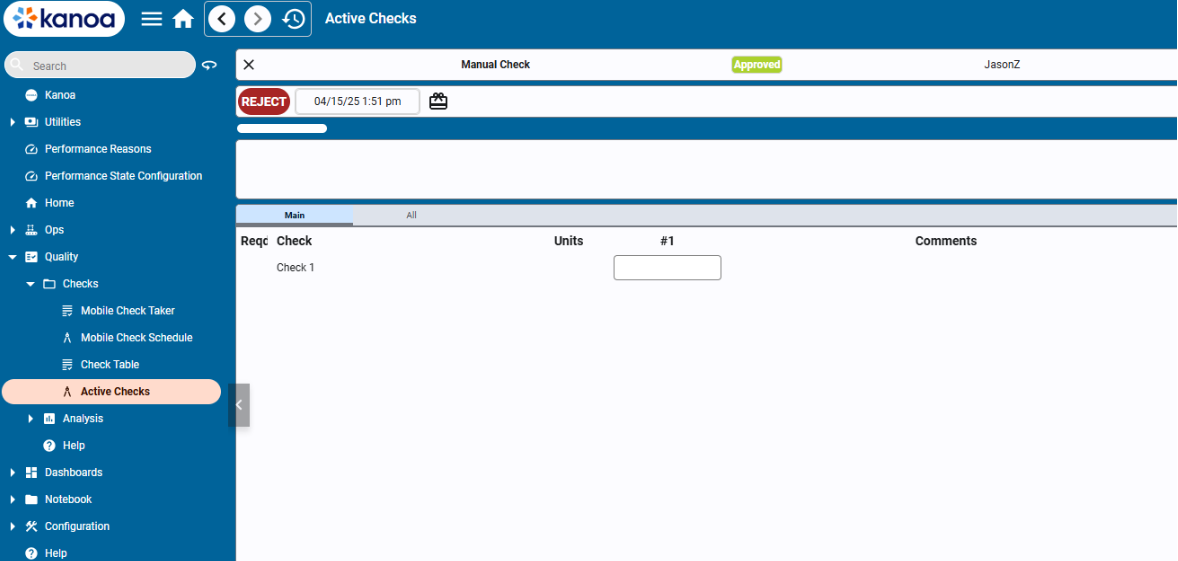
Reject a Check
You reject a check so it can be corrected. The product docs describe rejecting an Approved check.
- Open the check from Check Table.
- Use the toggle at the upper right to switch from view mode to edit mode.
- Click Reject.
The check can now be corrected. The inspector changes the wrong value and resubmits it. See Revise and Correct for the inspector's side.
While a check is rejected, it isn't Approved, so reports and SPC leave it out. Make sure it is corrected and resubmitted.
After the Correction
A resubmitted check goes back to Approved if its check sheet needs no sign-off. Otherwise it waits as Submitted for you to approve it again.
If the check sheet itself is wrong, such as a missing question or a wrong limit, reject doesn't help. Change the check sheet through a revision.
Check Your Understanding
- Which security function lets you approve a check?
- Why do reports and SPC leave out a Submitted check?
- An inspector's check has a wrong value. What do you do, and what does the inspector do?
Answers
- Approve Checks.
- They use only Approved checks.
- You reject the check. The inspector corrects the value and resubmits it.