Counters
Counters are the entry point for bringing production counts into Kanoa MES. By default, an infeed, outfeed and waste counter are automatically generated when an asset is 'OEE Enabled'. See Data Interface Tag
Creating Counters
Additional counters can be added via the 'Counters' tab on the Asset Configuration screen (Configuration > Ops > Assets).
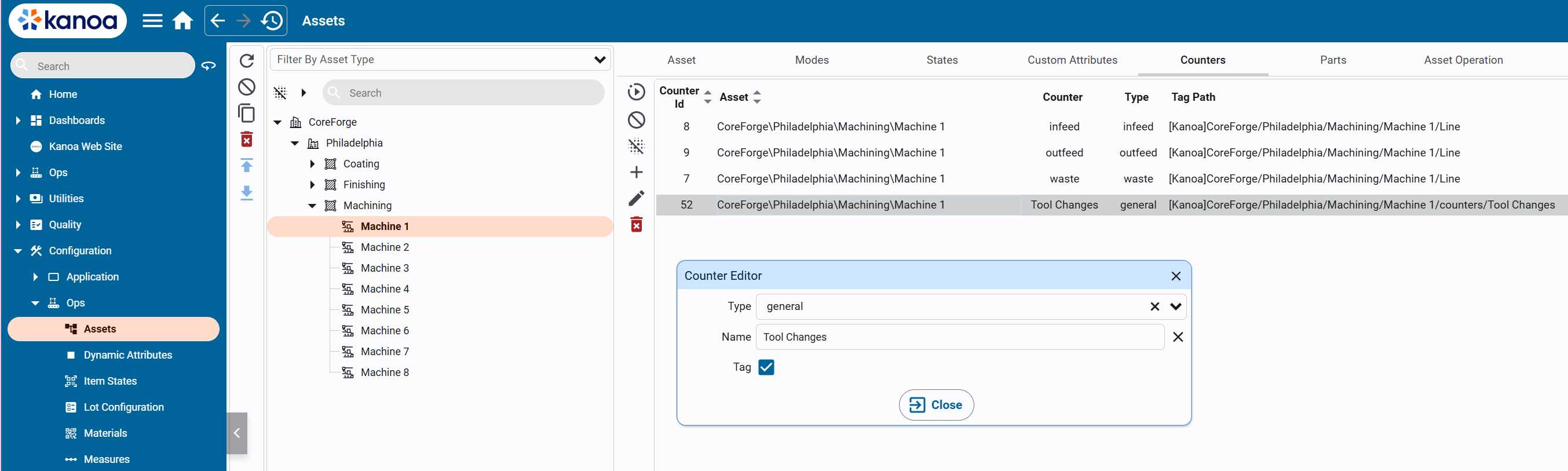
This provides a mechanism for adding additional infeed, outfeed and waste counters or general counters. General counters can be used to capture counts such a bottle tops that do not affect the OEE of an asset.
By selecting 'Tag', an instance of the counter UDT is created under the asset in the 'counters' folder. This can then be connected to a plc data source. Counters do not need to be wired to a data source, they can be created and counts captured via the system.kanoa.event.addCounterEvent() function